> ## Documentation Index
> Fetch the complete documentation index at: https://cometchat-22654f5b-docs-agent-native-development.mintlify.site/llms.txt
> Use this file to discover all available pages before exploring further.
# Incoming Call
> Display and handle incoming voice and video calls with CometChatIncomingCall component in React Native UI Kit, providing options to accept or decline.
| Field | Value |
| - | - |
| Component | `CometChatIncomingCall` |
| Package | `@cometchat/chat-uikit-react-native` |
| Import | `import { CometChatIncomingCall } from "@cometchat/chat-uikit-react-native";` |
| Purpose | Visual representation for incoming voice and video calls with accept/decline options. |
| Data props | `call` |
| Primary output | `onAccept(call)` — user accepted the incoming call |
| Other actions | `onDecline` · `onError` — [details](#actions-and-events) |
| View slots | `ItemView` · `LeadingView` · `TitleView` · `SubtitleView` · `TrailingView` — [details](#custom-view-slots) |
| UI events | `ccCallRejected` · `ccCallAccepted` · `ccCallEnded` · `ccCallFailed` |
| Styling | `style` prop — [tokens and overrides](#styling) |
| Prerequisites | `CometChatUIKit.init()` completed and a user logged in · `@cometchat/calls-sdk-react-native` installed (**not** a kit peer dependency) |
## Where It Fits
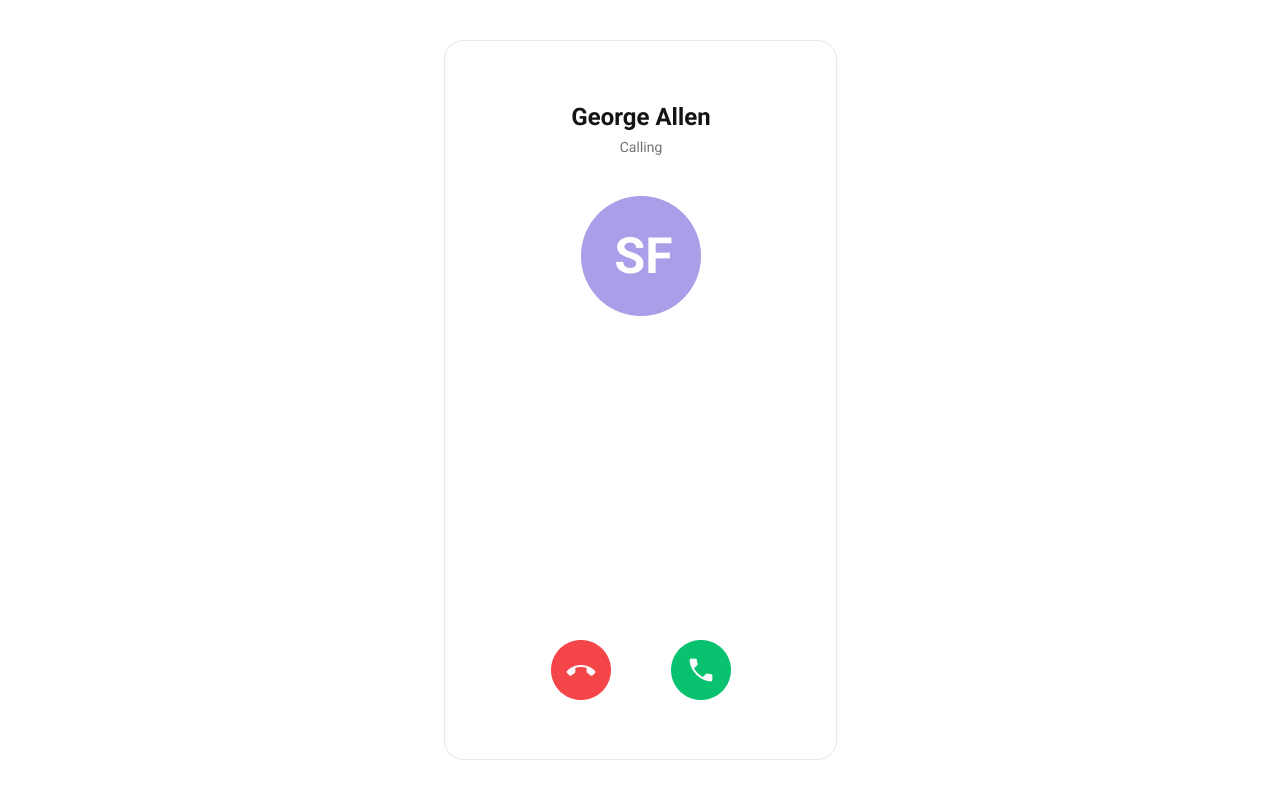
`CometChatIncomingCall` is a [Component](/ui-kit/react-native/components-overview#components) that serves as a visual representation when the user receives an incoming call, such as a voice call or video call, providing options to answer or decline the call.
 ***
## Minimal Render
```tsx lines theme={null}
import { CometChat } from "@cometchat/chat-sdk-react-native";
import { CometChatIncomingCall } from "@cometchat/chat-uikit-react-native";
import { useState, useRef, useEffect } from "react";
function IncomingCallDemo() {
const incomingCall = useRef(null);
const [callReceived, setCallReceived] = useState(false);
const listenerId = "INCOMING_CALL_LISTENER";
useEffect(() => {
CometChat.addCallListener(
listenerId,
new CometChat.CallListener({
onIncomingCallReceived: (call) => {
incomingCall.current = call;
setCallReceived(true);
},
onIncomingCallCancelled: (call) => {
incomingCall.current = null;
setCallReceived(false);
},
})
);
return () => {
CometChat.removeCallListener(listenerId);
};
}, []);
return (
<>
{callReceived && incomingCall.current && (
setCallReceived(false)}
/>
)}
);
}
```
***
## Actions and Events
### Callback Props
#### onAccept
Fires when the accept button is pressed.
```tsx lines theme={null}
onAccept?: (call: CometChat.BaseMessage) => void
```
```tsx lines theme={null}
import { CometChatIncomingCall } from "@cometchat/chat-uikit-react-native";
import { CometChat } from "@cometchat/chat-sdk-react-native";
function IncomingCallWithAccept() {
const handleAccept = (call: CometChat.BaseMessage) => {
console.log("Call accepted:", call);
};
return (
setCallReceived(false)}
/>
);
}
```
#### onDecline
Fires when the decline button is pressed.
```tsx lines theme={null}
onDecline?: (call: CometChat.BaseMessage) => void
```
```tsx lines theme={null}
import { CometChatIncomingCall } from "@cometchat/chat-uikit-react-native";
function IncomingCallWithDecline() {
const handleDecline = (call) => {
console.log("Call declined");
setCallReceived(false);
};
return (
);
}
```
#### onError
Fires on internal errors (network failure, auth issue, SDK exception).
```tsx lines theme={null}
onError?: (error: CometChat.CometChatException) => void
```
```tsx lines theme={null}
import { CometChatIncomingCall } from "@cometchat/chat-uikit-react-native";
import { CometChat } from "@cometchat/chat-sdk-react-native";
function IncomingCallWithError() {
return (
setCallReceived(false)}
onError={(error: CometChat.CometChatException) => {
console.error("IncomingCall error:", error);
}}
/>
);
}
```
### Global UI Events
`CometChatUIEventHandler` emits events subscribable from anywhere in the application. Add listeners and remove them on cleanup.
| Event | Fires when | Payload |
| - | - | - |
| `ccCallRejected` | Initiated call is rejected by the receiver | `{ call }` |
| `ccCallAccepted` | Initiated call is accepted by the receiver | `{ call }` |
| `ccCallEnded` | Initiated call successfully ends | `{ call }` |
| `ccCallFailed` | Error occurs during the initiated call | `{ call }` |
When to use: sync external UI with call state changes. For example, update a call status indicator, show notifications, or log call events.
```tsx lines theme={null}
import { useEffect } from "react";
import { CometChatUIEventHandler } from "@cometchat/chat-uikit-react-native";
function useIncomingCallEvents() {
useEffect(() => {
const listenerId = "INCOMING_CALL_EVENTS_" + Date.now();
CometChatUIEventHandler.addCallListener(listenerId, {
ccCallRejected: ({ call }) => {
console.log("Call rejected:", call);
},
ccCallAccepted: ({ call }) => {
console.log("Call accepted:", call);
},
ccCallEnded: ({ call }) => {
console.log("Call ended:", call);
},
ccCallFailed: ({ call }) => {
console.log("Call failed:", call);
},
});
return () => {
CometChatUIEventHandler.removeCallListener(listenerId);
};
}, []);
}
```
***
## Custom View Slots
Each slot replaces a section of the default UI. Slots that accept a call parameter receive the call object for customization.
| Slot | Signature | Replaces |
| - | - | - |
| `ItemView` | `(call) => JSX.Element` | Entire incoming call card |
| `LeadingView` | `(call) => JSX.Element` | Avatar / left section |
| `TitleView` | `(call) => JSX.Element` | Caller name / title text |
| `SubtitleView` | `(call) => JSX.Element` | Call type / status text |
| `TrailingView` | `(call) => JSX.Element` | Accept/decline buttons |
### ItemView
Custom view for the entire incoming call card.
```tsx lines theme={null}
ItemView?: (call: CometChat.Call | CometChat.CustomMessage) => JSX.Element
```
```tsx lines theme={null}
import { CometChatIncomingCall } from "@cometchat/chat-uikit-react-native";
import { CometChat } from "@cometchat/chat-sdk-react-native";
import { View, Text } from "react-native";
function ItemViewDemo() {
const getItemView = (call: CometChat.Call | CometChat.CustomMessage) => {
return (
Incoming Call
);
};
return (
setCallReceived(false)}
ItemView={getItemView}
/>
);
}
```
### LeadingView
Custom view for the avatar / left section.
```tsx lines theme={null}
LeadingView?: (call: CometChat.Call | CometChat.CustomMessage) => JSX.Element
```
```tsx lines theme={null}
import { CometChatIncomingCall } from "@cometchat/chat-uikit-react-native";
import { CometChat } from "@cometchat/chat-sdk-react-native";
import { View, Text } from "react-native";
function LeadingViewDemo() {
const getLeadingView = (call: CometChat.Call | CometChat.CustomMessage) => {
const caller = call.getCallInitiator();
return (
{caller.getName().charAt(0)}
);
};
return (
setCallReceived(false)}
LeadingView={getLeadingView}
/>
);
}
```
### SubtitleView
Custom view for the call type / status text.
```tsx lines theme={null}
SubtitleView?: (call: CometChat.Call | CometChat.CustomMessage) => JSX.Element
```
```tsx lines theme={null}
import { CometChatIncomingCall } from "@cometchat/chat-uikit-react-native";
import { CometChat } from "@cometchat/chat-sdk-react-native";
import { Text } from "react-native";
function SubtitleViewDemo() {
const getSubtitleView = (call: CometChat.Call | CometChat.CustomMessage) => {
const callType = call.getType() === "audio" ? "Voice Call" : "Video Call";
return {callType};
};
return (
setCallReceived(false)}
SubtitleView={getSubtitleView}
/>
);
}
```
***
## Styling
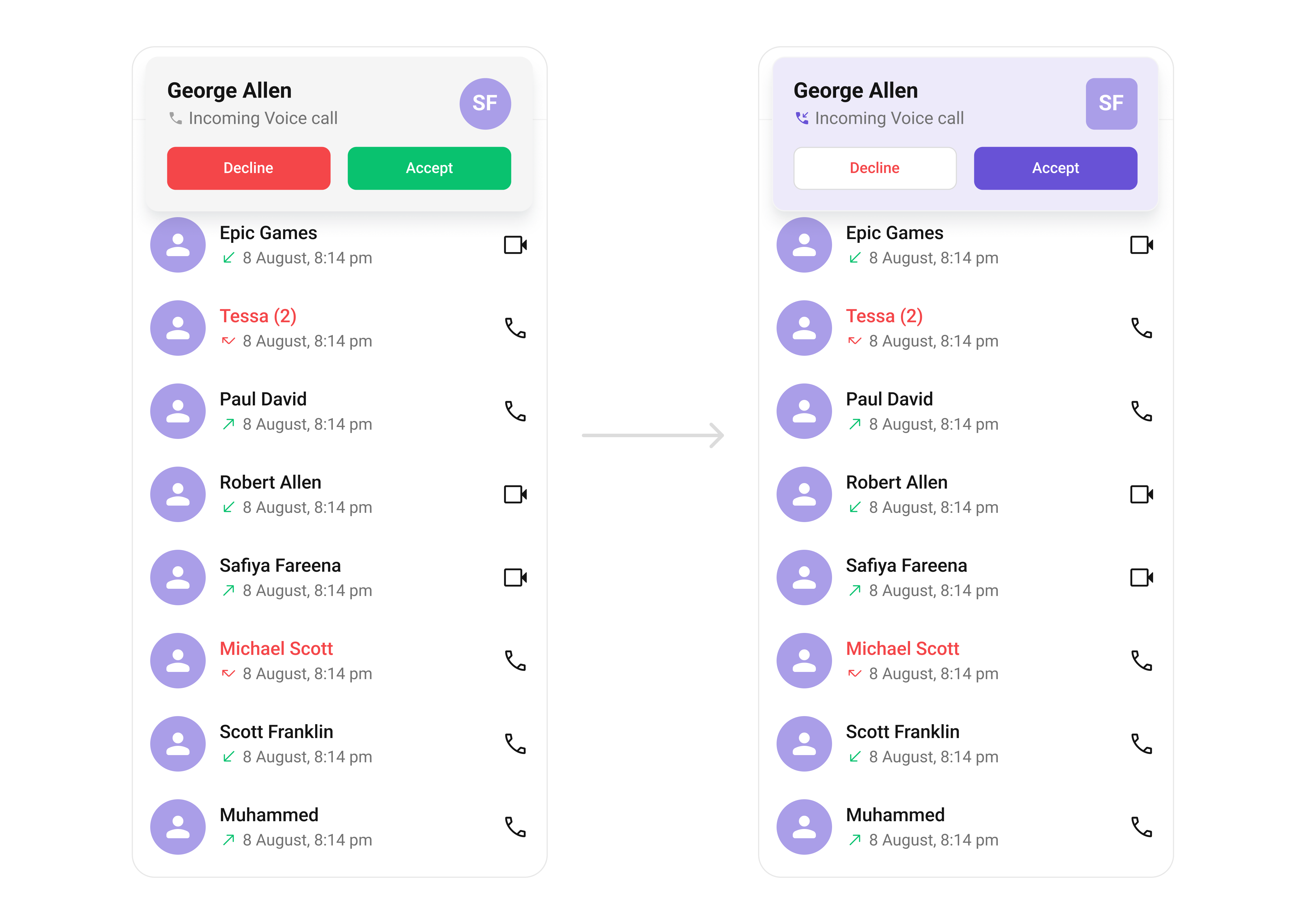
Using Style you can customize the look and feel of the component in your app. Pass a styling object as a prop to the `CometChatIncomingCall` component.
***
## Minimal Render
```tsx lines theme={null}
import { CometChat } from "@cometchat/chat-sdk-react-native";
import { CometChatIncomingCall } from "@cometchat/chat-uikit-react-native";
import { useState, useRef, useEffect } from "react";
function IncomingCallDemo() {
const incomingCall = useRef(null);
const [callReceived, setCallReceived] = useState(false);
const listenerId = "INCOMING_CALL_LISTENER";
useEffect(() => {
CometChat.addCallListener(
listenerId,
new CometChat.CallListener({
onIncomingCallReceived: (call) => {
incomingCall.current = call;
setCallReceived(true);
},
onIncomingCallCancelled: (call) => {
incomingCall.current = null;
setCallReceived(false);
},
})
);
return () => {
CometChat.removeCallListener(listenerId);
};
}, []);
return (
<>
{callReceived && incomingCall.current && (
setCallReceived(false)}
/>
)}
);
}
```
***
## Actions and Events
### Callback Props
#### onAccept
Fires when the accept button is pressed.
```tsx lines theme={null}
onAccept?: (call: CometChat.BaseMessage) => void
```
```tsx lines theme={null}
import { CometChatIncomingCall } from "@cometchat/chat-uikit-react-native";
import { CometChat } from "@cometchat/chat-sdk-react-native";
function IncomingCallWithAccept() {
const handleAccept = (call: CometChat.BaseMessage) => {
console.log("Call accepted:", call);
};
return (
setCallReceived(false)}
/>
);
}
```
#### onDecline
Fires when the decline button is pressed.
```tsx lines theme={null}
onDecline?: (call: CometChat.BaseMessage) => void
```
```tsx lines theme={null}
import { CometChatIncomingCall } from "@cometchat/chat-uikit-react-native";
function IncomingCallWithDecline() {
const handleDecline = (call) => {
console.log("Call declined");
setCallReceived(false);
};
return (
);
}
```
#### onError
Fires on internal errors (network failure, auth issue, SDK exception).
```tsx lines theme={null}
onError?: (error: CometChat.CometChatException) => void
```
```tsx lines theme={null}
import { CometChatIncomingCall } from "@cometchat/chat-uikit-react-native";
import { CometChat } from "@cometchat/chat-sdk-react-native";
function IncomingCallWithError() {
return (
setCallReceived(false)}
onError={(error: CometChat.CometChatException) => {
console.error("IncomingCall error:", error);
}}
/>
);
}
```
### Global UI Events
`CometChatUIEventHandler` emits events subscribable from anywhere in the application. Add listeners and remove them on cleanup.
| Event | Fires when | Payload |
| - | - | - |
| `ccCallRejected` | Initiated call is rejected by the receiver | `{ call }` |
| `ccCallAccepted` | Initiated call is accepted by the receiver | `{ call }` |
| `ccCallEnded` | Initiated call successfully ends | `{ call }` |
| `ccCallFailed` | Error occurs during the initiated call | `{ call }` |
When to use: sync external UI with call state changes. For example, update a call status indicator, show notifications, or log call events.
```tsx lines theme={null}
import { useEffect } from "react";
import { CometChatUIEventHandler } from "@cometchat/chat-uikit-react-native";
function useIncomingCallEvents() {
useEffect(() => {
const listenerId = "INCOMING_CALL_EVENTS_" + Date.now();
CometChatUIEventHandler.addCallListener(listenerId, {
ccCallRejected: ({ call }) => {
console.log("Call rejected:", call);
},
ccCallAccepted: ({ call }) => {
console.log("Call accepted:", call);
},
ccCallEnded: ({ call }) => {
console.log("Call ended:", call);
},
ccCallFailed: ({ call }) => {
console.log("Call failed:", call);
},
});
return () => {
CometChatUIEventHandler.removeCallListener(listenerId);
};
}, []);
}
```
***
## Custom View Slots
Each slot replaces a section of the default UI. Slots that accept a call parameter receive the call object for customization.
| Slot | Signature | Replaces |
| - | - | - |
| `ItemView` | `(call) => JSX.Element` | Entire incoming call card |
| `LeadingView` | `(call) => JSX.Element` | Avatar / left section |
| `TitleView` | `(call) => JSX.Element` | Caller name / title text |
| `SubtitleView` | `(call) => JSX.Element` | Call type / status text |
| `TrailingView` | `(call) => JSX.Element` | Accept/decline buttons |
### ItemView
Custom view for the entire incoming call card.
```tsx lines theme={null}
ItemView?: (call: CometChat.Call | CometChat.CustomMessage) => JSX.Element
```
```tsx lines theme={null}
import { CometChatIncomingCall } from "@cometchat/chat-uikit-react-native";
import { CometChat } from "@cometchat/chat-sdk-react-native";
import { View, Text } from "react-native";
function ItemViewDemo() {
const getItemView = (call: CometChat.Call | CometChat.CustomMessage) => {
return (
Incoming Call
);
};
return (
setCallReceived(false)}
ItemView={getItemView}
/>
);
}
```
### LeadingView
Custom view for the avatar / left section.
```tsx lines theme={null}
LeadingView?: (call: CometChat.Call | CometChat.CustomMessage) => JSX.Element
```
```tsx lines theme={null}
import { CometChatIncomingCall } from "@cometchat/chat-uikit-react-native";
import { CometChat } from "@cometchat/chat-sdk-react-native";
import { View, Text } from "react-native";
function LeadingViewDemo() {
const getLeadingView = (call: CometChat.Call | CometChat.CustomMessage) => {
const caller = call.getCallInitiator();
return (
{caller.getName().charAt(0)}
);
};
return (
setCallReceived(false)}
LeadingView={getLeadingView}
/>
);
}
```
### SubtitleView
Custom view for the call type / status text.
```tsx lines theme={null}
SubtitleView?: (call: CometChat.Call | CometChat.CustomMessage) => JSX.Element
```
```tsx lines theme={null}
import { CometChatIncomingCall } from "@cometchat/chat-uikit-react-native";
import { CometChat } from "@cometchat/chat-sdk-react-native";
import { Text } from "react-native";
function SubtitleViewDemo() {
const getSubtitleView = (call: CometChat.Call | CometChat.CustomMessage) => {
const callType = call.getType() === "audio" ? "Voice Call" : "Video Call";
return {callType};
};
return (
setCallReceived(false)}
SubtitleView={getSubtitleView}
/>
);
}
```
***
## Styling
Using Style you can customize the look and feel of the component in your app. Pass a styling object as a prop to the `CometChatIncomingCall` component.
 ```tsx lines theme={null}
import { CometChatIncomingCall, useTheme } from "@cometchat/chat-uikit-react-native";
function StylingDemo() {
const theme = useTheme();
return (
setCallReceived(false)}
style={{
containerStyle: {
backgroundColor: theme.color.extendedPrimary100,
},
avatarStyle: {
containerStyle: {
backgroundColor: theme.color.extendedPrimary500,
borderRadius: 8,
},
imageStyle: {
borderRadius: 8,
},
},
declineCallButtonStyle: {
backgroundColor: theme.color.staticWhite,
},
declineCallTextStyle: {
color: theme.color.error,
},
acceptCallButtonStyle: {
backgroundColor: theme.color.primary,
},
}}
/>
);
}
```
### Visibility Props
| Property | Description | Code |
| - | - | - |
| `disableSoundForCalls` | Disable/enable the sound of incoming calls | `disableSoundForCalls?: boolean` |
| `customSoundForCalls` | Set custom sound for incoming calls | `customSoundForCalls?: string` |
***
## Next Steps
Display and manage outgoing calls
Add voice and video call buttons to your UI
Overview of all calling features
Customize the appearance of UI Kit components
This documentation is built and hosted on [Mintlify](https://mintlify.com), a developer documentation platform.
```tsx lines theme={null}
import { CometChatIncomingCall, useTheme } from "@cometchat/chat-uikit-react-native";
function StylingDemo() {
const theme = useTheme();
return (
setCallReceived(false)}
style={{
containerStyle: {
backgroundColor: theme.color.extendedPrimary100,
},
avatarStyle: {
containerStyle: {
backgroundColor: theme.color.extendedPrimary500,
borderRadius: 8,
},
imageStyle: {
borderRadius: 8,
},
},
declineCallButtonStyle: {
backgroundColor: theme.color.staticWhite,
},
declineCallTextStyle: {
color: theme.color.error,
},
acceptCallButtonStyle: {
backgroundColor: theme.color.primary,
},
}}
/>
);
}
```
### Visibility Props
| Property | Description | Code |
| - | - | - |
| `disableSoundForCalls` | Disable/enable the sound of incoming calls | `disableSoundForCalls?: boolean` |
| `customSoundForCalls` | Set custom sound for incoming calls | `customSoundForCalls?: string` |
***
## Next Steps
Display and manage outgoing calls
Add voice and video call buttons to your UI
Overview of all calling features
Customize the appearance of UI Kit components
This documentation is built and hosted on [Mintlify](https://mintlify.com), a developer documentation platform.