> ## Documentation Index
> Fetch the complete documentation index at: https://cometchat-22654f5b-docs-agent-native-development.mintlify.site/llms.txt
> Use this file to discover all available pages before exploring further.
# Users
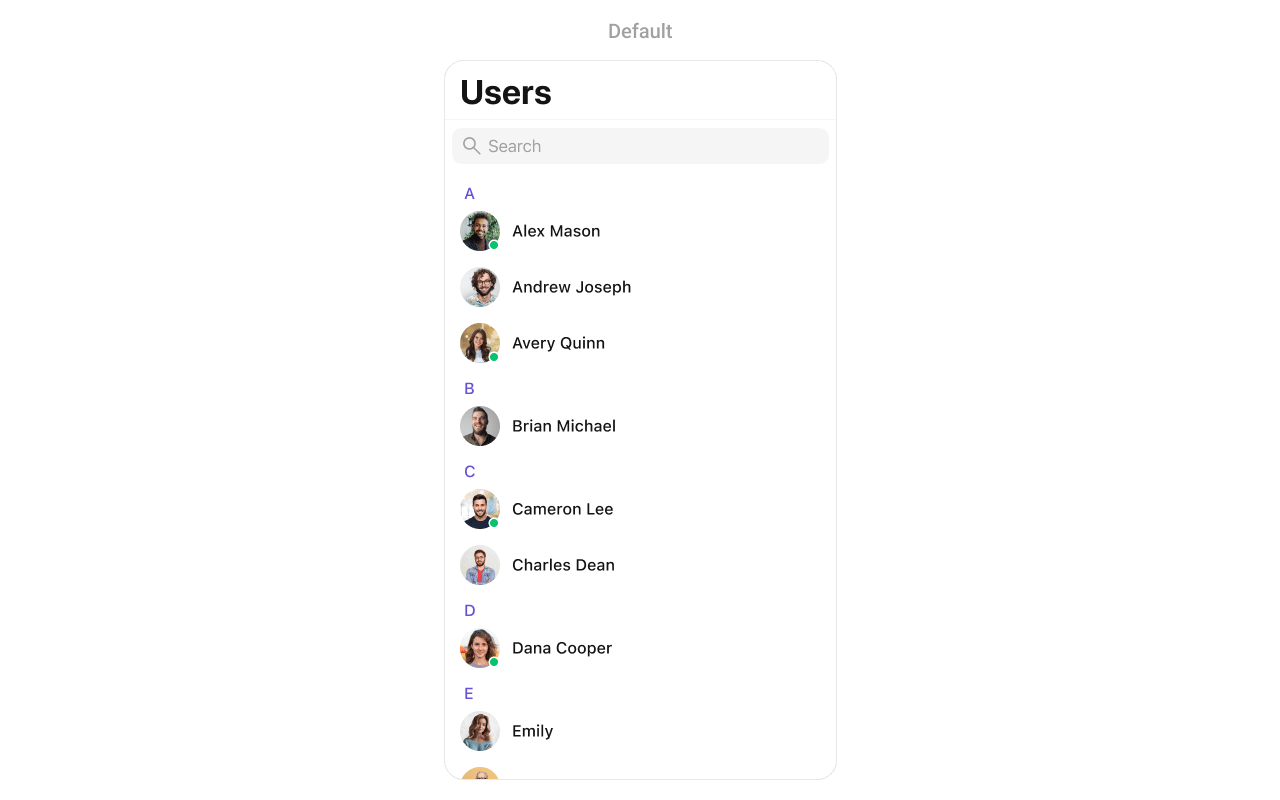
> Display CometChat iOS UI Kit users with avatars, online status, search, filtering, selection callbacks, and conversation navigation.
The `CometChatUsers` component displays a searchable list of all available users. It shows user names, avatars, and online/offline status indicators. Users can be filtered, searched, and selected for starting conversations.
 ```json theme={null}
{
"component": "CometChatUsers",
"package": "CometChatUIKitSwift",
"import": "import CometChatUIKitSwift\nimport CometChatSDK",
"description": "Displays a searchable list of all available users with avatars, names, and online/offline status indicators.",
"inherits": "UIViewController",
"primaryOutput": {
"callback": "onItemClick",
"type": "(User, IndexPath) -> Void"
},
"props": {
"data": {
"usersRequestBuilder": {
"type": "UsersRequest.UsersRequestBuilder?",
"default": "nil",
"note": "Custom request builder for filtering users"
},
"searchRequestBuilder": {
"type": "UsersRequest.UsersRequestBuilder?",
"default": "nil",
"note": "Custom request builder for search"
}
},
"callbacks": {
"onItemClick": "(User, IndexPath) -> Void",
"onItemLongClick": "(User, IndexPath) -> Void",
"onBack": "() -> Void",
"onSelection": "([User]) -> Void",
"onSelectedItemProceed": "([User]) -> Void",
"onError": "(CometChatException) -> Void",
"onEmpty": "() -> Void",
"onLoad": "([[User]]) -> Void"
},
"visibility": {
"hideSearch": { "type": "Bool", "default": false },
"hideNavigationBar": { "type": "Bool", "default": false },
"hideBackButton": { "type": "Bool", "default": false },
"hideUserStatus": { "type": "Bool", "default": false },
"hideSectionHeader": { "type": "Bool", "default": false },
"hideErrorView": { "type": "Bool", "default": false },
"hideLoadingState": { "type": "Bool", "default": false }
},
"selection": {
"selectionMode": { "type": "SelectionMode", "default": ".none" },
"selectionLimit": { "type": "Int", "default": 0, "note": "0 means unlimited" },
"selectedCellCount": { "type": "Int", "default": 0, "note": "Read-only count of selected users" }
},
"styling": {
"avatarStyle": { "type": "AvatarStyle", "default": "AvatarStyle()" },
"statusIndicatorStyle": { "type": "StatusIndicatorStyle", "default": "StatusIndicatorStyle()" }
},
"viewSlots": {
"listItemView": "(User) -> UIView",
"leadingView": "(User) -> UIView",
"titleView": "(User?) -> UIView",
"subtitleView": "(User?) -> UIView",
"trailingView": "(User?) -> UIView",
"emptyStateView": "() -> UIView",
"errorStateView": "() -> UIView",
"loadingStateView": "() -> UIView"
}
},
"methods": {
"swipeActions": {
"set(options:)": "((User?) -> [CometChatUserOption])? - Sets custom swipe actions",
"add(options:)": "((User?) -> [CometChatUserOption])? - Adds additional swipe actions"
},
"dataManipulation": {
"add(user:)": "User - Adds a user to the list",
"update(user:)": "User - Updates a user in the list",
"remove(user:)": "User - Removes a user from the list",
"getSelectedUsers()": "[User] - Returns selected users"
}
},
"events": [
{
"name": "ccUserBlocked",
"payload": "User",
"description": "Fires when a user is blocked"
},
{
"name": "ccUserUnblocked",
"payload": "User",
"description": "Fires when a user is unblocked"
}
],
"sdkListeners": [
"onUserOnline",
"onUserOffline"
],
"compositionExample": {
"description": "Users list for starting new conversations",
"components": ["CometChatUsers", "CometChatMessageHeader", "CometChatMessageList", "CometChatMessageComposer"],
"flow": "User taps on a user → onItemClick fires → push your own chat screen with the selected user"
},
"types": {
"User": {
"uid": "String",
"name": "String",
"avatar": "String?",
"status": "UserStatus",
"role": "String?"
},
"UserStatus": {
"online": "User is currently online",
"offline": "User is currently offline"
}
}
}
```
| Field | Value |
| - | - |
| Component | `CometChatUsers` |
| Package | `CometChatUIKitSwift` |
| Inherits | `UIViewController` |
***
## Where It Fits
`CometChatUsers` displays all available users for starting new conversations. It's typically used as a standalone screen or within a tab view controller.
```swift lines theme={null}
import UIKit
import CometChatUIKitSwift
import CometChatSDK
class UsersViewController: UIViewController {
override func viewDidLoad() {
super.viewDidLoad()
setupUsers()
}
private func setupUsers() {
let usersController = CometChatUsers()
// Handle user selection - start a conversation
usersController.set(onItemClick: { [weak self] user, indexPath in
self?.startConversation(with: user)
})
let navController = UINavigationController(rootViewController: usersController)
present(navController, animated: true)
}
private func startConversation(with user: User) {
let messagesVC = MessagesVC() // your own VC — see /ui-kit/ios/ios-conversation
messagesVC.set(user: user)
navigationController?.pushViewController(messagesVC, animated: true)
}
}
```
***
## Minimal Render
```swift lines theme={null}
import CometChatUIKitSwift
let users = CometChatUsers()
let navController = UINavigationController(rootViewController: users)
present(navController, animated: true)
```
***
## Filtering
Use `UsersRequest.UsersRequestBuilder` to filter which users appear in the list. The builder pattern allows chaining multiple filter conditions.
```swift lines theme={null}
import CometChatUIKitSwift
import CometChatSDK
// Create a custom request builder
let usersRequestBuilder = UsersRequest.UsersRequestBuilder(limit: 30)
.friendsOnly(true)
let users = CometChatUsers(usersRequestBuilder: usersRequestBuilder)
```
### Filter Recipes
| Recipe | Code |
| - | - |
| Friends only | `.friendsOnly(true)` |
| Online users only | `.set(status: .online)` |
| Search by name | `.set(searchKeyword: "John")` |
| Filter by role | `.set(roles: ["admin", "moderator"])` |
| Filter by tags | `.set(tags: ["premium"])` |
| Hide blocked users | `.hideBlockedUsers(true)` |
| Limit results | `UsersRequestBuilder(limit: 20)` |
| Specific UIDs | `.set(UIDs: ["user1", "user2"])` |
***
## Actions and Events
### Callback Props
#### onItemClick
Fires when a user taps on a user in the list. Use this to start a conversation.
```swift lines theme={null}
import CometChatUIKitSwift
import CometChatSDK
let users = CometChatUsers()
users.set(onItemClick: { [weak self] user, indexPath in
guard let self = self else { return }
let messagesVC = MessagesVC() // your own VC — see /ui-kit/ios/ios-conversation
messagesVC.set(user: user)
self.navigationController?.pushViewController(messagesVC, animated: true)
})
```
#### onItemLongClick
Fires when a user long-presses on a user. Use this to show additional options.
```swift lines theme={null}
import CometChatUIKitSwift
import CometChatSDK
let users = CometChatUsers()
users.set(onItemLongClick: { [weak self] user, indexPath in
guard let self = self else { return }
let alert = UIAlertController(title: user.name, message: nil, preferredStyle: .actionSheet)
alert.addAction(UIAlertAction(title: "View Profile", style: .default) { _ in
// View profile
})
alert.addAction(UIAlertAction(title: "Block User", style: .destructive) { _ in
// Block user
})
alert.addAction(UIAlertAction(title: "Cancel", style: .cancel))
self.present(alert, animated: true)
})
```
#### onBack
Fires when the back button is pressed.
```swift lines theme={null}
import CometChatUIKitSwift
let users = CometChatUsers()
users.set(onBack: { [weak self] in
self?.navigationController?.popViewController(animated: true)
})
```
#### onSelection
Fires when users are selected in selection mode.
```swift lines theme={null}
import CometChatUIKitSwift
import CometChatSDK
let users = CometChatUsers()
users.selectionMode = .multiple
users.set(onSelection: { [weak self] selectedUsers in
print("Selected \(selectedUsers.count) users")
})
```
#### onError
Fires when an error occurs while loading users.
```swift lines theme={null}
import CometChatUIKitSwift
let users = CometChatUsers()
users.set(onError: { error in
print("Error loading users: \(error.errorDescription)")
})
```
#### onEmpty
Fires when the user list is empty.
```swift lines theme={null}
import CometChatUIKitSwift
let users = CometChatUsers()
users.set(onEmpty: {
print("No users found")
})
```
#### onLoad
Fires when users are successfully loaded. The callback receives a nested array where each inner array represents a section of users (grouped alphabetically).
```swift lines theme={null}
import CometChatUIKitSwift
import CometChatSDK
let users = CometChatUsers()
users.set(onLoad: { userSections in
let totalUsers = userSections.flatMap { $0 }.count
print("Loaded \(totalUsers) users across \(userSections.count) sections")
})
```
### Actions Reference
| Method | Description | Example |
| - | - | - |
| `set(onItemClick:)` | Triggered when a user is tapped | Start conversation |
| `set(onItemLongClick:)` | Triggered on long press | Show options menu |
| `set(onBack:)` | Triggered when back button is pressed | Custom navigation |
| `set(onSelection:)` | Triggered in selection mode | Multi-select users |
| `set(onError:)` | Triggered when an error occurs | Show error alert |
| `set(onEmpty:)` | Triggered when list is empty | Show empty state |
| `set(onLoad:)` | Triggered when users load | Analytics tracking |
### Global UI Events
| Event | Fires when | Payload |
| - | - | - |
| `ccUserBlocked` | A user is blocked | `User` |
| `ccUserUnblocked` | A user is unblocked | `User` |
```swift lines theme={null}
import CometChatUIKitSwift
import CometChatSDK
class MyViewController: UIViewController, CometChatUserEventListener {
override func viewDidLoad() {
super.viewDidLoad()
CometChatUserEvents.addListener("my-listener", self)
}
override func viewWillDisappear(_ animated: Bool) {
super.viewWillDisappear(animated)
CometChatUserEvents.removeListener("my-listener")
}
func onUserBlock(user: User) {
print("User blocked: \(user.name ?? "")")
}
func onUserUnblock(user: User) {
print("User unblocked: \(user.name ?? "")")
}
}
```
### SDK Events (Real-Time, Automatic)
| SDK Listener | Internal behavior |
| - | - |
| `onUserOnline` | Updates status indicator to online |
| `onUserOffline` | Updates status indicator to offline |
***
## Custom View Slots
| Slot | Signature | Replaces |
| - | - | - |
| `listItemView` | `(User) -> UIView` | Entire user row |
| `leadingView` | `(User) -> UIView` | Avatar / left section |
| `titleView` | `(User?) -> UIView` | Name / title text |
| `subtitleView` | `(User?) -> UIView` | Status / subtitle text |
| `trailingView` | `(User?) -> UIView` | Right side content |
| `emptyStateView` | `() -> UIView` | Empty state display |
| `errorStateView` | `() -> UIView` | Error state display |
| `loadingStateView` | `() -> UIView` | Loading state display |
### listItemView
Replace the entire user row with a custom design.
```swift lines theme={null}
import UIKit
import CometChatUIKitSwift
import CometChatSDK
let users = CometChatUsers()
users.set(listItemView: { user in
let customView = UIView()
customView.backgroundColor = UIColor.systemBackground
let avatar = CometChatAvatar(image: UIImage())
avatar.setAvatar(avatarUrl: user.avatar, with: user.name ?? "")
let nameLabel = UILabel()
nameLabel.text = user.name
nameLabel.font = UIFont.systemFont(ofSize: 16, weight: .semibold)
let statusLabel = UILabel()
statusLabel.text = user.status == .online ? "🟢 Online" : "⚫ Offline"
statusLabel.font = UIFont.systemFont(ofSize: 12)
statusLabel.textColor = UIColor.secondaryLabel
customView.addSubview(avatar)
customView.addSubview(nameLabel)
customView.addSubview(statusLabel)
return customView
})
```
### leadingView
Customize the leading view (avatar area) of a user cell.
```swift lines theme={null}
import UIKit
import CometChatUIKitSwift
import CometChatSDK
let users = CometChatUsers()
users.set(leadingView: { user in
let view = CustomLeadingView(image: UIImage(named: "avatar"))
return view
})
```
```json theme={null}
{
"component": "CometChatUsers",
"package": "CometChatUIKitSwift",
"import": "import CometChatUIKitSwift\nimport CometChatSDK",
"description": "Displays a searchable list of all available users with avatars, names, and online/offline status indicators.",
"inherits": "UIViewController",
"primaryOutput": {
"callback": "onItemClick",
"type": "(User, IndexPath) -> Void"
},
"props": {
"data": {
"usersRequestBuilder": {
"type": "UsersRequest.UsersRequestBuilder?",
"default": "nil",
"note": "Custom request builder for filtering users"
},
"searchRequestBuilder": {
"type": "UsersRequest.UsersRequestBuilder?",
"default": "nil",
"note": "Custom request builder for search"
}
},
"callbacks": {
"onItemClick": "(User, IndexPath) -> Void",
"onItemLongClick": "(User, IndexPath) -> Void",
"onBack": "() -> Void",
"onSelection": "([User]) -> Void",
"onSelectedItemProceed": "([User]) -> Void",
"onError": "(CometChatException) -> Void",
"onEmpty": "() -> Void",
"onLoad": "([[User]]) -> Void"
},
"visibility": {
"hideSearch": { "type": "Bool", "default": false },
"hideNavigationBar": { "type": "Bool", "default": false },
"hideBackButton": { "type": "Bool", "default": false },
"hideUserStatus": { "type": "Bool", "default": false },
"hideSectionHeader": { "type": "Bool", "default": false },
"hideErrorView": { "type": "Bool", "default": false },
"hideLoadingState": { "type": "Bool", "default": false }
},
"selection": {
"selectionMode": { "type": "SelectionMode", "default": ".none" },
"selectionLimit": { "type": "Int", "default": 0, "note": "0 means unlimited" },
"selectedCellCount": { "type": "Int", "default": 0, "note": "Read-only count of selected users" }
},
"styling": {
"avatarStyle": { "type": "AvatarStyle", "default": "AvatarStyle()" },
"statusIndicatorStyle": { "type": "StatusIndicatorStyle", "default": "StatusIndicatorStyle()" }
},
"viewSlots": {
"listItemView": "(User) -> UIView",
"leadingView": "(User) -> UIView",
"titleView": "(User?) -> UIView",
"subtitleView": "(User?) -> UIView",
"trailingView": "(User?) -> UIView",
"emptyStateView": "() -> UIView",
"errorStateView": "() -> UIView",
"loadingStateView": "() -> UIView"
}
},
"methods": {
"swipeActions": {
"set(options:)": "((User?) -> [CometChatUserOption])? - Sets custom swipe actions",
"add(options:)": "((User?) -> [CometChatUserOption])? - Adds additional swipe actions"
},
"dataManipulation": {
"add(user:)": "User - Adds a user to the list",
"update(user:)": "User - Updates a user in the list",
"remove(user:)": "User - Removes a user from the list",
"getSelectedUsers()": "[User] - Returns selected users"
}
},
"events": [
{
"name": "ccUserBlocked",
"payload": "User",
"description": "Fires when a user is blocked"
},
{
"name": "ccUserUnblocked",
"payload": "User",
"description": "Fires when a user is unblocked"
}
],
"sdkListeners": [
"onUserOnline",
"onUserOffline"
],
"compositionExample": {
"description": "Users list for starting new conversations",
"components": ["CometChatUsers", "CometChatMessageHeader", "CometChatMessageList", "CometChatMessageComposer"],
"flow": "User taps on a user → onItemClick fires → push your own chat screen with the selected user"
},
"types": {
"User": {
"uid": "String",
"name": "String",
"avatar": "String?",
"status": "UserStatus",
"role": "String?"
},
"UserStatus": {
"online": "User is currently online",
"offline": "User is currently offline"
}
}
}
```
| Field | Value |
| - | - |
| Component | `CometChatUsers` |
| Package | `CometChatUIKitSwift` |
| Inherits | `UIViewController` |
***
## Where It Fits
`CometChatUsers` displays all available users for starting new conversations. It's typically used as a standalone screen or within a tab view controller.
```swift lines theme={null}
import UIKit
import CometChatUIKitSwift
import CometChatSDK
class UsersViewController: UIViewController {
override func viewDidLoad() {
super.viewDidLoad()
setupUsers()
}
private func setupUsers() {
let usersController = CometChatUsers()
// Handle user selection - start a conversation
usersController.set(onItemClick: { [weak self] user, indexPath in
self?.startConversation(with: user)
})
let navController = UINavigationController(rootViewController: usersController)
present(navController, animated: true)
}
private func startConversation(with user: User) {
let messagesVC = MessagesVC() // your own VC — see /ui-kit/ios/ios-conversation
messagesVC.set(user: user)
navigationController?.pushViewController(messagesVC, animated: true)
}
}
```
***
## Minimal Render
```swift lines theme={null}
import CometChatUIKitSwift
let users = CometChatUsers()
let navController = UINavigationController(rootViewController: users)
present(navController, animated: true)
```
***
## Filtering
Use `UsersRequest.UsersRequestBuilder` to filter which users appear in the list. The builder pattern allows chaining multiple filter conditions.
```swift lines theme={null}
import CometChatUIKitSwift
import CometChatSDK
// Create a custom request builder
let usersRequestBuilder = UsersRequest.UsersRequestBuilder(limit: 30)
.friendsOnly(true)
let users = CometChatUsers(usersRequestBuilder: usersRequestBuilder)
```
### Filter Recipes
| Recipe | Code |
| - | - |
| Friends only | `.friendsOnly(true)` |
| Online users only | `.set(status: .online)` |
| Search by name | `.set(searchKeyword: "John")` |
| Filter by role | `.set(roles: ["admin", "moderator"])` |
| Filter by tags | `.set(tags: ["premium"])` |
| Hide blocked users | `.hideBlockedUsers(true)` |
| Limit results | `UsersRequestBuilder(limit: 20)` |
| Specific UIDs | `.set(UIDs: ["user1", "user2"])` |
***
## Actions and Events
### Callback Props
#### onItemClick
Fires when a user taps on a user in the list. Use this to start a conversation.
```swift lines theme={null}
import CometChatUIKitSwift
import CometChatSDK
let users = CometChatUsers()
users.set(onItemClick: { [weak self] user, indexPath in
guard let self = self else { return }
let messagesVC = MessagesVC() // your own VC — see /ui-kit/ios/ios-conversation
messagesVC.set(user: user)
self.navigationController?.pushViewController(messagesVC, animated: true)
})
```
#### onItemLongClick
Fires when a user long-presses on a user. Use this to show additional options.
```swift lines theme={null}
import CometChatUIKitSwift
import CometChatSDK
let users = CometChatUsers()
users.set(onItemLongClick: { [weak self] user, indexPath in
guard let self = self else { return }
let alert = UIAlertController(title: user.name, message: nil, preferredStyle: .actionSheet)
alert.addAction(UIAlertAction(title: "View Profile", style: .default) { _ in
// View profile
})
alert.addAction(UIAlertAction(title: "Block User", style: .destructive) { _ in
// Block user
})
alert.addAction(UIAlertAction(title: "Cancel", style: .cancel))
self.present(alert, animated: true)
})
```
#### onBack
Fires when the back button is pressed.
```swift lines theme={null}
import CometChatUIKitSwift
let users = CometChatUsers()
users.set(onBack: { [weak self] in
self?.navigationController?.popViewController(animated: true)
})
```
#### onSelection
Fires when users are selected in selection mode.
```swift lines theme={null}
import CometChatUIKitSwift
import CometChatSDK
let users = CometChatUsers()
users.selectionMode = .multiple
users.set(onSelection: { [weak self] selectedUsers in
print("Selected \(selectedUsers.count) users")
})
```
#### onError
Fires when an error occurs while loading users.
```swift lines theme={null}
import CometChatUIKitSwift
let users = CometChatUsers()
users.set(onError: { error in
print("Error loading users: \(error.errorDescription)")
})
```
#### onEmpty
Fires when the user list is empty.
```swift lines theme={null}
import CometChatUIKitSwift
let users = CometChatUsers()
users.set(onEmpty: {
print("No users found")
})
```
#### onLoad
Fires when users are successfully loaded. The callback receives a nested array where each inner array represents a section of users (grouped alphabetically).
```swift lines theme={null}
import CometChatUIKitSwift
import CometChatSDK
let users = CometChatUsers()
users.set(onLoad: { userSections in
let totalUsers = userSections.flatMap { $0 }.count
print("Loaded \(totalUsers) users across \(userSections.count) sections")
})
```
### Actions Reference
| Method | Description | Example |
| - | - | - |
| `set(onItemClick:)` | Triggered when a user is tapped | Start conversation |
| `set(onItemLongClick:)` | Triggered on long press | Show options menu |
| `set(onBack:)` | Triggered when back button is pressed | Custom navigation |
| `set(onSelection:)` | Triggered in selection mode | Multi-select users |
| `set(onError:)` | Triggered when an error occurs | Show error alert |
| `set(onEmpty:)` | Triggered when list is empty | Show empty state |
| `set(onLoad:)` | Triggered when users load | Analytics tracking |
### Global UI Events
| Event | Fires when | Payload |
| - | - | - |
| `ccUserBlocked` | A user is blocked | `User` |
| `ccUserUnblocked` | A user is unblocked | `User` |
```swift lines theme={null}
import CometChatUIKitSwift
import CometChatSDK
class MyViewController: UIViewController, CometChatUserEventListener {
override func viewDidLoad() {
super.viewDidLoad()
CometChatUserEvents.addListener("my-listener", self)
}
override func viewWillDisappear(_ animated: Bool) {
super.viewWillDisappear(animated)
CometChatUserEvents.removeListener("my-listener")
}
func onUserBlock(user: User) {
print("User blocked: \(user.name ?? "")")
}
func onUserUnblock(user: User) {
print("User unblocked: \(user.name ?? "")")
}
}
```
### SDK Events (Real-Time, Automatic)
| SDK Listener | Internal behavior |
| - | - |
| `onUserOnline` | Updates status indicator to online |
| `onUserOffline` | Updates status indicator to offline |
***
## Custom View Slots
| Slot | Signature | Replaces |
| - | - | - |
| `listItemView` | `(User) -> UIView` | Entire user row |
| `leadingView` | `(User) -> UIView` | Avatar / left section |
| `titleView` | `(User?) -> UIView` | Name / title text |
| `subtitleView` | `(User?) -> UIView` | Status / subtitle text |
| `trailingView` | `(User?) -> UIView` | Right side content |
| `emptyStateView` | `() -> UIView` | Empty state display |
| `errorStateView` | `() -> UIView` | Error state display |
| `loadingStateView` | `() -> UIView` | Loading state display |
### listItemView
Replace the entire user row with a custom design.
```swift lines theme={null}
import UIKit
import CometChatUIKitSwift
import CometChatSDK
let users = CometChatUsers()
users.set(listItemView: { user in
let customView = UIView()
customView.backgroundColor = UIColor.systemBackground
let avatar = CometChatAvatar(image: UIImage())
avatar.setAvatar(avatarUrl: user.avatar, with: user.name ?? "")
let nameLabel = UILabel()
nameLabel.text = user.name
nameLabel.font = UIFont.systemFont(ofSize: 16, weight: .semibold)
let statusLabel = UILabel()
statusLabel.text = user.status == .online ? "🟢 Online" : "⚫ Offline"
statusLabel.font = UIFont.systemFont(ofSize: 12)
statusLabel.textColor = UIColor.secondaryLabel
customView.addSubview(avatar)
customView.addSubview(nameLabel)
customView.addSubview(statusLabel)
return customView
})
```
### leadingView
Customize the leading view (avatar area) of a user cell.
```swift lines theme={null}
import UIKit
import CometChatUIKitSwift
import CometChatSDK
let users = CometChatUsers()
users.set(leadingView: { user in
let view = CustomLeadingView(image: UIImage(named: "avatar"))
return view
})
```
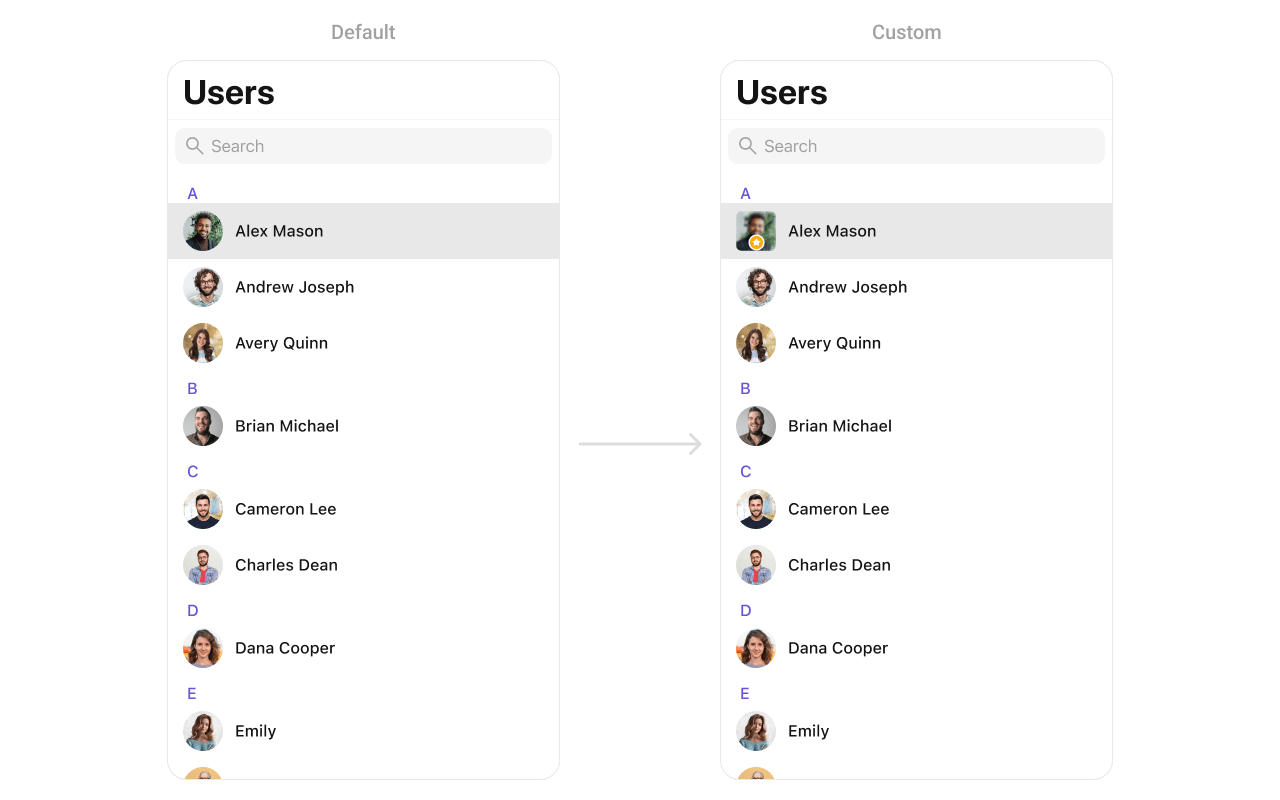 You can create a `CustomLeadingView` as a custom `UIView`:
```swift lines theme={null}
import UIKit
class CustomLeadingView: UIView {
// MARK: - UI Components
private let imageView: UIImageView = {
let imageView = UIImageView()
imageView.contentMode = .scaleAspectFill
imageView.clipsToBounds = true
imageView.layer.cornerRadius = 10
return imageView
}()
private let badgeView: UIView = {
let view = UIView()
view.backgroundColor = .orange
view.layer.cornerRadius = 12
view.layer.borderWidth = 2
view.layer.borderColor = UIColor.white.cgColor
let icon = UIImageView(image: UIImage(systemName: "star.fill"))
icon.tintColor = .white
icon.translatesAutoresizingMaskIntoConstraints = false
view.addSubview(icon)
NSLayoutConstraint.activate([
icon.centerXAnchor.constraint(equalTo: view.centerXAnchor),
icon.centerYAnchor.constraint(equalTo: view.centerYAnchor),
icon.widthAnchor.constraint(equalToConstant: 14),
icon.heightAnchor.constraint(equalToConstant: 14)
])
return view
}()
// MARK: - Initialization
init(image: UIImage?) {
super.init(frame: .zero)
imageView.image = image
addSubview(imageView)
addSubview(badgeView)
imageView.translatesAutoresizingMaskIntoConstraints = false
badgeView.translatesAutoresizingMaskIntoConstraints = false
NSLayoutConstraint.activate([
imageView.topAnchor.constraint(equalTo: topAnchor),
imageView.leadingAnchor.constraint(equalTo: leadingAnchor),
imageView.trailingAnchor.constraint(equalTo: trailingAnchor),
imageView.bottomAnchor.constraint(equalTo: bottomAnchor),
badgeView.widthAnchor.constraint(equalToConstant: 24),
badgeView.heightAnchor.constraint(equalToConstant: 24),
badgeView.bottomAnchor.constraint(equalTo: imageView.bottomAnchor, constant: -4),
badgeView.trailingAnchor.constraint(equalTo: imageView.trailingAnchor, constant: -4)
])
}
required init?(coder: NSCoder) {
fatalError("init(coder:) has not been implemented")
}
}
```
### titleView
Customize the title view of a user cell.
```swift lines theme={null}
import UIKit
import CometChatUIKitSwift
import CometChatSDK
let users = CometChatUsers()
users.set(titleView: { user in
let view = CustomTitleView(name: user.name ?? "", role: "Teacher")
return view
})
```
You can create a `CustomLeadingView` as a custom `UIView`:
```swift lines theme={null}
import UIKit
class CustomLeadingView: UIView {
// MARK: - UI Components
private let imageView: UIImageView = {
let imageView = UIImageView()
imageView.contentMode = .scaleAspectFill
imageView.clipsToBounds = true
imageView.layer.cornerRadius = 10
return imageView
}()
private let badgeView: UIView = {
let view = UIView()
view.backgroundColor = .orange
view.layer.cornerRadius = 12
view.layer.borderWidth = 2
view.layer.borderColor = UIColor.white.cgColor
let icon = UIImageView(image: UIImage(systemName: "star.fill"))
icon.tintColor = .white
icon.translatesAutoresizingMaskIntoConstraints = false
view.addSubview(icon)
NSLayoutConstraint.activate([
icon.centerXAnchor.constraint(equalTo: view.centerXAnchor),
icon.centerYAnchor.constraint(equalTo: view.centerYAnchor),
icon.widthAnchor.constraint(equalToConstant: 14),
icon.heightAnchor.constraint(equalToConstant: 14)
])
return view
}()
// MARK: - Initialization
init(image: UIImage?) {
super.init(frame: .zero)
imageView.image = image
addSubview(imageView)
addSubview(badgeView)
imageView.translatesAutoresizingMaskIntoConstraints = false
badgeView.translatesAutoresizingMaskIntoConstraints = false
NSLayoutConstraint.activate([
imageView.topAnchor.constraint(equalTo: topAnchor),
imageView.leadingAnchor.constraint(equalTo: leadingAnchor),
imageView.trailingAnchor.constraint(equalTo: trailingAnchor),
imageView.bottomAnchor.constraint(equalTo: bottomAnchor),
badgeView.widthAnchor.constraint(equalToConstant: 24),
badgeView.heightAnchor.constraint(equalToConstant: 24),
badgeView.bottomAnchor.constraint(equalTo: imageView.bottomAnchor, constant: -4),
badgeView.trailingAnchor.constraint(equalTo: imageView.trailingAnchor, constant: -4)
])
}
required init?(coder: NSCoder) {
fatalError("init(coder:) has not been implemented")
}
}
```
### titleView
Customize the title view of a user cell.
```swift lines theme={null}
import UIKit
import CometChatUIKitSwift
import CometChatSDK
let users = CometChatUsers()
users.set(titleView: { user in
let view = CustomTitleView(name: user.name ?? "", role: "Teacher")
return view
})
```
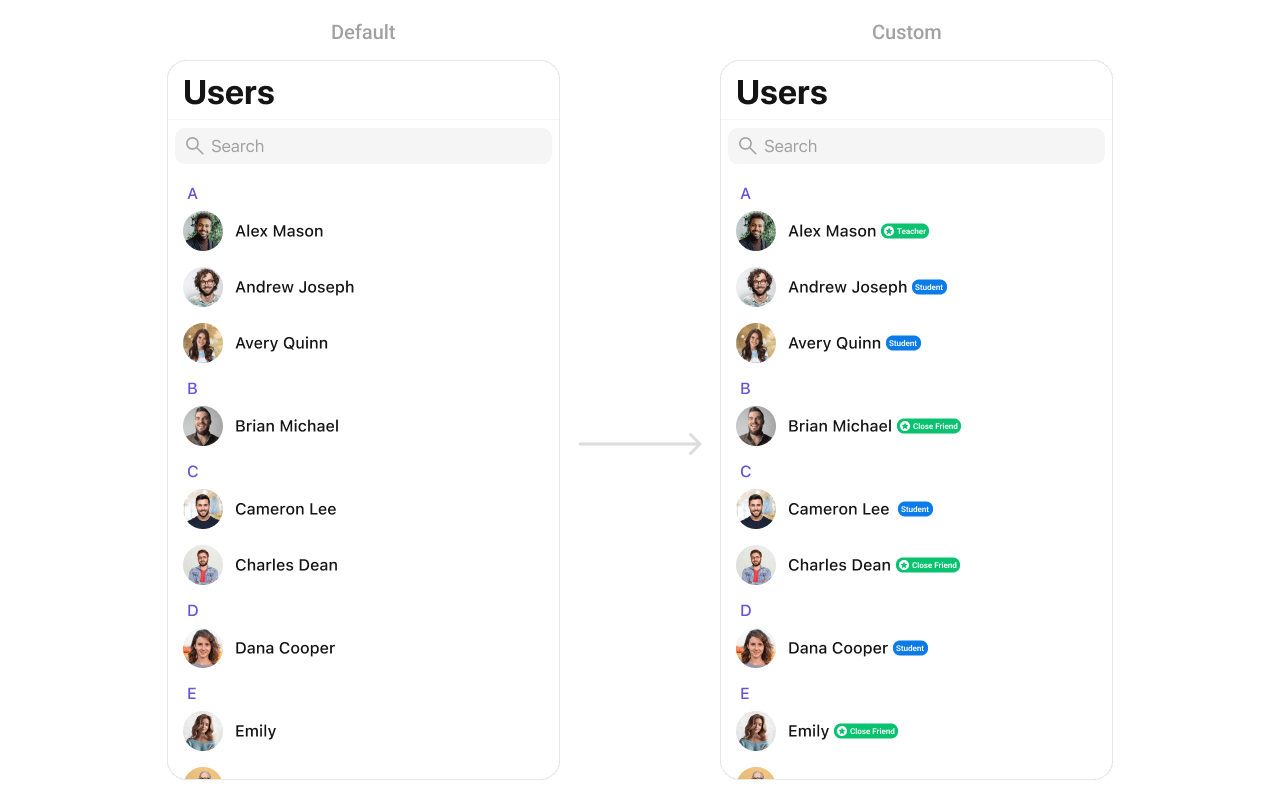 You can create a `CustomTitleView` as a custom `UIView`:
```swift lines theme={null}
import UIKit
class CustomTitleView: UIView {
// MARK: - UI Components
private let nameLabel: UILabel = {
let label = UILabel()
label.font = UIFont.boldSystemFont(ofSize: 18)
label.textColor = .black
return label
}()
private let badgeLabel: UILabel = {
let label = UILabel()
label.font = UIFont.systemFont(ofSize: 14)
label.textColor = .white
label.backgroundColor = .systemGreen
label.text = "Teacher"
label.textAlignment = .center
label.layer.cornerRadius = 8
label.layer.masksToBounds = true
return label
}()
// MARK: - Initialization
init(name: String, role: String) {
super.init(frame: .zero)
nameLabel.text = name
badgeLabel.text = " \(role) "
let stackView = UIStackView(arrangedSubviews: [nameLabel, badgeLabel])
stackView.axis = .horizontal
stackView.spacing = 8
stackView.alignment = .center
addSubview(stackView)
stackView.translatesAutoresizingMaskIntoConstraints = false
NSLayoutConstraint.activate([
stackView.leadingAnchor.constraint(equalTo: leadingAnchor),
stackView.trailingAnchor.constraint(equalTo: trailingAnchor),
stackView.topAnchor.constraint(equalTo: topAnchor),
stackView.bottomAnchor.constraint(equalTo: bottomAnchor)
])
}
required init?(coder: NSCoder) {
fatalError("init(coder:) has not been implemented")
}
}
```
### subtitleView
Customize the subtitle area below the user name.
```swift lines theme={null}
import UIKit
import CometChatUIKitSwift
import CometChatSDK
let users = CometChatUsers()
users.set(subtitle: { user in
let view = CustomSubtitleView(lastActiveDate: "2 hours ago")
return view
})
```
You can create a `CustomTitleView` as a custom `UIView`:
```swift lines theme={null}
import UIKit
class CustomTitleView: UIView {
// MARK: - UI Components
private let nameLabel: UILabel = {
let label = UILabel()
label.font = UIFont.boldSystemFont(ofSize: 18)
label.textColor = .black
return label
}()
private let badgeLabel: UILabel = {
let label = UILabel()
label.font = UIFont.systemFont(ofSize: 14)
label.textColor = .white
label.backgroundColor = .systemGreen
label.text = "Teacher"
label.textAlignment = .center
label.layer.cornerRadius = 8
label.layer.masksToBounds = true
return label
}()
// MARK: - Initialization
init(name: String, role: String) {
super.init(frame: .zero)
nameLabel.text = name
badgeLabel.text = " \(role) "
let stackView = UIStackView(arrangedSubviews: [nameLabel, badgeLabel])
stackView.axis = .horizontal
stackView.spacing = 8
stackView.alignment = .center
addSubview(stackView)
stackView.translatesAutoresizingMaskIntoConstraints = false
NSLayoutConstraint.activate([
stackView.leadingAnchor.constraint(equalTo: leadingAnchor),
stackView.trailingAnchor.constraint(equalTo: trailingAnchor),
stackView.topAnchor.constraint(equalTo: topAnchor),
stackView.bottomAnchor.constraint(equalTo: bottomAnchor)
])
}
required init?(coder: NSCoder) {
fatalError("init(coder:) has not been implemented")
}
}
```
### subtitleView
Customize the subtitle area below the user name.
```swift lines theme={null}
import UIKit
import CometChatUIKitSwift
import CometChatSDK
let users = CometChatUsers()
users.set(subtitle: { user in
let view = CustomSubtitleView(lastActiveDate: "2 hours ago")
return view
})
```
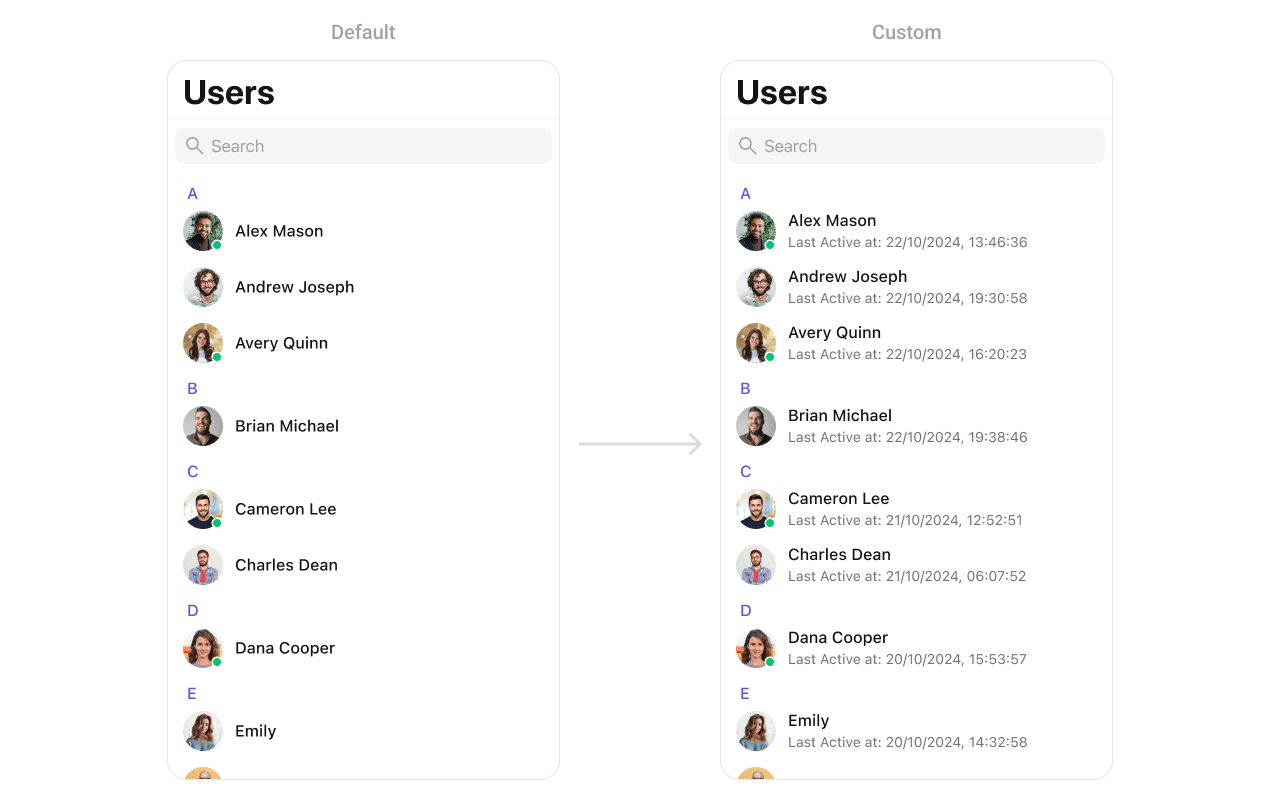 You can create a `CustomSubtitleView` as a custom `UIView`:
```swift lines theme={null}
import UIKit
class CustomSubtitleView: UILabel {
init(lastActiveDate: String) {
super.init(frame: .zero)
self.text = "Last Active at: \(lastActiveDate)"
self.textColor = UIColor.gray
self.font = UIFont.systemFont(ofSize: 14)
self.numberOfLines = 1
}
required init?(coder: NSCoder) {
fatalError("init(coder:) has not been implemented")
}
}
```
### trailingView
Customize the trailing view (right side) of a user cell.
```swift lines theme={null}
import UIKit
import CometChatUIKitSwift
import CometChatSDK
let users = CometChatUsers()
users.set(trailingView: { user in
let view = CustomTrailView()
return view
})
```
You can create a `CustomSubtitleView` as a custom `UIView`:
```swift lines theme={null}
import UIKit
class CustomSubtitleView: UILabel {
init(lastActiveDate: String) {
super.init(frame: .zero)
self.text = "Last Active at: \(lastActiveDate)"
self.textColor = UIColor.gray
self.font = UIFont.systemFont(ofSize: 14)
self.numberOfLines = 1
}
required init?(coder: NSCoder) {
fatalError("init(coder:) has not been implemented")
}
}
```
### trailingView
Customize the trailing view (right side) of a user cell.
```swift lines theme={null}
import UIKit
import CometChatUIKitSwift
import CometChatSDK
let users = CometChatUsers()
users.set(trailingView: { user in
let view = CustomTrailView()
return view
})
```
 You can create a `CustomTrailView` as a custom `UIView`:
```swift lines theme={null}
import UIKit
class CustomTrailView: UIView {
// MARK: - UI Components
private let badgeView: UIView = {
let view = UIView()
view.backgroundColor = .purple
view.layer.cornerRadius = 12
view.translatesAutoresizingMaskIntoConstraints = false
return view
}()
private let icon: UIImageView = {
let imageView = UIImageView(image: UIImage(systemName: "star.fill"))
imageView.tintColor = .white
imageView.translatesAutoresizingMaskIntoConstraints = false
return imageView
}()
private let label: UILabel = {
let label = UILabel()
label.text = "PRO"
label.font = UIFont.boldSystemFont(ofSize: 14)
label.textColor = .white
label.translatesAutoresizingMaskIntoConstraints = false
return label
}()
// MARK: - Initialization
init() {
super.init(frame: .zero)
addSubview(badgeView)
badgeView.addSubview(icon)
badgeView.addSubview(label)
NSLayoutConstraint.activate([
badgeView.leadingAnchor.constraint(equalTo: leadingAnchor),
badgeView.trailingAnchor.constraint(equalTo: trailingAnchor),
badgeView.topAnchor.constraint(equalTo: topAnchor),
badgeView.bottomAnchor.constraint(equalTo: bottomAnchor),
icon.centerXAnchor.constraint(equalTo: badgeView.centerXAnchor),
icon.topAnchor.constraint(equalTo: badgeView.topAnchor, constant: 4),
icon.widthAnchor.constraint(equalToConstant: 16),
icon.heightAnchor.constraint(equalToConstant: 16),
label.centerXAnchor.constraint(equalTo: badgeView.centerXAnchor),
label.topAnchor.constraint(equalTo: icon.bottomAnchor, constant: 2),
label.bottomAnchor.constraint(equalTo: badgeView.bottomAnchor, constant: -4)
])
}
required init?(coder: NSCoder) {
fatalError("init(coder:) has not been implemented")
}
}
```
### loadingStateView
Customize the loading state view displayed while data is being fetched.
```swift lines theme={null}
import UIKit
import CometChatUIKitSwift
let users = CometChatUsers()
let loadingIndicator = UIActivityIndicatorView(style: .medium)
loadingIndicator.startAnimating()
users.set(loadingView: loadingIndicator)
```
### errorStateView
Customize the error state view displayed when an error occurs.
```swift lines theme={null}
import UIKit
import CometChatUIKitSwift
let users = CometChatUsers()
let errorLabel = UILabel()
errorLabel.text = "Something went wrong!"
errorLabel.textColor = .red
users.set(errorView: errorLabel)
```
### emptyStateView
Customize the empty state view displayed when no users are available.
```swift lines theme={null}
import UIKit
import CometChatUIKitSwift
let users = CometChatUsers()
let emptyLabel = UILabel()
emptyLabel.text = "No users found"
emptyLabel.textColor = .gray
emptyLabel.textAlignment = .center
users.set(emptyView: emptyLabel)
```
***
## Methods
### Swipe Action Methods
#### set(options:)
Sets custom swipe actions for user list items, replacing the default options. These options appear when the user swipes on a user cell.
```swift lines theme={null}
@discardableResult
public func set(options: ((_ user: User?) -> [CometChatUserOption])?) -> Self
```
| Parameter | Type | Description |
| - | - | - |
| `options` | `((User?) -> [CometChatUserOption])?` | Closure that returns an array of swipe action options for a user |
```swift lines theme={null}
import UIKit
import CometChatUIKitSwift
import CometChatSDK
let users = CometChatUsers()
users.set(options: { user in
var options = [CometChatUserOption]()
// Add block option
let blockOption = CometChatUserOption(
id: "block",
title: "Block",
icon: UIImage(systemName: "hand.raised"),
backgroundColor: .systemRed
) { selectedUser in
// Handle block action
print("Block user: \(selectedUser?.name ?? "")")
}
options.append(blockOption)
// Add message option
let messageOption = CometChatUserOption(
id: "message",
title: "Message",
icon: UIImage(systemName: "message"),
backgroundColor: .systemBlue
) { selectedUser in
// Handle message action
print("Message user: \(selectedUser?.name ?? "")")
}
options.append(messageOption)
return options
})
```
#### add(options:)
Adds additional swipe actions to the existing default options.
```swift lines theme={null}
@discardableResult
public func add(options: ((_ user: User?) -> [CometChatUserOption])?) -> Self
```
| Parameter | Type | Description |
| - | - | - |
| `options` | `((User?) -> [CometChatUserOption])?` | Closure that returns additional swipe action options to append |
```swift lines theme={null}
import UIKit
import CometChatUIKitSwift
import CometChatSDK
let users = CometChatUsers()
users.add(options: { user in
var options = [CometChatUserOption]()
// Add favorite option
let favoriteOption = CometChatUserOption(
id: "favorite",
title: "Favorite",
icon: UIImage(systemName: "star.fill"),
backgroundColor: .systemOrange
) { selectedUser in
print("Favorite user: \(selectedUser?.name ?? "")")
}
options.append(favoriteOption)
return options
})
```
### Data Manipulation Methods
#### add(user:)
Adds a new user to the user list.
```swift lines theme={null}
@discardableResult
public func add(user: User) -> Self
```
| Parameter | Type | Description |
| - | - | - |
| `user` | `User` | The user to add to the list |
```swift lines theme={null}
import CometChatUIKitSwift
import CometChatSDK
let users = CometChatUsers()
// Add a user programmatically
let newUser = User(uid: "user-123", name: "John Doe")
users.add(user: newUser)
```
#### update(user:)
Updates an existing user in the list.
```swift lines theme={null}
@discardableResult
public func update(user: User) -> Self
```
| Parameter | Type | Description |
| - | - | - |
| `user` | `User` | The user with updated information |
```swift lines theme={null}
import CometChatUIKitSwift
import CometChatSDK
let users = CometChatUsers()
// Update a user's information
if var existingUser = userToUpdate {
existingUser.name = "Updated Name"
users.update(user: existingUser)
}
```
#### remove(user:)
Removes a user from the list.
```swift lines theme={null}
@discardableResult
public func remove(user: User) -> Self
```
| Parameter | Type | Description |
| - | - | - |
| `user` | `User` | The user to remove from the list |
```swift lines theme={null}
import CometChatUIKitSwift
import CometChatSDK
let users = CometChatUsers()
// Remove a user from the UI
users.remove(user: userToRemove)
```
#### getSelectedUsers()
Returns an array of currently selected users when in selection mode.
```swift lines theme={null}
public func getSelectedUsers() -> [User]
```
```swift lines theme={null}
import CometChatUIKitSwift
import CometChatSDK
let users = CometChatUsers()
users.selectionMode = .multiple
// Get all selected users
let selectedUsers = users.getSelectedUsers()
print("Selected \(selectedUsers.count) users")
for user in selectedUsers {
print("User: \(user.name ?? "")")
}
```
***
## Custom ListItem
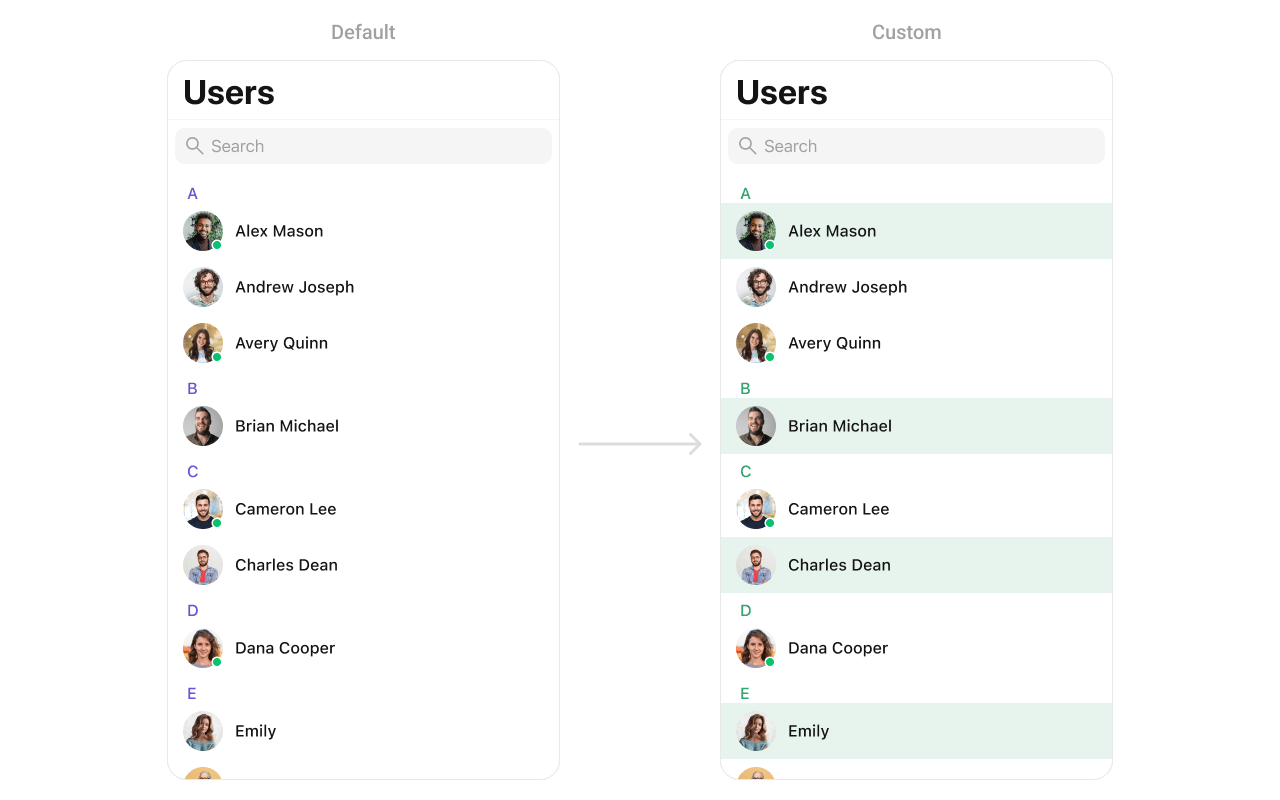
For more complex or unique list items, you can create a custom `UIView` file named `CustomListItem` and integrate it into the `set(listItemView:)` method.
You can create a `CustomTrailView` as a custom `UIView`:
```swift lines theme={null}
import UIKit
class CustomTrailView: UIView {
// MARK: - UI Components
private let badgeView: UIView = {
let view = UIView()
view.backgroundColor = .purple
view.layer.cornerRadius = 12
view.translatesAutoresizingMaskIntoConstraints = false
return view
}()
private let icon: UIImageView = {
let imageView = UIImageView(image: UIImage(systemName: "star.fill"))
imageView.tintColor = .white
imageView.translatesAutoresizingMaskIntoConstraints = false
return imageView
}()
private let label: UILabel = {
let label = UILabel()
label.text = "PRO"
label.font = UIFont.boldSystemFont(ofSize: 14)
label.textColor = .white
label.translatesAutoresizingMaskIntoConstraints = false
return label
}()
// MARK: - Initialization
init() {
super.init(frame: .zero)
addSubview(badgeView)
badgeView.addSubview(icon)
badgeView.addSubview(label)
NSLayoutConstraint.activate([
badgeView.leadingAnchor.constraint(equalTo: leadingAnchor),
badgeView.trailingAnchor.constraint(equalTo: trailingAnchor),
badgeView.topAnchor.constraint(equalTo: topAnchor),
badgeView.bottomAnchor.constraint(equalTo: bottomAnchor),
icon.centerXAnchor.constraint(equalTo: badgeView.centerXAnchor),
icon.topAnchor.constraint(equalTo: badgeView.topAnchor, constant: 4),
icon.widthAnchor.constraint(equalToConstant: 16),
icon.heightAnchor.constraint(equalToConstant: 16),
label.centerXAnchor.constraint(equalTo: badgeView.centerXAnchor),
label.topAnchor.constraint(equalTo: icon.bottomAnchor, constant: 2),
label.bottomAnchor.constraint(equalTo: badgeView.bottomAnchor, constant: -4)
])
}
required init?(coder: NSCoder) {
fatalError("init(coder:) has not been implemented")
}
}
```
### loadingStateView
Customize the loading state view displayed while data is being fetched.
```swift lines theme={null}
import UIKit
import CometChatUIKitSwift
let users = CometChatUsers()
let loadingIndicator = UIActivityIndicatorView(style: .medium)
loadingIndicator.startAnimating()
users.set(loadingView: loadingIndicator)
```
### errorStateView
Customize the error state view displayed when an error occurs.
```swift lines theme={null}
import UIKit
import CometChatUIKitSwift
let users = CometChatUsers()
let errorLabel = UILabel()
errorLabel.text = "Something went wrong!"
errorLabel.textColor = .red
users.set(errorView: errorLabel)
```
### emptyStateView
Customize the empty state view displayed when no users are available.
```swift lines theme={null}
import UIKit
import CometChatUIKitSwift
let users = CometChatUsers()
let emptyLabel = UILabel()
emptyLabel.text = "No users found"
emptyLabel.textColor = .gray
emptyLabel.textAlignment = .center
users.set(emptyView: emptyLabel)
```
***
## Methods
### Swipe Action Methods
#### set(options:)
Sets custom swipe actions for user list items, replacing the default options. These options appear when the user swipes on a user cell.
```swift lines theme={null}
@discardableResult
public func set(options: ((_ user: User?) -> [CometChatUserOption])?) -> Self
```
| Parameter | Type | Description |
| - | - | - |
| `options` | `((User?) -> [CometChatUserOption])?` | Closure that returns an array of swipe action options for a user |
```swift lines theme={null}
import UIKit
import CometChatUIKitSwift
import CometChatSDK
let users = CometChatUsers()
users.set(options: { user in
var options = [CometChatUserOption]()
// Add block option
let blockOption = CometChatUserOption(
id: "block",
title: "Block",
icon: UIImage(systemName: "hand.raised"),
backgroundColor: .systemRed
) { selectedUser in
// Handle block action
print("Block user: \(selectedUser?.name ?? "")")
}
options.append(blockOption)
// Add message option
let messageOption = CometChatUserOption(
id: "message",
title: "Message",
icon: UIImage(systemName: "message"),
backgroundColor: .systemBlue
) { selectedUser in
// Handle message action
print("Message user: \(selectedUser?.name ?? "")")
}
options.append(messageOption)
return options
})
```
#### add(options:)
Adds additional swipe actions to the existing default options.
```swift lines theme={null}
@discardableResult
public func add(options: ((_ user: User?) -> [CometChatUserOption])?) -> Self
```
| Parameter | Type | Description |
| - | - | - |
| `options` | `((User?) -> [CometChatUserOption])?` | Closure that returns additional swipe action options to append |
```swift lines theme={null}
import UIKit
import CometChatUIKitSwift
import CometChatSDK
let users = CometChatUsers()
users.add(options: { user in
var options = [CometChatUserOption]()
// Add favorite option
let favoriteOption = CometChatUserOption(
id: "favorite",
title: "Favorite",
icon: UIImage(systemName: "star.fill"),
backgroundColor: .systemOrange
) { selectedUser in
print("Favorite user: \(selectedUser?.name ?? "")")
}
options.append(favoriteOption)
return options
})
```
### Data Manipulation Methods
#### add(user:)
Adds a new user to the user list.
```swift lines theme={null}
@discardableResult
public func add(user: User) -> Self
```
| Parameter | Type | Description |
| - | - | - |
| `user` | `User` | The user to add to the list |
```swift lines theme={null}
import CometChatUIKitSwift
import CometChatSDK
let users = CometChatUsers()
// Add a user programmatically
let newUser = User(uid: "user-123", name: "John Doe")
users.add(user: newUser)
```
#### update(user:)
Updates an existing user in the list.
```swift lines theme={null}
@discardableResult
public func update(user: User) -> Self
```
| Parameter | Type | Description |
| - | - | - |
| `user` | `User` | The user with updated information |
```swift lines theme={null}
import CometChatUIKitSwift
import CometChatSDK
let users = CometChatUsers()
// Update a user's information
if var existingUser = userToUpdate {
existingUser.name = "Updated Name"
users.update(user: existingUser)
}
```
#### remove(user:)
Removes a user from the list.
```swift lines theme={null}
@discardableResult
public func remove(user: User) -> Self
```
| Parameter | Type | Description |
| - | - | - |
| `user` | `User` | The user to remove from the list |
```swift lines theme={null}
import CometChatUIKitSwift
import CometChatSDK
let users = CometChatUsers()
// Remove a user from the UI
users.remove(user: userToRemove)
```
#### getSelectedUsers()
Returns an array of currently selected users when in selection mode.
```swift lines theme={null}
public func getSelectedUsers() -> [User]
```
```swift lines theme={null}
import CometChatUIKitSwift
import CometChatSDK
let users = CometChatUsers()
users.selectionMode = .multiple
// Get all selected users
let selectedUsers = users.getSelectedUsers()
print("Selected \(selectedUsers.count) users")
for user in selectedUsers {
print("User: \(user.name ?? "")")
}
```
***
## Custom ListItem
For more complex or unique list items, you can create a custom `UIView` file named `CustomListItem` and integrate it into the `set(listItemView:)` method.
 ```swift lines theme={null}
import UIKit
import CometChatUIKitSwift
import CometChatSDK
class CustomListItem: UIView {
// MARK: - UI Components
private var profileImageView: CometChatAvatar = {
let imageView = CometChatAvatar(image: UIImage())
imageView.translatesAutoresizingMaskIntoConstraints = false
return imageView
}()
private var nameLabel: UILabel = {
let label = UILabel()
label.translatesAutoresizingMaskIntoConstraints = false
return label
}()
// MARK: - Initialization
override init(frame: CGRect) {
super.init(frame: frame)
setupUI()
}
required init?(coder aDecoder: NSCoder) {
fatalError("init(coder:) has not been implemented")
}
// MARK: - Setup
private func setupUI() {
addSubview(profileImageView)
addSubview(nameLabel)
NSLayoutConstraint.activate([
// Profile image constraints
profileImageView.leadingAnchor.constraint(equalTo: leadingAnchor, constant: 8),
profileImageView.centerYAnchor.constraint(equalTo: centerYAnchor),
profileImageView.widthAnchor.constraint(equalToConstant: 40),
profileImageView.heightAnchor.constraint(equalToConstant: 40),
// Name label constraints
nameLabel.leadingAnchor.constraint(equalTo: profileImageView.trailingAnchor, constant: 8),
nameLabel.trailingAnchor.constraint(equalTo: trailingAnchor, constant: -8),
nameLabel.centerYAnchor.constraint(equalTo: centerYAnchor)
])
}
// MARK: - Configuration
func set(user: User) {
nameLabel.text = user.name
profileImageView.setAvatar(avatarUrl: user.avatar, with: user.name)
}
}
```
Usage:
```swift lines theme={null}
import CometChatUIKitSwift
import CometChatSDK
let users = CometChatUsers()
users.set(listItemView: { user in
let customItem = CustomListItem()
customItem.set(user: user)
return customItem
})
```
***
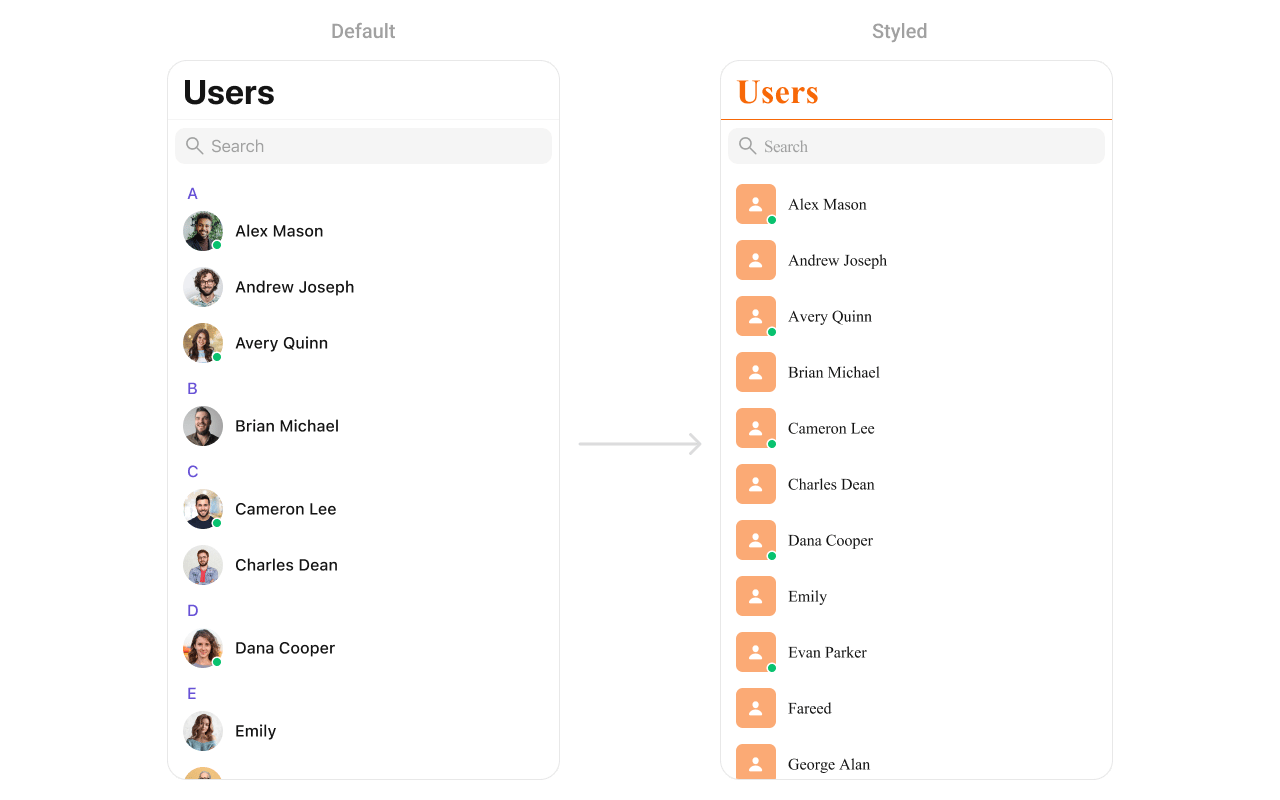
## Styling
### Style Hierarchy
1. Global styles (`CometChatUsers.style`) apply to all instances
2. Instance styles override global for specific instances
### Global Level Styling
```swift lines theme={null}
import UIKit
import CometChatUIKitSwift
// Apply global styles that affect all CometChatUsers instances
CometChatUsers.style.backgroundColor = UIColor.systemBackground
CometChatUsers.style.titleColor = UIColor.label
CometChatUsers.style.titleFont = UIFont.systemFont(ofSize: 34, weight: .bold)
CometChatUsers.style.listItemTitleTextColor = UIColor.label
CometChatUsers.style.listItemSubTitleTextColor = UIColor.secondaryLabel
// Custom avatar style
let avatarStyle = AvatarStyle()
avatarStyle.cornerRadius = CometChatCornerStyle(cornerRadius: 20)
CometChatUsers.avatarStyle = avatarStyle
```
### Instance Level Styling
```swift lines theme={null}
import UIKit
import CometChatUIKitSwift
// Create a custom style for a specific instance
var customStyle = UsersStyle()
customStyle.backgroundColor = UIColor(red: 0.95, green: 0.95, blue: 0.97, alpha: 1.0)
customStyle.titleColor = UIColor.darkGray
customStyle.listItemBackground = UIColor.white
let users = CometChatUsers()
users.style = customStyle
```
```swift lines theme={null}
import UIKit
import CometChatUIKitSwift
import CometChatSDK
class CustomListItem: UIView {
// MARK: - UI Components
private var profileImageView: CometChatAvatar = {
let imageView = CometChatAvatar(image: UIImage())
imageView.translatesAutoresizingMaskIntoConstraints = false
return imageView
}()
private var nameLabel: UILabel = {
let label = UILabel()
label.translatesAutoresizingMaskIntoConstraints = false
return label
}()
// MARK: - Initialization
override init(frame: CGRect) {
super.init(frame: frame)
setupUI()
}
required init?(coder aDecoder: NSCoder) {
fatalError("init(coder:) has not been implemented")
}
// MARK: - Setup
private func setupUI() {
addSubview(profileImageView)
addSubview(nameLabel)
NSLayoutConstraint.activate([
// Profile image constraints
profileImageView.leadingAnchor.constraint(equalTo: leadingAnchor, constant: 8),
profileImageView.centerYAnchor.constraint(equalTo: centerYAnchor),
profileImageView.widthAnchor.constraint(equalToConstant: 40),
profileImageView.heightAnchor.constraint(equalToConstant: 40),
// Name label constraints
nameLabel.leadingAnchor.constraint(equalTo: profileImageView.trailingAnchor, constant: 8),
nameLabel.trailingAnchor.constraint(equalTo: trailingAnchor, constant: -8),
nameLabel.centerYAnchor.constraint(equalTo: centerYAnchor)
])
}
// MARK: - Configuration
func set(user: User) {
nameLabel.text = user.name
profileImageView.setAvatar(avatarUrl: user.avatar, with: user.name)
}
}
```
Usage:
```swift lines theme={null}
import CometChatUIKitSwift
import CometChatSDK
let users = CometChatUsers()
users.set(listItemView: { user in
let customItem = CustomListItem()
customItem.set(user: user)
return customItem
})
```
***
## Styling
### Style Hierarchy
1. Global styles (`CometChatUsers.style`) apply to all instances
2. Instance styles override global for specific instances
### Global Level Styling
```swift lines theme={null}
import UIKit
import CometChatUIKitSwift
// Apply global styles that affect all CometChatUsers instances
CometChatUsers.style.backgroundColor = UIColor.systemBackground
CometChatUsers.style.titleColor = UIColor.label
CometChatUsers.style.titleFont = UIFont.systemFont(ofSize: 34, weight: .bold)
CometChatUsers.style.listItemTitleTextColor = UIColor.label
CometChatUsers.style.listItemSubTitleTextColor = UIColor.secondaryLabel
// Custom avatar style
let avatarStyle = AvatarStyle()
avatarStyle.cornerRadius = CometChatCornerStyle(cornerRadius: 20)
CometChatUsers.avatarStyle = avatarStyle
```
### Instance Level Styling
```swift lines theme={null}
import UIKit
import CometChatUIKitSwift
// Create a custom style for a specific instance
var customStyle = UsersStyle()
customStyle.backgroundColor = UIColor(red: 0.95, green: 0.95, blue: 0.97, alpha: 1.0)
customStyle.titleColor = UIColor.darkGray
customStyle.listItemBackground = UIColor.white
let users = CometChatUsers()
users.style = customStyle
```
 ### Key Style Properties
| Property | Type | Default | Description |
| - | - | - | - |
| `backgroundColor` | `UIColor` | `CometChatTheme.backgroundColor01` | Background color |
| `titleColor` | `UIColor` | `CometChatTheme.textColorPrimary` | Navigation title color |
| `titleFont` | `UIFont` | `CometChatTypography.Heading4.medium` | Navigation title font |
| `listItemTitleTextColor` | `UIColor` | `CometChatTheme.textColorPrimary` | User name color |
| `listItemTitleFont` | `UIFont` | `CometChatTypography.Heading4.medium` | User name font |
| `listItemSubTitleTextColor` | `UIColor` | `CometChatTheme.textColorSecondary` | Status text color |
| `listItemSubTitleFont` | `UIFont` | `CometChatTypography.Body.regular` | Status text font |
| `listItemBackground` | `UIColor` | `.clear` | List item background |
| `searchBarBackgroundColor` | `UIColor?` | `nil` | Search bar background |
| `searchBarTextColor` | `UIColor?` | `nil` | Search bar text color |
| `headerTitleColor` | `UIColor` | `CometChatTheme.textColorHighlight` | Section header color |
| `headerTitleFont` | `UIFont` | `CometChatTypography.Heading4.medium` | Section header font |
### Customization Matrix
| What to change | Where | Property/API | Example |
| - | - | - | - |
| Background color | Style | `backgroundColor` | `UIColor.systemBackground` |
| Title appearance | Style | `titleColor`, `titleFont` | Custom colors and fonts |
| List item look | Style | `listItemBackground` | `UIColor.white` |
| Avatar appearance | Style | `avatarStyle` | `AvatarStyle()` with custom radius |
| Search bar | Style | `searchBarBackgroundColor` | Custom background |
| Hide search | Property | `hideSearch` | `users.hideSearch = true` |
| Hide status | Property | `hideUserStatus` | `users.hideUserStatus = true` |
| Custom row | View Slot | `set(listItemView:)` | See Custom View Slots |
***
## Props
All props are optional. Sorted alphabetically.
### avatarStyle
Customizes the appearance of avatars in user list items.
| | |
| - | - |
| Type | `AvatarStyle` |
| Default | `AvatarStyle()` |
```swift lines theme={null}
import CometChatUIKitSwift
let users = CometChatUsers()
let avatarStyle = AvatarStyle()
avatarStyle.backgroundColor = UIColor.systemBlue
avatarStyle.cornerRadius = CometChatCornerStyle(cornerRadius: 8)
avatarStyle.borderWidth = 1
avatarStyle.borderColor = UIColor.systemGray4
users.avatarStyle = avatarStyle
```
### hideBackButton
Hides the back button in the navigation bar.
| | |
| - | - |
| Type | `Bool` |
| Default | `false` |
### hideErrorView
Hides the error state view.
| | |
| - | - |
| Type | `Bool` |
| Default | `false` |
### hideLoadingState
Hides the loading state indicator.
| | |
| - | - |
| Type | `Bool` |
| Default | `false` |
### hideNavigationBar
Hides the entire navigation bar.
| | |
| - | - |
| Type | `Bool` |
| Default | `false` |
### hideSearch
Hides the search bar.
| | |
| - | - |
| Type | `Bool` |
| Default | `false` |
### hideSectionHeader
Hides the alphabetical section headers.
| | |
| - | - |
| Type | `Bool` |
| Default | `false` |
### hideUserStatus
Hides online/offline status indicators.
| | |
| - | - |
| Type | `Bool` |
| Default | `false` |
### onSelectedItemProceed
Callback triggered when the user confirms their selection in selection mode. Use this to handle the selected users.
| | |
| - | - |
| Type | `(([User]) -> Void)?` |
| Default | `nil` |
```swift lines theme={null}
import CometChatUIKitSwift
import CometChatSDK
let users = CometChatUsers()
users.selectionMode = .multiple
users.selectionLimit = 5
users.onSelectedItemProceed = { selectedUsers in
print("Proceeding with \(selectedUsers.count) users")
// Process the selected users
for user in selectedUsers {
print("User: \(user.name ?? "")")
}
}
```
### searchRequestBuilder
Custom request builder for search functionality.
| | |
| - | - |
| Type | `UsersRequest.UsersRequestBuilder?` |
| Default | `nil` |
### selectedCellCount
Returns the count of currently selected users in selection mode.
| | |
| - | - |
| Type | `Int` |
| Default | `0` |
### selectionLimit
Sets the maximum number of users that can be selected in selection mode. When the limit is reached, further selections are disabled.
| | |
| - | - |
| Type | `Int` |
| Default | `0` (unlimited) |
```swift lines theme={null}
import CometChatUIKitSwift
let users = CometChatUsers()
users.selectionMode = .multiple
// Limit selection to 5 users
users.selectionLimit = 5
// Handle selection confirmation
users.onSelectedItemProceed = { selectedUsers in
print("Selected \(selectedUsers.count) users")
// Process the selected users
for user in selectedUsers {
print("User: \(user.name ?? "")")
}
}
```
### selectionMode
Sets the selection mode for multi-select functionality.
| | |
| - | - |
| Type | `SelectionMode` |
| Default | `.none` |
### statusIndicatorStyle
Customizes the appearance of online/offline status indicators.
| | |
| - | - |
| Type | `StatusIndicatorStyle` |
| Default | `StatusIndicatorStyle()` |
```swift lines theme={null}
import CometChatUIKitSwift
let users = CometChatUsers()
let statusIndicatorStyle = StatusIndicatorStyle()
statusIndicatorStyle.backgroundColor = UIColor.systemGreen
statusIndicatorStyle.borderWidth = 2
statusIndicatorStyle.borderColor = UIColor.white
users.statusIndicatorStyle = statusIndicatorStyle
```
### usersRequestBuilder
Custom request builder for filtering users.
| | |
| - | - |
| Type | `UsersRequest.UsersRequestBuilder?` |
| Default | `nil` |
***
## Events
| Event | Payload | Fires when |
| - | - | - |
| `ccUserBlocked` | `User` | A user is blocked |
| `ccUserUnblocked` | `User` | A user is unblocked |
***
## Common Patterns
### Friends-only list
```swift lines theme={null}
let friendsBuilder = UsersRequest.UsersRequestBuilder(limit: 30)
.friendsOnly(true)
let users = CometChatUsers()
users.set(userRequestBuilder: friendsBuilder)
```
### Online users only
```swift lines theme={null}
let onlineBuilder = UsersRequest.UsersRequestBuilder(limit: 30)
.set(status: .online)
let users = CometChatUsers()
users.set(userRequestBuilder: onlineBuilder)
```
### Custom empty state with CTA
```swift lines theme={null}
let users = CometChatUsers()
// emptyStateView is a UIView you assign (inherited from CometChatListBase) —
// build it first, then set it. set(emptyView:) is the equivalent builder form.
let emptyView = UIView()
let label = UILabel()
label.text = "No users found"
label.textAlignment = .center
label.textColor = .secondaryLabel
let button = UIButton(type: .system)
button.setTitle("Invite friends", for: .normal)
// Add subviews and constraints to emptyView...
users.emptyStateView = emptyView // or: users.set(emptyView: emptyView)
```
### Hide all chrome — minimal list
```swift lines theme={null}
let users = CometChatUsers()
users.hideSearch = true
users.hideUserStatus = true
users.hideSectionHeader = true
```
### Multi-select users
```swift lines theme={null}
let users = CometChatUsers()
users.selectionMode = .multiple
users.set(onSelection: { selectedUsers in
print("Selected \(selectedUsers.count) users")
// Create group with selected users, etc.
})
```
***
## Related Components
* [Messages](/ui-kit/ios/message-list) - Display messages with a user
* [Conversations](/ui-kit/ios/conversations) - List all conversations
* [Groups](/ui-kit/ios/groups) - List all groups
* [Users With Messages](/ui-kit/ios/users) - Combined users and messages view
This documentation is built and hosted on [Mintlify](https://mintlify.com), a developer documentation platform.
### Key Style Properties
| Property | Type | Default | Description |
| - | - | - | - |
| `backgroundColor` | `UIColor` | `CometChatTheme.backgroundColor01` | Background color |
| `titleColor` | `UIColor` | `CometChatTheme.textColorPrimary` | Navigation title color |
| `titleFont` | `UIFont` | `CometChatTypography.Heading4.medium` | Navigation title font |
| `listItemTitleTextColor` | `UIColor` | `CometChatTheme.textColorPrimary` | User name color |
| `listItemTitleFont` | `UIFont` | `CometChatTypography.Heading4.medium` | User name font |
| `listItemSubTitleTextColor` | `UIColor` | `CometChatTheme.textColorSecondary` | Status text color |
| `listItemSubTitleFont` | `UIFont` | `CometChatTypography.Body.regular` | Status text font |
| `listItemBackground` | `UIColor` | `.clear` | List item background |
| `searchBarBackgroundColor` | `UIColor?` | `nil` | Search bar background |
| `searchBarTextColor` | `UIColor?` | `nil` | Search bar text color |
| `headerTitleColor` | `UIColor` | `CometChatTheme.textColorHighlight` | Section header color |
| `headerTitleFont` | `UIFont` | `CometChatTypography.Heading4.medium` | Section header font |
### Customization Matrix
| What to change | Where | Property/API | Example |
| - | - | - | - |
| Background color | Style | `backgroundColor` | `UIColor.systemBackground` |
| Title appearance | Style | `titleColor`, `titleFont` | Custom colors and fonts |
| List item look | Style | `listItemBackground` | `UIColor.white` |
| Avatar appearance | Style | `avatarStyle` | `AvatarStyle()` with custom radius |
| Search bar | Style | `searchBarBackgroundColor` | Custom background |
| Hide search | Property | `hideSearch` | `users.hideSearch = true` |
| Hide status | Property | `hideUserStatus` | `users.hideUserStatus = true` |
| Custom row | View Slot | `set(listItemView:)` | See Custom View Slots |
***
## Props
All props are optional. Sorted alphabetically.
### avatarStyle
Customizes the appearance of avatars in user list items.
| | |
| - | - |
| Type | `AvatarStyle` |
| Default | `AvatarStyle()` |
```swift lines theme={null}
import CometChatUIKitSwift
let users = CometChatUsers()
let avatarStyle = AvatarStyle()
avatarStyle.backgroundColor = UIColor.systemBlue
avatarStyle.cornerRadius = CometChatCornerStyle(cornerRadius: 8)
avatarStyle.borderWidth = 1
avatarStyle.borderColor = UIColor.systemGray4
users.avatarStyle = avatarStyle
```
### hideBackButton
Hides the back button in the navigation bar.
| | |
| - | - |
| Type | `Bool` |
| Default | `false` |
### hideErrorView
Hides the error state view.
| | |
| - | - |
| Type | `Bool` |
| Default | `false` |
### hideLoadingState
Hides the loading state indicator.
| | |
| - | - |
| Type | `Bool` |
| Default | `false` |
### hideNavigationBar
Hides the entire navigation bar.
| | |
| - | - |
| Type | `Bool` |
| Default | `false` |
### hideSearch
Hides the search bar.
| | |
| - | - |
| Type | `Bool` |
| Default | `false` |
### hideSectionHeader
Hides the alphabetical section headers.
| | |
| - | - |
| Type | `Bool` |
| Default | `false` |
### hideUserStatus
Hides online/offline status indicators.
| | |
| - | - |
| Type | `Bool` |
| Default | `false` |
### onSelectedItemProceed
Callback triggered when the user confirms their selection in selection mode. Use this to handle the selected users.
| | |
| - | - |
| Type | `(([User]) -> Void)?` |
| Default | `nil` |
```swift lines theme={null}
import CometChatUIKitSwift
import CometChatSDK
let users = CometChatUsers()
users.selectionMode = .multiple
users.selectionLimit = 5
users.onSelectedItemProceed = { selectedUsers in
print("Proceeding with \(selectedUsers.count) users")
// Process the selected users
for user in selectedUsers {
print("User: \(user.name ?? "")")
}
}
```
### searchRequestBuilder
Custom request builder for search functionality.
| | |
| - | - |
| Type | `UsersRequest.UsersRequestBuilder?` |
| Default | `nil` |
### selectedCellCount
Returns the count of currently selected users in selection mode.
| | |
| - | - |
| Type | `Int` |
| Default | `0` |
### selectionLimit
Sets the maximum number of users that can be selected in selection mode. When the limit is reached, further selections are disabled.
| | |
| - | - |
| Type | `Int` |
| Default | `0` (unlimited) |
```swift lines theme={null}
import CometChatUIKitSwift
let users = CometChatUsers()
users.selectionMode = .multiple
// Limit selection to 5 users
users.selectionLimit = 5
// Handle selection confirmation
users.onSelectedItemProceed = { selectedUsers in
print("Selected \(selectedUsers.count) users")
// Process the selected users
for user in selectedUsers {
print("User: \(user.name ?? "")")
}
}
```
### selectionMode
Sets the selection mode for multi-select functionality.
| | |
| - | - |
| Type | `SelectionMode` |
| Default | `.none` |
### statusIndicatorStyle
Customizes the appearance of online/offline status indicators.
| | |
| - | - |
| Type | `StatusIndicatorStyle` |
| Default | `StatusIndicatorStyle()` |
```swift lines theme={null}
import CometChatUIKitSwift
let users = CometChatUsers()
let statusIndicatorStyle = StatusIndicatorStyle()
statusIndicatorStyle.backgroundColor = UIColor.systemGreen
statusIndicatorStyle.borderWidth = 2
statusIndicatorStyle.borderColor = UIColor.white
users.statusIndicatorStyle = statusIndicatorStyle
```
### usersRequestBuilder
Custom request builder for filtering users.
| | |
| - | - |
| Type | `UsersRequest.UsersRequestBuilder?` |
| Default | `nil` |
***
## Events
| Event | Payload | Fires when |
| - | - | - |
| `ccUserBlocked` | `User` | A user is blocked |
| `ccUserUnblocked` | `User` | A user is unblocked |
***
## Common Patterns
### Friends-only list
```swift lines theme={null}
let friendsBuilder = UsersRequest.UsersRequestBuilder(limit: 30)
.friendsOnly(true)
let users = CometChatUsers()
users.set(userRequestBuilder: friendsBuilder)
```
### Online users only
```swift lines theme={null}
let onlineBuilder = UsersRequest.UsersRequestBuilder(limit: 30)
.set(status: .online)
let users = CometChatUsers()
users.set(userRequestBuilder: onlineBuilder)
```
### Custom empty state with CTA
```swift lines theme={null}
let users = CometChatUsers()
// emptyStateView is a UIView you assign (inherited from CometChatListBase) —
// build it first, then set it. set(emptyView:) is the equivalent builder form.
let emptyView = UIView()
let label = UILabel()
label.text = "No users found"
label.textAlignment = .center
label.textColor = .secondaryLabel
let button = UIButton(type: .system)
button.setTitle("Invite friends", for: .normal)
// Add subviews and constraints to emptyView...
users.emptyStateView = emptyView // or: users.set(emptyView: emptyView)
```
### Hide all chrome — minimal list
```swift lines theme={null}
let users = CometChatUsers()
users.hideSearch = true
users.hideUserStatus = true
users.hideSectionHeader = true
```
### Multi-select users
```swift lines theme={null}
let users = CometChatUsers()
users.selectionMode = .multiple
users.set(onSelection: { selectedUsers in
print("Selected \(selectedUsers.count) users")
// Create group with selected users, etc.
})
```
***
## Related Components
* [Messages](/ui-kit/ios/message-list) - Display messages with a user
* [Conversations](/ui-kit/ios/conversations) - List all conversations
* [Groups](/ui-kit/ios/groups) - List all groups
* [Users With Messages](/ui-kit/ios/users) - Combined users and messages view
This documentation is built and hosted on [Mintlify](https://mintlify.com), a developer documentation platform.