> ## Documentation Index
> Fetch the complete documentation index at: https://cometchat-22654f5b-docs-agent-native-development.mintlify.site/llms.txt
> Use this file to discover all available pages before exploring further.
# Groups
> Display CometChat Android UI Kit groups with avatars, member counts, group type indicators, search, filtering, join, and conversation actions.
```json theme={null}
{
"component": "CometChatGroups",
"package": "com.cometchat.chatuikit.groups",
"xmlElement": "",
"description": "Scrollable list of all available groups with search, avatars, names, and group type indicators (public, private, password-protected).",
"primaryOutput": {
"method": "setOnItemClick",
"type": "OnItemClick"
},
"methods": {
"data": {
"setGroupsRequestBuilder": {
"type": "GroupsRequest.GroupsRequestBuilder",
"default": "SDK default",
"note": "Pass the builder, not the result of .build()"
},
"setSearchRequestBuilder": {
"type": "GroupsRequest.GroupsRequestBuilder",
"default": "Same as main builder",
"note": "Separate builder for search results"
}
},
"callbacks": {
"setOnItemClick": "OnItemClick",
"setOnItemLongClick": "OnItemLongClick",
"setOnBackPressListener": "OnBackPress",
"setOnSelection": "OnSelection",
"setOnError": "OnError",
"setOnLoad": "OnLoad",
"setOnEmpty": "OnEmpty"
},
"visibility": {
"setBackIconVisibility": { "type": "int (View.VISIBLE | View.GONE)", "default": "View.GONE" },
"setToolbarVisibility": { "type": "int", "default": "View.VISIBLE" },
"setLoadingStateVisibility": { "type": "int", "default": "View.VISIBLE" },
"setErrorStateVisibility": { "type": "int", "default": "View.VISIBLE" },
"setEmptyStateVisibility": { "type": "int", "default": "View.VISIBLE" },
"setSeparatorVisibility": { "type": "int", "default": "View.VISIBLE" },
"setGroupTypeVisibility": { "type": "int", "default": "View.VISIBLE" },
"setSearchBoxVisibility": { "type": "int", "default": "View.VISIBLE" }
},
"selection": {
"setSelectionMode": {
"type": "UIKitConstants.SelectionMode",
"values": ["NONE", "SINGLE", "MULTIPLE"],
"default": "NONE"
}
},
"viewSlots": {
"setItemView": "GroupsViewHolderListener — entire list item row",
"setLeadingView": "GroupsViewHolderListener — avatar / left section",
"setTitleView": "GroupsViewHolderListener — name / title text",
"setSubtitleView": "GroupsViewHolderListener — subtitle text below name",
"setTrailingView": "GroupsViewHolderListener — right section",
"setLoadingView": "@LayoutRes int — loading spinner",
"setEmptyView": "@LayoutRes int — empty state",
"setErrorView": "@LayoutRes int — error state",
"setOverflowMenu": "View — toolbar menu",
"setOptions": "Function2> — long-press context menu (replaces defaults)",
"addOptions": "Function2> — long-press context menu (appends to defaults)"
},
"advanced": {
"selectGroup": "Group, SelectionMode — programmatic selection",
"clearSelection": "void — clears all selected groups",
"getSelectedGroups": "List — returns selected items",
"setSearchKeyword": "String — programmatic search",
"setTitleText": "String — custom toolbar title",
"setSearchPlaceholderText": "String — search placeholder",
"getBinding": "CometchatGroupListBinding — root ViewBinding",
"getViewModel": "GroupsViewModel — internal ViewModel access",
"getAdapter": "GroupsAdapter — internal adapter access",
"setAdapter": "GroupsAdapter — replace the default adapter"
},
"style": {
"setStyle": {
"type": "@StyleRes int",
"parent": "CometChatGroupsStyle"
}
}
},
"events": [
{
"name": "CometChatGroupEvents.ccGroupCreated",
"payload": "Group",
"description": "Logged-in user created a group"
},
{
"name": "CometChatGroupEvents.ccGroupDeleted",
"payload": "Group",
"description": "Logged-in user deleted a group"
},
{
"name": "CometChatGroupEvents.ccGroupLeft",
"payload": "Action, User, Group",
"description": "Logged-in user left a group"
},
{
"name": "CometChatGroupEvents.ccGroupMemberJoined",
"payload": "User, Group",
"description": "Logged-in user joined a group"
},
{
"name": "CometChatGroupEvents.ccGroupMemberAdded",
"payload": "List, List, Group, User",
"description": "Logged-in user added members to a group"
},
{
"name": "CometChatGroupEvents.ccGroupMemberKicked",
"payload": "Action, User, User, Group",
"description": "Logged-in user kicked a member from a group"
},
{
"name": "CometChatGroupEvents.ccGroupMemberBanned",
"payload": "Action, User, User, Group",
"description": "Logged-in user banned a member from a group"
},
{
"name": "CometChatGroupEvents.ccGroupMemberUnBanned",
"payload": "Action, User, User, Group",
"description": "Logged-in user unbanned a member from a group"
},
{
"name": "CometChatGroupEvents.ccGroupMemberScopeChanged",
"payload": "Action, User, String, String, Group",
"description": "Logged-in user changed a member's scope"
},
{
"name": "CometChatGroupEvents.ccOwnershipChanged",
"payload": "Group, GroupMember",
"description": "Logged-in user transferred group ownership"
}
],
"sdkListeners": [
"onGroupMemberJoined",
"onGroupMemberLeft",
"onGroupMemberKicked",
"onGroupMemberBanned",
"onGroupMemberUnbanned",
"onGroupMemberScopeChanged",
"onMemberAddedToGroup"
]
}
```
## Where It Fits
`CometChatGroups` is a list component. It renders all available groups and emits the selected `Group` via `setOnItemClick`. Wire it to `CometChatMessageHeader`, `CometChatMessageList`, and `CometChatMessageComposer` to build a group messaging layout.
```kotlin ChatActivity.kt lines theme={null}
class ChatActivity : AppCompatActivity() {
private lateinit var groups: CometChatGroups
private lateinit var messageHeader: CometChatMessageHeader
private lateinit var messageList: CometChatMessageList
private lateinit var messageComposer: CometChatMessageComposer
override fun onCreate(savedInstanceState: Bundle?) {
super.onCreate(savedInstanceState)
setContentView(R.layout.activity_chat)
groups = findViewById(R.id.groups)
messageHeader = findViewById(R.id.message_header)
messageList = findViewById(R.id.message_list)
messageComposer = findViewById(R.id.message_composer)
groups.setOnItemClick { view, position, group ->
messageHeader.setGroup(group)
messageList.setGroup(group)
messageComposer.setGroup(group)
}
}
}
```
```java ChatActivity.java lines theme={null}
public class ChatActivity extends AppCompatActivity {
private CometChatGroups groups;
private CometChatMessageHeader messageHeader;
private CometChatMessageList messageList;
private CometChatMessageComposer messageComposer;
@Override
protected void onCreate(Bundle savedInstanceState) {
super.onCreate(savedInstanceState);
setContentView(R.layout.activity_chat);
groups = findViewById(R.id.groups);
messageHeader = findViewById(R.id.message_header);
messageList = findViewById(R.id.message_list);
messageComposer = findViewById(R.id.message_composer);
groups.setOnItemClick((view, position, group) -> {
messageHeader.setGroup(group);
messageList.setGroup(group);
messageComposer.setGroup(group);
});
}
}
```
## Quick Start
Add the component to your layout XML:
```xml layout_activity.xml lines theme={null}
```
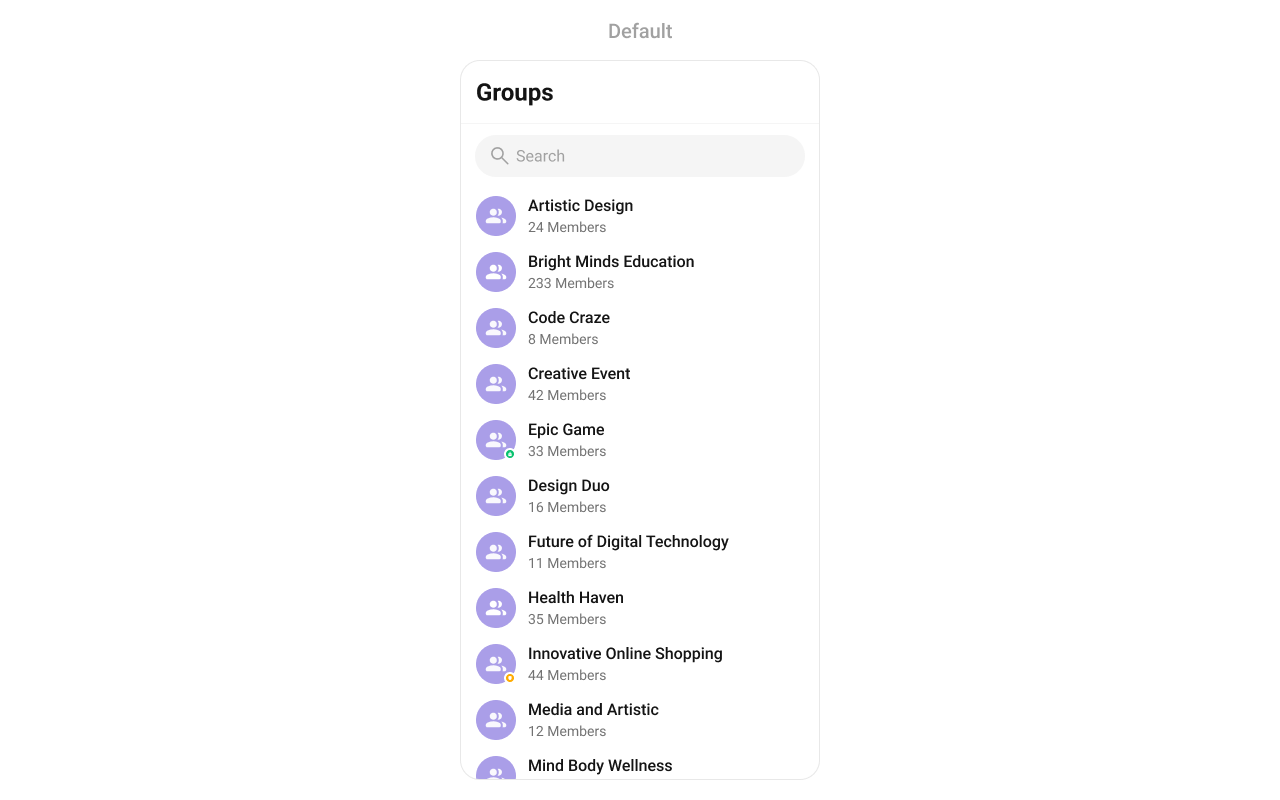 Prerequisites: CometChat SDK initialized with `CometChatUIKit.init()`, a user logged in, and the `cometchat-chat-uikit-android` dependency added.
To add programmatically in an Activity:
```kotlin YourActivity.kt lines theme={null}
override fun onCreate(savedInstanceState: Bundle?) {
super.onCreate(savedInstanceState)
setContentView(CometChatGroups(this))
}
```
```java YourActivity.java lines theme={null}
@Override
protected void onCreate(Bundle savedInstanceState) {
super.onCreate(savedInstanceState);
setContentView(new CometChatGroups(this));
}
```
Or in a Fragment:
```kotlin YourFragment.kt lines theme={null}
override fun onCreateView(inflater: LayoutInflater, container: ViewGroup?, savedInstanceState: Bundle?): View {
return CometChatGroups(requireContext())
}
```
```java YourFragment.java lines theme={null}
@Override
public View onCreateView(LayoutInflater inflater, ViewGroup container, Bundle savedInstanceState) {
return new CometChatGroups(getContext());
}
```
## Filtering Groups
Pass a `GroupsRequest.GroupsRequestBuilder` to `setGroupsRequestBuilder`. Pass the builder instance — not the result of `.build()`.
```kotlin lines theme={null}
val builder = GroupsRequestBuilder()
.setLimit(10)
.joinedOnly(true)
cometchatGroups.setGroupsRequestBuilder(builder)
```
```java lines theme={null}
GroupsRequest.GroupsRequestBuilder builder = new GroupsRequest.GroupsRequestBuilder()
.setLimit(10)
.joinedOnly(true);
cometchatGroups.setGroupsRequestBuilder(builder);
```
### Filter Recipes
| Recipe | Code |
| - | - |
| Joined only | `builder.joinedOnly(true)` |
| Limit to 10 per page | `builder.setLimit(10)` |
| Search by keyword | `builder.setSearchKeyWord("design")` |
| Filter by tags | `builder.setTags(Arrays.asList("vip"))` |
| With tags | `builder.withTags(true)` |
> The component uses infinite scroll — the next page loads as the user scrolls to the bottom. Refer to [GroupsRequestBuilder](/sdk/android/retrieve-groups) for the full builder API.
### Search Request Builder
Use `setSearchRequestBuilder` to customize the search list separately from the main list:
```kotlin lines theme={null}
val searchBuilder = GroupsRequestBuilder()
.setLimit(10)
.setSearchKeyWord("**")
cometchatGroups.setSearchRequestBuilder(searchBuilder)
```
```java lines theme={null}
GroupsRequest.GroupsRequestBuilder searchBuilder = new GroupsRequest.GroupsRequestBuilder()
.setLimit(10)
.setSearchKeyWord("**");
cometchatGroups.setSearchRequestBuilder(searchBuilder);
```
## Actions and Events
### Callback Methods
#### `setOnItemClick`
Fires when a group row is tapped. Primary navigation hook — set the active group and render the message view.
```kotlin YourActivity.kt lines theme={null}
cometchatGroups.onItemClick = OnItemClick { view, position, group ->
}
```
```java YourActivity.java lines theme={null}
cometchatGroups.setOnItemClick((view1, position, group) -> {
});
```
> **What this does:** Replaces the default item-click behavior. When a user taps a group, your custom lambda executes instead of the built-in navigation.
#### `setOnItemLongClick`
Fires when a group row is long-pressed. Use for additional actions like delete or leave.
```kotlin YourActivity.kt lines theme={null}
cometchatGroups.onItemLongClick = OnItemLongClick({ view, position, group ->
})
```
```java YourActivity.java lines theme={null}
cometchatGroups.setOnItemLongClick((view1, position, group) -> {
});
```
#### `setOnBackPressListener`
Fires when the user presses the back button in the app bar. Default: navigates to the previous activity.
```kotlin YourActivity.kt lines theme={null}
cometchatGroups.onBackPressListener = OnBackPress {
}
```
```java YourActivity.java lines theme={null}
cometchatGroups.setOnBackPressListener(() -> {
});
```
#### `setOnSelection`
Fires when a group is checked/unchecked in multi-select mode. Requires `setSelectionMode` to be set.
```kotlin YourActivity.kt lines theme={null}
cometchatGroups.setOnSelection(object : OnSelection {
override fun onSelection(t: MutableList?) {
}
})
```
```java YourActivity.java lines theme={null}
cometchatGroups.setOnSelection(t -> {
});
```
#### `setOnError`
Fires on internal errors (network failure, auth issue, SDK exception).
```kotlin YourActivity.kt lines theme={null}
cometchatGroups.setOnError {
}
```
```java YourActivity.java lines theme={null}
cometchatGroups.setOnError(cometchatException -> {
});
```
#### `setOnLoad`
Fires when the list is successfully fetched and loaded.
```kotlin YourActivity.kt lines theme={null}
cometchatGroups.setOnLoad(object : OnLoad {
override fun onLoad(list: MutableList?) {
}
})
```
```java YourActivity.java lines theme={null}
cometchatGroups.setOnLoad(list -> {
});
```
#### `setOnEmpty`
Fires when the list is empty, enabling custom handling such as showing a placeholder.
```kotlin YourActivity.kt lines theme={null}
cometchatGroups.setOnEmpty {
}
```
```java YourActivity.java lines theme={null}
cometchatGroups.setOnEmpty(() -> {
});
```
* **Verify**: After setting an action callback, trigger the corresponding user interaction (tap, long-press, back, select) and confirm your custom logic executes instead of the default behavior.
### Global UI Events
`CometChatGroupEvents` emits events subscribable from anywhere in the application. Add a listener and remove it when no longer needed.
| Event | Fires when | Payload |
| - | - | - |
| `ccGroupCreated` | The logged-in user creates a group | `Group` |
| `ccGroupDeleted` | The logged-in user deletes a group | `Group` |
| `ccGroupLeft` | The logged-in user leaves a group | `Action, User, Group` |
| `ccGroupMemberJoined` | The logged-in user joins a group | `User, Group` |
| `ccGroupMemberAdded` | The logged-in user adds members to a group | `List, List, Group, User` |
| `ccGroupMemberKicked` | The logged-in user kicks a member | `Action, User, User, Group` |
| `ccGroupMemberBanned` | The logged-in user bans a member | `Action, User, User, Group` |
| `ccGroupMemberUnBanned` | The logged-in user unbans a member | `Action, User, User, Group` |
| `ccGroupMemberScopeChanged` | The logged-in user changes a member's scope | `Action, User, String, String, Group` |
| `ccOwnershipChanged` | The logged-in user transfers group ownership | `Group, GroupMember` |
```kotlin Add Listener lines theme={null}
CometChatGroupEvents.addGroupListener("LISTENER_TAG", object : CometChatGroupEvents() {
override fun ccGroupCreated(group: Group?) {
super.ccGroupCreated(group)
}
override fun ccGroupDeleted(group: Group?) {
super.ccGroupDeleted(group)
}
override fun ccGroupLeft(actionMessage: Action?, leftUser: User?, leftGroup: Group?) {
super.ccGroupLeft(actionMessage, leftUser, leftGroup)
}
override fun ccGroupMemberJoined(joinedUser: User?, joinedGroup: Group?) {
super.ccGroupMemberJoined(joinedUser, joinedGroup)
}
override fun ccGroupMemberAdded(
actionMessages: List?,
usersAdded: List?,
userAddedIn: Group?,
addedBy: User?
) {
super.ccGroupMemberAdded(actionMessages, usersAdded, userAddedIn, addedBy)
}
override fun ccGroupMemberKicked(
actionMessage: Action?,
kickedUser: User?,
kickedBy: User?,
kickedFrom: Group?
) {
super.ccGroupMemberKicked(actionMessage, kickedUser, kickedBy, kickedFrom)
}
override fun ccGroupMemberBanned(
actionMessage: Action?,
bannedUser: User?,
bannedBy: User?,
bannedFrom: Group?
) {
super.ccGroupMemberBanned(actionMessage, bannedUser, bannedBy, bannedFrom)
}
override fun ccGroupMemberUnBanned(
actionMessage: Action?,
unbannedUser: User?,
unBannedBy: User?,
unBannedFrom: Group?
) {
super.ccGroupMemberUnBanned(actionMessage, unbannedUser, unBannedBy, unBannedFrom)
}
override fun ccGroupMemberScopeChanged(
actionMessage: Action?,
updatedUser: User?,
scopeChangedTo: String?,
scopeChangedFrom: String?,
group: Group?
) {
super.ccGroupMemberScopeChanged(
actionMessage,
updatedUser,
scopeChangedTo,
scopeChangedFrom,
group
)
}
override fun ccOwnershipChanged(group: Group?, newOwner: GroupMember?) {
super.ccOwnershipChanged(group, newOwner)
}
})
```
Remove Listener
```
CometChatGroupEvents.removeListeners()
```
```java Add Listener lines theme={null}
CometChatGroupEvents.addGroupListener("LISTENER_TAG", new CometChatGroupEvents() {
@Override
public void ccGroupCreated(Group group) {
super.ccGroupCreated(group);
}
@Override
public void ccGroupDeleted(Group group) {
super.ccGroupDeleted(group);
}
@Override
public void ccGroupLeft(Action actionMessage, User leftUser, Group leftGroup) {
super.ccGroupLeft(actionMessage, leftUser, leftGroup);
}
@Override
public void ccGroupMemberJoined(User joinedUser, Group joinedGroup) {
super.ccGroupMemberJoined(joinedUser, joinedGroup);
}
@Override
public void ccGroupMemberAdded(List actionMessages, List usersAdded, Group userAddedIn, User addedBy) {
super.ccGroupMemberAdded(actionMessages, usersAdded, userAddedIn, addedBy);
}
@Override
public void ccGroupMemberKicked(Action actionMessage, User kickedUser, User kickedBy, Group kickedFrom) {
super.ccGroupMemberKicked(actionMessage, kickedUser, kickedBy, kickedFrom);
}
@Override
public void ccGroupMemberBanned(Action actionMessage, User bannedUser, User bannedBy, Group bannedFrom) {
super.ccGroupMemberBanned(actionMessage, bannedUser, bannedBy, bannedFrom);
}
@Override
public void ccGroupMemberUnBanned(Action actionMessage, User unbannedUser, User unBannedBy, Group unBannedFrom) {
super.ccGroupMemberUnBanned(actionMessage, unbannedUser, unBannedBy, unBannedFrom);
}
@Override
public void ccGroupMemberScopeChanged(Action actionMessage, User updatedUser, String scopeChangedTo, String scopeChangedFrom, Group group) {
super.ccGroupMemberScopeChanged(actionMessage, updatedUser, scopeChangedTo, scopeChangedFrom, group);
}
@Override
public void ccOwnershipChanged(Group group, GroupMember newOwner) {
super.ccOwnershipChanged(group, newOwner);
}
});
```
Remove Listener
```
CometChatGroupEvents.removeListeners();
```
### SDK Events (Real-Time, Automatic)
The component listens to these SDK events internally. No manual attachment needed unless additional side effects are required.
| SDK Listener | Internal behavior |
| - | - |
| `onGroupMemberJoined` | Updates the group list when a member joins |
| `onGroupMemberLeft` | Updates the group list when a member leaves |
| `onGroupMemberKicked` | Updates the group list when a member is kicked |
| `onGroupMemberBanned` | Updates the group list when a member is banned |
| `onGroupMemberUnbanned` | Updates the group list when a member is unbanned |
| `onGroupMemberScopeChanged` | Updates the group list when a member's scope changes |
| `onMemberAddedToGroup` | Updates the group list when members are added |
> Automatic: group membership changes update the list in real time.
## Functionality
Small functional customizations such as toggling visibility of UI elements and configuring selection modes.
| Methods | Description | Code |
| - | - | - |
| `setBackIconVisibility` | Toggles visibility for the back button in the app bar | `.setBackIconVisibility(View.VISIBLE);` |
| `setToolbarVisibility` | Toggles visibility for the toolbar in the app bar | `.setToolbarVisibility(View.GONE);` |
| `setLoadingStateVisibility` | Hides the loading state while fetching groups | `.setLoadingStateVisibility(View.GONE);` |
| `setErrorStateVisibility` | Hides the error state on fetching groups | `.setErrorStateVisibility(View.GONE);` |
| `setEmptyStateVisibility` | Hides the empty state on fetching groups | `.setEmptyStateVisibility(View.GONE);` |
| `setSeparatorVisibility` | Controls visibility of separators in the list view | `.setSeparatorVisibility(View.GONE);` |
| `setGroupTypeVisibility` | Controls visibility of the group type indicator (public, private, password) | `.setGroupTypeVisibility(View.GONE);` |
| `setSearchBoxVisibility` | Controls visibility of the search box in the toolbar | `.setSearchBoxVisibility(View.GONE);` |
| `setSelectionMode` | Determines the selection mode (single or multiple) | `.setSelectionMode(UIKitConstants.SelectionMode.MULTIPLE);` |
| `setSearchKeyword` | Programmatically triggers a search with the given keyword | `.setSearchKeyword("design");` |
| `setTitleText` | Sets a custom title in the toolbar | `.setTitleText("My Groups");` |
| `setTitleVisibility` | Toggles visibility for the title text in the toolbar | `.setTitleVisibility(View.GONE);` |
| `setSearchPlaceholderText` | Sets the placeholder text for the search input | `.setSearchPlaceholderText("Find groups...");` |
* **Verify**: After calling a visibility method, confirm the corresponding UI element is shown or hidden.
## Custom View Slots
Each slot replaces a section of the default UI. Slots that accept a `Group` parameter receive the group object for that row via the `GroupsViewHolderListener` pattern (`createView` + `bindView`).
| Slot | Method | Replaces |
| - | - | - |
| Leading view | `setLeadingView(GroupsViewHolderListener)` | Avatar / left section |
| Title view | `setTitleView(GroupsViewHolderListener)` | Name / title text |
| Subtitle view | `setSubtitleView(GroupsViewHolderListener)` | Subtitle text below name |
| Trailing view | `setTrailingView(GroupsViewHolderListener)` | Right section |
| Item view | `setItemView(GroupsViewHolderListener)` | Entire list item row |
| Loading view | `setLoadingView(@LayoutRes int)` | Loading spinner |
| Empty view | `setEmptyView(@LayoutRes int)` | Empty state |
| Error view | `setErrorView(@LayoutRes int)` | Error state |
| Overflow menu | `setOverflowMenu(View)` | Toolbar menu |
| Options (replace) | `setOptions(Function2)` | Long-press context menu (replaces defaults) |
| Options (append) | `addOptions(Function2)` | Long-press context menu (appends to defaults) |
### `setLeadingView`
Replace the avatar / left section.
```kotlin lines theme={null}
cometchatGroups.setLeadingView(object : GroupsViewHolderListener() {
override fun createView(
context: Context?,
listItem: CometchatListBaseItemsBinding?
): View? {
return null
}
override fun bindView(
context: Context,
createdView: View,
group: Group,
holder: RecyclerView.ViewHolder,
groupList: List,
position: Int
) {
}
})
```
```java lines theme={null}
cometchatGroups.setLeadingView(new GroupsViewHolderListener() {
@Override
public View createView(Context context, CometchatListBaseItemsBinding listItem) {
return null;
}
@Override
public void bindView(Context context, View createdView, Group group, RecyclerView.ViewHolder holder, List groupList, int position) {
}
});
```
> **What this does:** Registers a `GroupsViewHolderListener` that provides a custom view for the leading (left) area of each group item. `createView` inflates your layout, and `bindView` populates it with group data.
Join status badge example:
Prerequisites: CometChat SDK initialized with `CometChatUIKit.init()`, a user logged in, and the `cometchat-chat-uikit-android` dependency added.
To add programmatically in an Activity:
```kotlin YourActivity.kt lines theme={null}
override fun onCreate(savedInstanceState: Bundle?) {
super.onCreate(savedInstanceState)
setContentView(CometChatGroups(this))
}
```
```java YourActivity.java lines theme={null}
@Override
protected void onCreate(Bundle savedInstanceState) {
super.onCreate(savedInstanceState);
setContentView(new CometChatGroups(this));
}
```
Or in a Fragment:
```kotlin YourFragment.kt lines theme={null}
override fun onCreateView(inflater: LayoutInflater, container: ViewGroup?, savedInstanceState: Bundle?): View {
return CometChatGroups(requireContext())
}
```
```java YourFragment.java lines theme={null}
@Override
public View onCreateView(LayoutInflater inflater, ViewGroup container, Bundle savedInstanceState) {
return new CometChatGroups(getContext());
}
```
## Filtering Groups
Pass a `GroupsRequest.GroupsRequestBuilder` to `setGroupsRequestBuilder`. Pass the builder instance — not the result of `.build()`.
```kotlin lines theme={null}
val builder = GroupsRequestBuilder()
.setLimit(10)
.joinedOnly(true)
cometchatGroups.setGroupsRequestBuilder(builder)
```
```java lines theme={null}
GroupsRequest.GroupsRequestBuilder builder = new GroupsRequest.GroupsRequestBuilder()
.setLimit(10)
.joinedOnly(true);
cometchatGroups.setGroupsRequestBuilder(builder);
```
### Filter Recipes
| Recipe | Code |
| - | - |
| Joined only | `builder.joinedOnly(true)` |
| Limit to 10 per page | `builder.setLimit(10)` |
| Search by keyword | `builder.setSearchKeyWord("design")` |
| Filter by tags | `builder.setTags(Arrays.asList("vip"))` |
| With tags | `builder.withTags(true)` |
> The component uses infinite scroll — the next page loads as the user scrolls to the bottom. Refer to [GroupsRequestBuilder](/sdk/android/retrieve-groups) for the full builder API.
### Search Request Builder
Use `setSearchRequestBuilder` to customize the search list separately from the main list:
```kotlin lines theme={null}
val searchBuilder = GroupsRequestBuilder()
.setLimit(10)
.setSearchKeyWord("**")
cometchatGroups.setSearchRequestBuilder(searchBuilder)
```
```java lines theme={null}
GroupsRequest.GroupsRequestBuilder searchBuilder = new GroupsRequest.GroupsRequestBuilder()
.setLimit(10)
.setSearchKeyWord("**");
cometchatGroups.setSearchRequestBuilder(searchBuilder);
```
## Actions and Events
### Callback Methods
#### `setOnItemClick`
Fires when a group row is tapped. Primary navigation hook — set the active group and render the message view.
```kotlin YourActivity.kt lines theme={null}
cometchatGroups.onItemClick = OnItemClick { view, position, group ->
}
```
```java YourActivity.java lines theme={null}
cometchatGroups.setOnItemClick((view1, position, group) -> {
});
```
> **What this does:** Replaces the default item-click behavior. When a user taps a group, your custom lambda executes instead of the built-in navigation.
#### `setOnItemLongClick`
Fires when a group row is long-pressed. Use for additional actions like delete or leave.
```kotlin YourActivity.kt lines theme={null}
cometchatGroups.onItemLongClick = OnItemLongClick({ view, position, group ->
})
```
```java YourActivity.java lines theme={null}
cometchatGroups.setOnItemLongClick((view1, position, group) -> {
});
```
#### `setOnBackPressListener`
Fires when the user presses the back button in the app bar. Default: navigates to the previous activity.
```kotlin YourActivity.kt lines theme={null}
cometchatGroups.onBackPressListener = OnBackPress {
}
```
```java YourActivity.java lines theme={null}
cometchatGroups.setOnBackPressListener(() -> {
});
```
#### `setOnSelection`
Fires when a group is checked/unchecked in multi-select mode. Requires `setSelectionMode` to be set.
```kotlin YourActivity.kt lines theme={null}
cometchatGroups.setOnSelection(object : OnSelection {
override fun onSelection(t: MutableList?) {
}
})
```
```java YourActivity.java lines theme={null}
cometchatGroups.setOnSelection(t -> {
});
```
#### `setOnError`
Fires on internal errors (network failure, auth issue, SDK exception).
```kotlin YourActivity.kt lines theme={null}
cometchatGroups.setOnError {
}
```
```java YourActivity.java lines theme={null}
cometchatGroups.setOnError(cometchatException -> {
});
```
#### `setOnLoad`
Fires when the list is successfully fetched and loaded.
```kotlin YourActivity.kt lines theme={null}
cometchatGroups.setOnLoad(object : OnLoad {
override fun onLoad(list: MutableList?) {
}
})
```
```java YourActivity.java lines theme={null}
cometchatGroups.setOnLoad(list -> {
});
```
#### `setOnEmpty`
Fires when the list is empty, enabling custom handling such as showing a placeholder.
```kotlin YourActivity.kt lines theme={null}
cometchatGroups.setOnEmpty {
}
```
```java YourActivity.java lines theme={null}
cometchatGroups.setOnEmpty(() -> {
});
```
* **Verify**: After setting an action callback, trigger the corresponding user interaction (tap, long-press, back, select) and confirm your custom logic executes instead of the default behavior.
### Global UI Events
`CometChatGroupEvents` emits events subscribable from anywhere in the application. Add a listener and remove it when no longer needed.
| Event | Fires when | Payload |
| - | - | - |
| `ccGroupCreated` | The logged-in user creates a group | `Group` |
| `ccGroupDeleted` | The logged-in user deletes a group | `Group` |
| `ccGroupLeft` | The logged-in user leaves a group | `Action, User, Group` |
| `ccGroupMemberJoined` | The logged-in user joins a group | `User, Group` |
| `ccGroupMemberAdded` | The logged-in user adds members to a group | `List, List, Group, User` |
| `ccGroupMemberKicked` | The logged-in user kicks a member | `Action, User, User, Group` |
| `ccGroupMemberBanned` | The logged-in user bans a member | `Action, User, User, Group` |
| `ccGroupMemberUnBanned` | The logged-in user unbans a member | `Action, User, User, Group` |
| `ccGroupMemberScopeChanged` | The logged-in user changes a member's scope | `Action, User, String, String, Group` |
| `ccOwnershipChanged` | The logged-in user transfers group ownership | `Group, GroupMember` |
```kotlin Add Listener lines theme={null}
CometChatGroupEvents.addGroupListener("LISTENER_TAG", object : CometChatGroupEvents() {
override fun ccGroupCreated(group: Group?) {
super.ccGroupCreated(group)
}
override fun ccGroupDeleted(group: Group?) {
super.ccGroupDeleted(group)
}
override fun ccGroupLeft(actionMessage: Action?, leftUser: User?, leftGroup: Group?) {
super.ccGroupLeft(actionMessage, leftUser, leftGroup)
}
override fun ccGroupMemberJoined(joinedUser: User?, joinedGroup: Group?) {
super.ccGroupMemberJoined(joinedUser, joinedGroup)
}
override fun ccGroupMemberAdded(
actionMessages: List?,
usersAdded: List?,
userAddedIn: Group?,
addedBy: User?
) {
super.ccGroupMemberAdded(actionMessages, usersAdded, userAddedIn, addedBy)
}
override fun ccGroupMemberKicked(
actionMessage: Action?,
kickedUser: User?,
kickedBy: User?,
kickedFrom: Group?
) {
super.ccGroupMemberKicked(actionMessage, kickedUser, kickedBy, kickedFrom)
}
override fun ccGroupMemberBanned(
actionMessage: Action?,
bannedUser: User?,
bannedBy: User?,
bannedFrom: Group?
) {
super.ccGroupMemberBanned(actionMessage, bannedUser, bannedBy, bannedFrom)
}
override fun ccGroupMemberUnBanned(
actionMessage: Action?,
unbannedUser: User?,
unBannedBy: User?,
unBannedFrom: Group?
) {
super.ccGroupMemberUnBanned(actionMessage, unbannedUser, unBannedBy, unBannedFrom)
}
override fun ccGroupMemberScopeChanged(
actionMessage: Action?,
updatedUser: User?,
scopeChangedTo: String?,
scopeChangedFrom: String?,
group: Group?
) {
super.ccGroupMemberScopeChanged(
actionMessage,
updatedUser,
scopeChangedTo,
scopeChangedFrom,
group
)
}
override fun ccOwnershipChanged(group: Group?, newOwner: GroupMember?) {
super.ccOwnershipChanged(group, newOwner)
}
})
```
Remove Listener
```
CometChatGroupEvents.removeListeners()
```
```java Add Listener lines theme={null}
CometChatGroupEvents.addGroupListener("LISTENER_TAG", new CometChatGroupEvents() {
@Override
public void ccGroupCreated(Group group) {
super.ccGroupCreated(group);
}
@Override
public void ccGroupDeleted(Group group) {
super.ccGroupDeleted(group);
}
@Override
public void ccGroupLeft(Action actionMessage, User leftUser, Group leftGroup) {
super.ccGroupLeft(actionMessage, leftUser, leftGroup);
}
@Override
public void ccGroupMemberJoined(User joinedUser, Group joinedGroup) {
super.ccGroupMemberJoined(joinedUser, joinedGroup);
}
@Override
public void ccGroupMemberAdded(List actionMessages, List usersAdded, Group userAddedIn, User addedBy) {
super.ccGroupMemberAdded(actionMessages, usersAdded, userAddedIn, addedBy);
}
@Override
public void ccGroupMemberKicked(Action actionMessage, User kickedUser, User kickedBy, Group kickedFrom) {
super.ccGroupMemberKicked(actionMessage, kickedUser, kickedBy, kickedFrom);
}
@Override
public void ccGroupMemberBanned(Action actionMessage, User bannedUser, User bannedBy, Group bannedFrom) {
super.ccGroupMemberBanned(actionMessage, bannedUser, bannedBy, bannedFrom);
}
@Override
public void ccGroupMemberUnBanned(Action actionMessage, User unbannedUser, User unBannedBy, Group unBannedFrom) {
super.ccGroupMemberUnBanned(actionMessage, unbannedUser, unBannedBy, unBannedFrom);
}
@Override
public void ccGroupMemberScopeChanged(Action actionMessage, User updatedUser, String scopeChangedTo, String scopeChangedFrom, Group group) {
super.ccGroupMemberScopeChanged(actionMessage, updatedUser, scopeChangedTo, scopeChangedFrom, group);
}
@Override
public void ccOwnershipChanged(Group group, GroupMember newOwner) {
super.ccOwnershipChanged(group, newOwner);
}
});
```
Remove Listener
```
CometChatGroupEvents.removeListeners();
```
### SDK Events (Real-Time, Automatic)
The component listens to these SDK events internally. No manual attachment needed unless additional side effects are required.
| SDK Listener | Internal behavior |
| - | - |
| `onGroupMemberJoined` | Updates the group list when a member joins |
| `onGroupMemberLeft` | Updates the group list when a member leaves |
| `onGroupMemberKicked` | Updates the group list when a member is kicked |
| `onGroupMemberBanned` | Updates the group list when a member is banned |
| `onGroupMemberUnbanned` | Updates the group list when a member is unbanned |
| `onGroupMemberScopeChanged` | Updates the group list when a member's scope changes |
| `onMemberAddedToGroup` | Updates the group list when members are added |
> Automatic: group membership changes update the list in real time.
## Functionality
Small functional customizations such as toggling visibility of UI elements and configuring selection modes.
| Methods | Description | Code |
| - | - | - |
| `setBackIconVisibility` | Toggles visibility for the back button in the app bar | `.setBackIconVisibility(View.VISIBLE);` |
| `setToolbarVisibility` | Toggles visibility for the toolbar in the app bar | `.setToolbarVisibility(View.GONE);` |
| `setLoadingStateVisibility` | Hides the loading state while fetching groups | `.setLoadingStateVisibility(View.GONE);` |
| `setErrorStateVisibility` | Hides the error state on fetching groups | `.setErrorStateVisibility(View.GONE);` |
| `setEmptyStateVisibility` | Hides the empty state on fetching groups | `.setEmptyStateVisibility(View.GONE);` |
| `setSeparatorVisibility` | Controls visibility of separators in the list view | `.setSeparatorVisibility(View.GONE);` |
| `setGroupTypeVisibility` | Controls visibility of the group type indicator (public, private, password) | `.setGroupTypeVisibility(View.GONE);` |
| `setSearchBoxVisibility` | Controls visibility of the search box in the toolbar | `.setSearchBoxVisibility(View.GONE);` |
| `setSelectionMode` | Determines the selection mode (single or multiple) | `.setSelectionMode(UIKitConstants.SelectionMode.MULTIPLE);` |
| `setSearchKeyword` | Programmatically triggers a search with the given keyword | `.setSearchKeyword("design");` |
| `setTitleText` | Sets a custom title in the toolbar | `.setTitleText("My Groups");` |
| `setTitleVisibility` | Toggles visibility for the title text in the toolbar | `.setTitleVisibility(View.GONE);` |
| `setSearchPlaceholderText` | Sets the placeholder text for the search input | `.setSearchPlaceholderText("Find groups...");` |
* **Verify**: After calling a visibility method, confirm the corresponding UI element is shown or hidden.
## Custom View Slots
Each slot replaces a section of the default UI. Slots that accept a `Group` parameter receive the group object for that row via the `GroupsViewHolderListener` pattern (`createView` + `bindView`).
| Slot | Method | Replaces |
| - | - | - |
| Leading view | `setLeadingView(GroupsViewHolderListener)` | Avatar / left section |
| Title view | `setTitleView(GroupsViewHolderListener)` | Name / title text |
| Subtitle view | `setSubtitleView(GroupsViewHolderListener)` | Subtitle text below name |
| Trailing view | `setTrailingView(GroupsViewHolderListener)` | Right section |
| Item view | `setItemView(GroupsViewHolderListener)` | Entire list item row |
| Loading view | `setLoadingView(@LayoutRes int)` | Loading spinner |
| Empty view | `setEmptyView(@LayoutRes int)` | Empty state |
| Error view | `setErrorView(@LayoutRes int)` | Error state |
| Overflow menu | `setOverflowMenu(View)` | Toolbar menu |
| Options (replace) | `setOptions(Function2)` | Long-press context menu (replaces defaults) |
| Options (append) | `addOptions(Function2)` | Long-press context menu (appends to defaults) |
### `setLeadingView`
Replace the avatar / left section.
```kotlin lines theme={null}
cometchatGroups.setLeadingView(object : GroupsViewHolderListener() {
override fun createView(
context: Context?,
listItem: CometchatListBaseItemsBinding?
): View? {
return null
}
override fun bindView(
context: Context,
createdView: View,
group: Group,
holder: RecyclerView.ViewHolder,
groupList: List,
position: Int
) {
}
})
```
```java lines theme={null}
cometchatGroups.setLeadingView(new GroupsViewHolderListener() {
@Override
public View createView(Context context, CometchatListBaseItemsBinding listItem) {
return null;
}
@Override
public void bindView(Context context, View createdView, Group group, RecyclerView.ViewHolder holder, List groupList, int position) {
}
});
```
> **What this does:** Registers a `GroupsViewHolderListener` that provides a custom view for the leading (left) area of each group item. `createView` inflates your layout, and `bindView` populates it with group data.
Join status badge example:
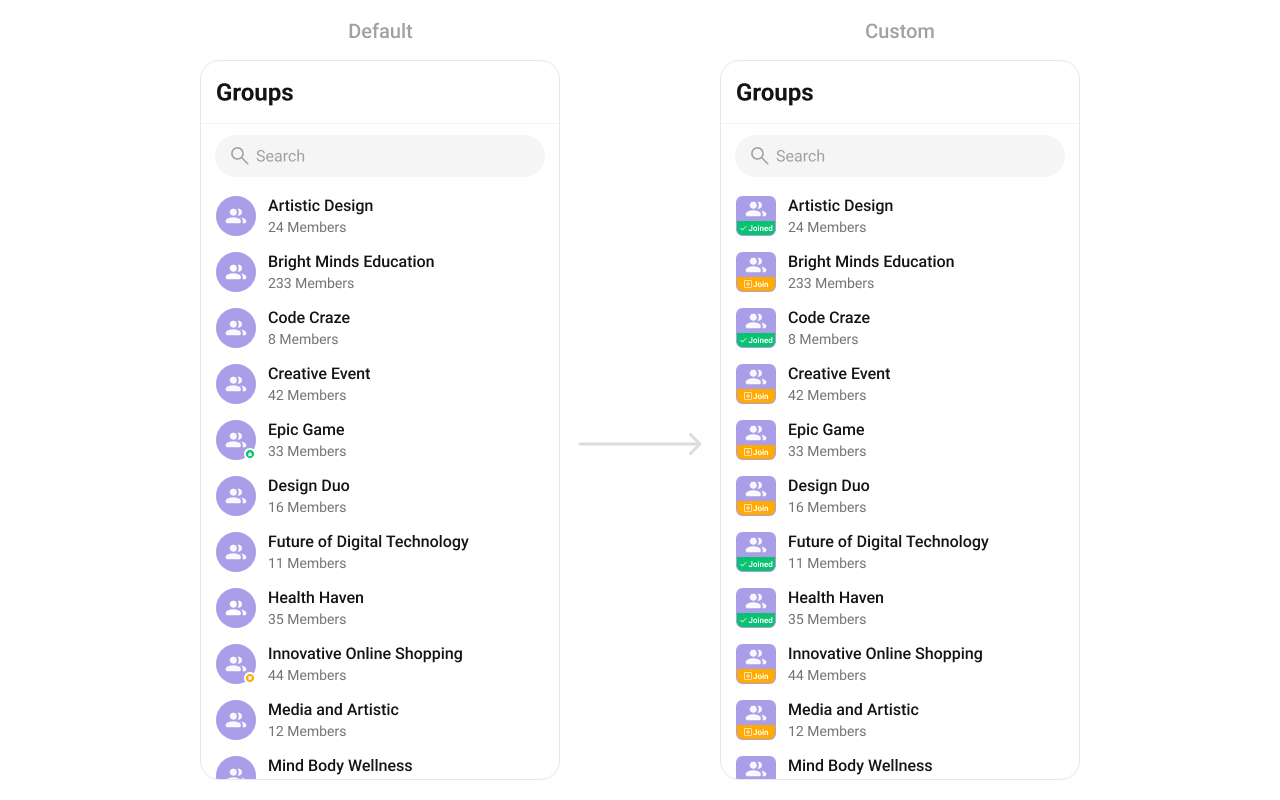 Create a `custom_leading_avatar_view.xml` layout:
```xml custom_leading_avatar_view.xml lines theme={null}
```
```kotlin lines theme={null}
cometchatGroups.setLeadingView(object : GroupsViewHolderListener() {
override fun createView(context: Context?, listItem: CometchatListBaseItemsBinding?): View {
return LayoutInflater.from(context).inflate(R.layout.custom_leading_avatar_view, null)
}
override fun bindView(
context: Context,
createdView: View,
group: Group,
holder: RecyclerView.ViewHolder,
groupList: List,
position: Int
) {
val groupAvatar = createdView.findViewById(R.id.leading_avatar_view)
groupAvatar.background = if (group.isJoined) ResourcesCompat.getDrawable(
resources,
R.drawable.group_leading_joined,
null
) else ResourcesCompat.getDrawable(
resources,
R.drawable.group_leading_join,
null
)
groupAvatar.setOnLongClickListener { v: View? ->
if (group.isJoined) {
Toast.makeText(context, "Group already joined", Toast.LENGTH_SHORT).show()
} else {
Toast.makeText(context, "Joining group", Toast.LENGTH_SHORT).show()
}
true
}
}
})
```
```java lines theme={null}
cometchatGroups.setLeadingView(new GroupsViewHolderListener() {
@Override
public View createView(Context context, CometchatListBaseItemsBinding listItem) {
return LayoutInflater.from(context).inflate(R.layout.custom_leading_avatar_view, null);
}
@Override
public void bindView(Context context,
View createdView,
Group group,
RecyclerView.ViewHolder holder,
List groupList,
int position) {
LinearLayout groupAvatar = createdView.findViewById(R.id.leading_avatar_view);
groupAvatar.setBackground(group.isJoined() ? ResourcesCompat.getDrawable(getResources(),
R.drawable.group_leading_joined,
null) : ResourcesCompat.getDrawable(getResources(),
R.drawable.group_leading_join,
null));
groupAvatar.setOnLongClickListener(v -> {
if (group.isJoined()) {
Toast.makeText(context, "Group already joined", Toast.LENGTH_SHORT).show();
} else {
Toast.makeText(context, "Joining group", Toast.LENGTH_SHORT).show();
}
return true;
});
}
});
```
### `setTitleView`
Replace the name / title text.
```kotlin lines theme={null}
cometchatGroups.setTitleView(object : GroupsViewHolderListener() {
override fun createView(
context: Context?,
listItem: CometchatListBaseItemsBinding?
): View? {
return null
}
override fun bindView(
context: Context,
createdView: View,
group: Group,
holder: RecyclerView.ViewHolder,
groupList: List,
position: Int
) {
}
})
```
```java lines theme={null}
cometchatGroups.setTitleView(new GroupsViewHolderListener() {
@Override
public View createView(Context context, CometchatListBaseItemsBinding listItem) {
return null;
}
@Override
public void bindView(Context context, View createdView, Group group, RecyclerView.ViewHolder holder, List groupList, int position) {
}
});
```
Group type icon example:
Create a `custom_leading_avatar_view.xml` layout:
```xml custom_leading_avatar_view.xml lines theme={null}
```
```kotlin lines theme={null}
cometchatGroups.setLeadingView(object : GroupsViewHolderListener() {
override fun createView(context: Context?, listItem: CometchatListBaseItemsBinding?): View {
return LayoutInflater.from(context).inflate(R.layout.custom_leading_avatar_view, null)
}
override fun bindView(
context: Context,
createdView: View,
group: Group,
holder: RecyclerView.ViewHolder,
groupList: List,
position: Int
) {
val groupAvatar = createdView.findViewById(R.id.leading_avatar_view)
groupAvatar.background = if (group.isJoined) ResourcesCompat.getDrawable(
resources,
R.drawable.group_leading_joined,
null
) else ResourcesCompat.getDrawable(
resources,
R.drawable.group_leading_join,
null
)
groupAvatar.setOnLongClickListener { v: View? ->
if (group.isJoined) {
Toast.makeText(context, "Group already joined", Toast.LENGTH_SHORT).show()
} else {
Toast.makeText(context, "Joining group", Toast.LENGTH_SHORT).show()
}
true
}
}
})
```
```java lines theme={null}
cometchatGroups.setLeadingView(new GroupsViewHolderListener() {
@Override
public View createView(Context context, CometchatListBaseItemsBinding listItem) {
return LayoutInflater.from(context).inflate(R.layout.custom_leading_avatar_view, null);
}
@Override
public void bindView(Context context,
View createdView,
Group group,
RecyclerView.ViewHolder holder,
List groupList,
int position) {
LinearLayout groupAvatar = createdView.findViewById(R.id.leading_avatar_view);
groupAvatar.setBackground(group.isJoined() ? ResourcesCompat.getDrawable(getResources(),
R.drawable.group_leading_joined,
null) : ResourcesCompat.getDrawable(getResources(),
R.drawable.group_leading_join,
null));
groupAvatar.setOnLongClickListener(v -> {
if (group.isJoined()) {
Toast.makeText(context, "Group already joined", Toast.LENGTH_SHORT).show();
} else {
Toast.makeText(context, "Joining group", Toast.LENGTH_SHORT).show();
}
return true;
});
}
});
```
### `setTitleView`
Replace the name / title text.
```kotlin lines theme={null}
cometchatGroups.setTitleView(object : GroupsViewHolderListener() {
override fun createView(
context: Context?,
listItem: CometchatListBaseItemsBinding?
): View? {
return null
}
override fun bindView(
context: Context,
createdView: View,
group: Group,
holder: RecyclerView.ViewHolder,
groupList: List,
position: Int
) {
}
})
```
```java lines theme={null}
cometchatGroups.setTitleView(new GroupsViewHolderListener() {
@Override
public View createView(Context context, CometchatListBaseItemsBinding listItem) {
return null;
}
@Override
public void bindView(Context context, View createdView, Group group, RecyclerView.ViewHolder holder, List groupList, int position) {
}
});
```
Group type icon example:
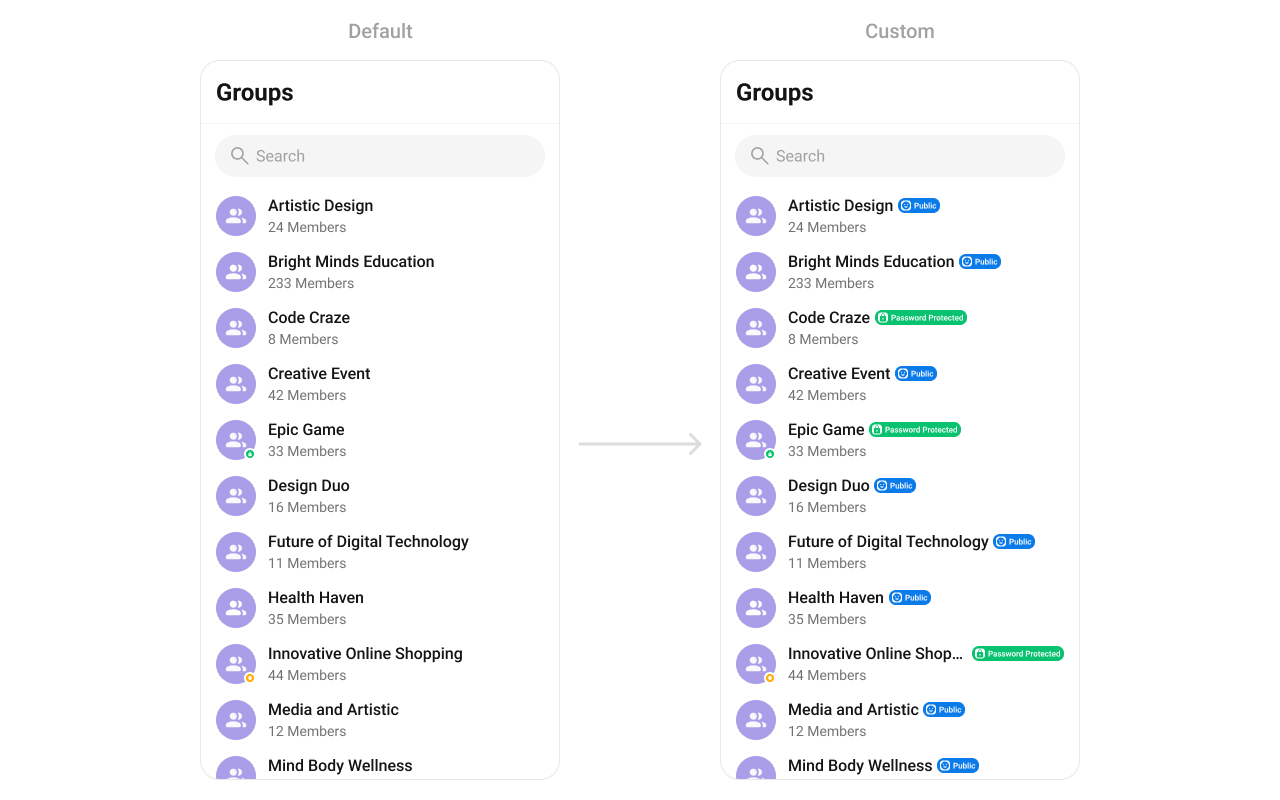 Create a `custom_group_title_view.xml` layout:
```xml custom_group_title_view.xml lines theme={null}
```
```kotlin lines theme={null}
cometchatGroups.setTitleView(object : GroupsViewHolderListener() {
override fun createView(context: Context?, listItem: CometchatListBaseItemsBinding?): View {
return LayoutInflater.from(context).inflate(R.layout.custom_group_title_view, null)
}
override fun bindView(
context: Context,
createdView: View,
group: Group,
holder: RecyclerView.ViewHolder,
groupList: List,
position: Int
) {
val layout = createdView.findViewById(R.id.group_layout)
val layoutParams = LinearLayout.LayoutParams(
ViewGroup.LayoutParams.WRAP_CONTENT,
ViewGroup.LayoutParams.WRAP_CONTENT
)
layout.layoutParams = layoutParams
val name = createdView.findViewById(R.id.title)
name.text = group.name
val type = createdView.findViewById(R.id.type)
if (CometChatConstants.GROUP_TYPE_PUBLIC == group.groupType) {
type.visibility = View.VISIBLE
type.background = ResourcesCompat.getDrawable(resources, R.drawable.public_icon, null)
} else if (CometChatConstants.GROUP_TYPE_PASSWORD == group.groupType) {
type.visibility = View.VISIBLE
type.background = ResourcesCompat.getDrawable(resources, R.drawable.passowrd_icon, null)
} else if (CometChatConstants.GROUP_TYPE_PRIVATE == group.groupType) {
type.visibility = View.VISIBLE
type.background = ResourcesCompat.getDrawable(resources, R.drawable.private_icon, null)
} else {
type.visibility = View.GONE
}
}
})
```
```java lines theme={null}
cometchatGroups.setTitleView(new GroupsViewHolderListener() {
@Override
public View createView(Context context, CometchatListBaseItemsBinding listItem) {
return LayoutInflater.from(context).inflate(R.layout.custom_group_title_view, null);
}
@Override
public void bindView(Context context, View createdView, Group group, RecyclerView.ViewHolder holder, List groupList, int position) {
LinearLayout layout = createdView.findViewById(R.id.user_layout);
LinearLayout.LayoutParams layoutParams = new LinearLayout.LayoutParams(ViewGroup.LayoutParams.WRAP_CONTENT,
ViewGroup.LayoutParams.WRAP_CONTENT);
layout.setLayoutParams(layoutParams);
TextView name = createdView.findViewById(R.id.title);
name.setText(group.getName());
View type = createdView.findViewById(R.id.type);
if (CometChatConstants.GROUP_TYPE_PUBLIC.equals(group.getGroupType())) {
type.setVisibility(View.VISIBLE);
type.setBackground(ResourcesCompat.getDrawable(getResources(), R.drawable.public_icon, null));
} else if (CometChatConstants.GROUP_TYPE_PASSWORD.equals(group.getGroupType())) {
type.setVisibility(View.VISIBLE);
type.setBackground(ResourcesCompat.getDrawable(getResources(), R.drawable.passowrd_icon, null));
} else if (CometChatConstants.GROUP_TYPE_PRIVATE.equals(group.getGroupType())) {
type.setVisibility(View.VISIBLE);
type.setBackground(ResourcesCompat.getDrawable(getResources(), R.drawable.private_icon, null));
} else {
type.setVisibility(View.GONE);
}
}
});
```
### `setSubtitleView`
Replace the subtitle text below the group's name.
```kotlin lines theme={null}
cometchatGroups.setSubtitleView(object : GroupsViewHolderListener() {
override fun createView(
context: Context?,
listItem: CometchatListBaseItemsBinding?
): View? {
return null
}
override fun bindView(
context: Context,
createdView: View,
group: Group,
holder: RecyclerView.ViewHolder,
groupList: List,
position: Int
) {
}
})
```
```java lines theme={null}
cometchatGroups.setSubtitleView(new GroupsViewHolderListener() {
@Override
public View createView(Context context, CometchatListBaseItemsBinding listItem) {
return null;
}
@Override
public void bindView(Context context, View createdView, Group group, RecyclerView.ViewHolder holder, List groupList, int position) {
}
});
```
Example with member count and description:
Create a `custom_group_title_view.xml` layout:
```xml custom_group_title_view.xml lines theme={null}
```
```kotlin lines theme={null}
cometchatGroups.setTitleView(object : GroupsViewHolderListener() {
override fun createView(context: Context?, listItem: CometchatListBaseItemsBinding?): View {
return LayoutInflater.from(context).inflate(R.layout.custom_group_title_view, null)
}
override fun bindView(
context: Context,
createdView: View,
group: Group,
holder: RecyclerView.ViewHolder,
groupList: List,
position: Int
) {
val layout = createdView.findViewById(R.id.group_layout)
val layoutParams = LinearLayout.LayoutParams(
ViewGroup.LayoutParams.WRAP_CONTENT,
ViewGroup.LayoutParams.WRAP_CONTENT
)
layout.layoutParams = layoutParams
val name = createdView.findViewById(R.id.title)
name.text = group.name
val type = createdView.findViewById(R.id.type)
if (CometChatConstants.GROUP_TYPE_PUBLIC == group.groupType) {
type.visibility = View.VISIBLE
type.background = ResourcesCompat.getDrawable(resources, R.drawable.public_icon, null)
} else if (CometChatConstants.GROUP_TYPE_PASSWORD == group.groupType) {
type.visibility = View.VISIBLE
type.background = ResourcesCompat.getDrawable(resources, R.drawable.passowrd_icon, null)
} else if (CometChatConstants.GROUP_TYPE_PRIVATE == group.groupType) {
type.visibility = View.VISIBLE
type.background = ResourcesCompat.getDrawable(resources, R.drawable.private_icon, null)
} else {
type.visibility = View.GONE
}
}
})
```
```java lines theme={null}
cometchatGroups.setTitleView(new GroupsViewHolderListener() {
@Override
public View createView(Context context, CometchatListBaseItemsBinding listItem) {
return LayoutInflater.from(context).inflate(R.layout.custom_group_title_view, null);
}
@Override
public void bindView(Context context, View createdView, Group group, RecyclerView.ViewHolder holder, List groupList, int position) {
LinearLayout layout = createdView.findViewById(R.id.user_layout);
LinearLayout.LayoutParams layoutParams = new LinearLayout.LayoutParams(ViewGroup.LayoutParams.WRAP_CONTENT,
ViewGroup.LayoutParams.WRAP_CONTENT);
layout.setLayoutParams(layoutParams);
TextView name = createdView.findViewById(R.id.title);
name.setText(group.getName());
View type = createdView.findViewById(R.id.type);
if (CometChatConstants.GROUP_TYPE_PUBLIC.equals(group.getGroupType())) {
type.setVisibility(View.VISIBLE);
type.setBackground(ResourcesCompat.getDrawable(getResources(), R.drawable.public_icon, null));
} else if (CometChatConstants.GROUP_TYPE_PASSWORD.equals(group.getGroupType())) {
type.setVisibility(View.VISIBLE);
type.setBackground(ResourcesCompat.getDrawable(getResources(), R.drawable.passowrd_icon, null));
} else if (CometChatConstants.GROUP_TYPE_PRIVATE.equals(group.getGroupType())) {
type.setVisibility(View.VISIBLE);
type.setBackground(ResourcesCompat.getDrawable(getResources(), R.drawable.private_icon, null));
} else {
type.setVisibility(View.GONE);
}
}
});
```
### `setSubtitleView`
Replace the subtitle text below the group's name.
```kotlin lines theme={null}
cometchatGroups.setSubtitleView(object : GroupsViewHolderListener() {
override fun createView(
context: Context?,
listItem: CometchatListBaseItemsBinding?
): View? {
return null
}
override fun bindView(
context: Context,
createdView: View,
group: Group,
holder: RecyclerView.ViewHolder,
groupList: List,
position: Int
) {
}
})
```
```java lines theme={null}
cometchatGroups.setSubtitleView(new GroupsViewHolderListener() {
@Override
public View createView(Context context, CometchatListBaseItemsBinding listItem) {
return null;
}
@Override
public void bindView(Context context, View createdView, Group group, RecyclerView.ViewHolder holder, List groupList, int position) {
}
});
```
Example with member count and description:
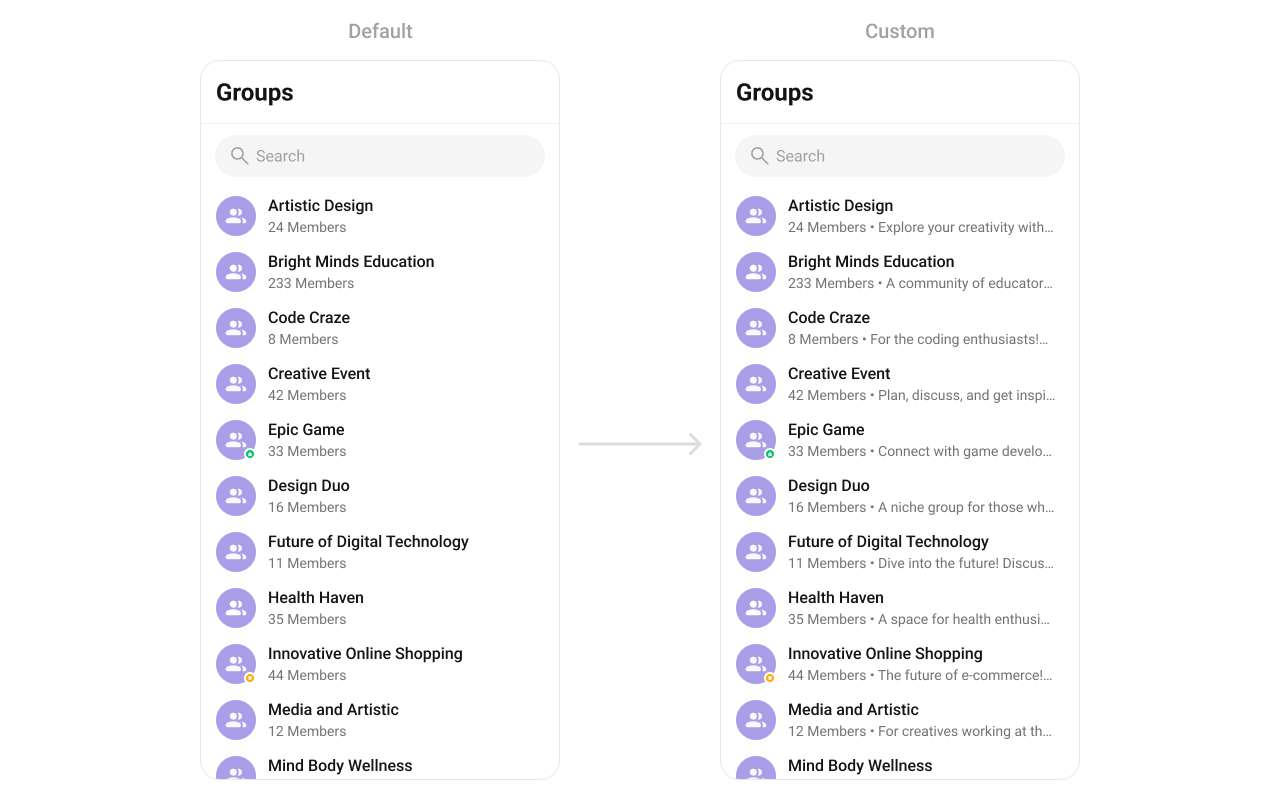 ```kotlin YourActivity.kt lines theme={null}
cometchatGroups.setSubtitleView(object : GroupsViewHolderListener() {
override fun createView(
context: Context?,
listItem: CometchatListBaseItemsBinding?
): View {
return TextView(context)
}
override fun bindView(
context: Context,
createdView: View,
group: Group,
holder: RecyclerView.ViewHolder,
groupList: List,
position: Int
) {
val textView = createdView as TextView
textView.text =
if (group.membersCount > 1) group.membersCount.toString() + " members" else group.membersCount.toString() + " member" + " • " + group.description
}
})
```
```java YourActivity.java lines theme={null}
cometchatGroups.setSubtitleView(new GroupsViewHolderListener() {
@Override
public View createView(Context context, CometchatListBaseItemsBinding listItem) {
return new TextView(context);
}
@Override
public void bindView(Context context, View createdView, Group group, RecyclerView.ViewHolder holder, List groupList, int position) {
TextView textView = (TextView) createdView;
textView.setText(group.getMembersCount() > 1 ? group.getMembersCount() + " members" : group.getMembersCount() + " member" + " • " + group.getDescription());
}
});
```
### `setTrailingView`
Replace the right section of each group item.
```kotlin lines theme={null}
cometchatGroups.setTrailingView(object : GroupsViewHolderListener() {
override fun createView(
context: Context?,
listItem: CometchatListBaseItemsBinding?
): View? {
return null
}
override fun bindView(
context: Context,
createdView: View,
group: Group,
holder: RecyclerView.ViewHolder,
groupList: List,
position: Int
) {
}
})
```
```java lines theme={null}
cometchatGroups.setTrailingView(new GroupsViewHolderListener() {
@Override
public View createView(Context context, CometchatListBaseItemsBinding listItem) {
return null;
}
@Override
public void bindView(Context context, View createdView, Group group, RecyclerView.ViewHolder holder, List groupList, int position) {
}
});
```
Join button example:
```kotlin YourActivity.kt lines theme={null}
cometchatGroups.setSubtitleView(object : GroupsViewHolderListener() {
override fun createView(
context: Context?,
listItem: CometchatListBaseItemsBinding?
): View {
return TextView(context)
}
override fun bindView(
context: Context,
createdView: View,
group: Group,
holder: RecyclerView.ViewHolder,
groupList: List,
position: Int
) {
val textView = createdView as TextView
textView.text =
if (group.membersCount > 1) group.membersCount.toString() + " members" else group.membersCount.toString() + " member" + " • " + group.description
}
})
```
```java YourActivity.java lines theme={null}
cometchatGroups.setSubtitleView(new GroupsViewHolderListener() {
@Override
public View createView(Context context, CometchatListBaseItemsBinding listItem) {
return new TextView(context);
}
@Override
public void bindView(Context context, View createdView, Group group, RecyclerView.ViewHolder holder, List groupList, int position) {
TextView textView = (TextView) createdView;
textView.setText(group.getMembersCount() > 1 ? group.getMembersCount() + " members" : group.getMembersCount() + " member" + " • " + group.getDescription());
}
});
```
### `setTrailingView`
Replace the right section of each group item.
```kotlin lines theme={null}
cometchatGroups.setTrailingView(object : GroupsViewHolderListener() {
override fun createView(
context: Context?,
listItem: CometchatListBaseItemsBinding?
): View? {
return null
}
override fun bindView(
context: Context,
createdView: View,
group: Group,
holder: RecyclerView.ViewHolder,
groupList: List,
position: Int
) {
}
})
```
```java lines theme={null}
cometchatGroups.setTrailingView(new GroupsViewHolderListener() {
@Override
public View createView(Context context, CometchatListBaseItemsBinding listItem) {
return null;
}
@Override
public void bindView(Context context, View createdView, Group group, RecyclerView.ViewHolder holder, List groupList, int position) {
}
});
```
Join button example:
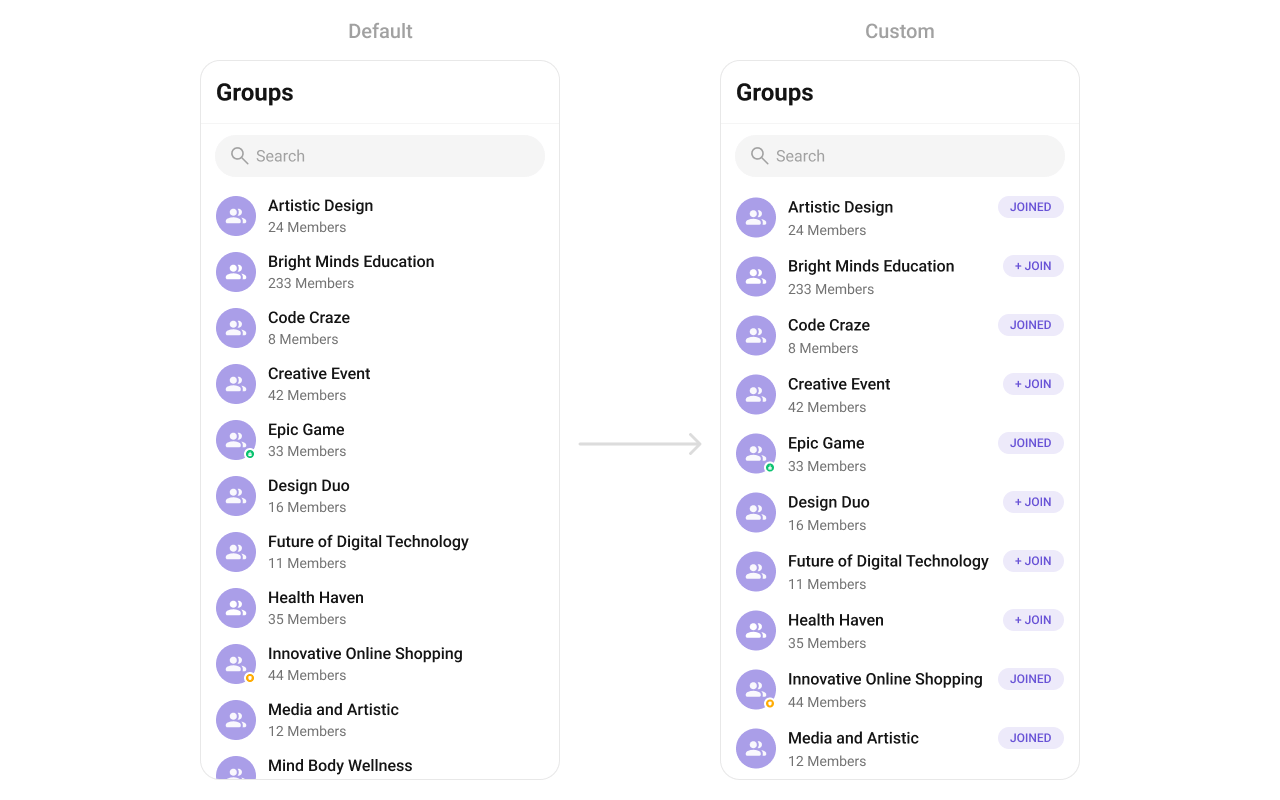 Create a `custom_tail_view.xml` layout:
```xml custom_tail_view.xml lines theme={null}
```
```kotlin lines theme={null}
cometchatGroups.setTrailingView(object : GroupsViewHolderListener() {
override fun createView(context: Context?, listItem: CometchatListBaseItemsBinding?): View {
return LayoutInflater.from(context).inflate(R.layout.custom_tail_view, null)
}
override fun bindView(
context: Context,
createdView: View,
group: Group,
holder: RecyclerView.ViewHolder,
groupList: List,
position: Int
) {
val button = createdView.findViewById(R.id.button)
button.text = (if (group.isJoined) "Joined" else "+ Join")
}
})
```
```java lines theme={null}
cometchatGroups.setTrailingView(new GroupsViewHolderListener() {
@Override
public View createView(Context context, CometchatListBaseItemsBinding listItem) {
return LayoutInflater.from(context).inflate(R.layout.custom_tail_view, null);
}
@Override
public void bindView(Context context,
View createdView,
Group group,
RecyclerView.ViewHolder holder,
List groupList,
int position) {
MaterialButton button = createdView.findViewById(R.id.button);
button.setText(group.isJoined() ? "Joined" : "+ Join");
}
});
```
### `setItemView`
Replace the entire list item row.
```kotlin lines theme={null}
cometchatGroups.setItemView(object : GroupsViewHolderListener() {
override fun createView(
context: Context?,
listItem: CometchatListBaseItemsBinding?
): View? {
return null
}
override fun bindView(
context: Context,
createdView: View,
group: Group,
holder: RecyclerView.ViewHolder,
groupList: List,
position: Int
) {
}
})
```
```java lines theme={null}
cometchatGroups.setItemView(new GroupsViewHolderListener() {
@Override
public View createView(Context context, CometchatListBaseItemsBinding listItem) {
return null;
}
@Override
public void bindView(Context context, View createdView, Group group, RecyclerView.ViewHolder holder, List groupList, int position) {
}
});
```
Custom list item example:
Create a `custom_tail_view.xml` layout:
```xml custom_tail_view.xml lines theme={null}
```
```kotlin lines theme={null}
cometchatGroups.setTrailingView(object : GroupsViewHolderListener() {
override fun createView(context: Context?, listItem: CometchatListBaseItemsBinding?): View {
return LayoutInflater.from(context).inflate(R.layout.custom_tail_view, null)
}
override fun bindView(
context: Context,
createdView: View,
group: Group,
holder: RecyclerView.ViewHolder,
groupList: List,
position: Int
) {
val button = createdView.findViewById(R.id.button)
button.text = (if (group.isJoined) "Joined" else "+ Join")
}
})
```
```java lines theme={null}
cometchatGroups.setTrailingView(new GroupsViewHolderListener() {
@Override
public View createView(Context context, CometchatListBaseItemsBinding listItem) {
return LayoutInflater.from(context).inflate(R.layout.custom_tail_view, null);
}
@Override
public void bindView(Context context,
View createdView,
Group group,
RecyclerView.ViewHolder holder,
List groupList,
int position) {
MaterialButton button = createdView.findViewById(R.id.button);
button.setText(group.isJoined() ? "Joined" : "+ Join");
}
});
```
### `setItemView`
Replace the entire list item row.
```kotlin lines theme={null}
cometchatGroups.setItemView(object : GroupsViewHolderListener() {
override fun createView(
context: Context?,
listItem: CometchatListBaseItemsBinding?
): View? {
return null
}
override fun bindView(
context: Context,
createdView: View,
group: Group,
holder: RecyclerView.ViewHolder,
groupList: List,
position: Int
) {
}
})
```
```java lines theme={null}
cometchatGroups.setItemView(new GroupsViewHolderListener() {
@Override
public View createView(Context context, CometchatListBaseItemsBinding listItem) {
return null;
}
@Override
public void bindView(Context context, View createdView, Group group, RecyclerView.ViewHolder holder, List groupList, int position) {
}
});
```
Custom list item example:
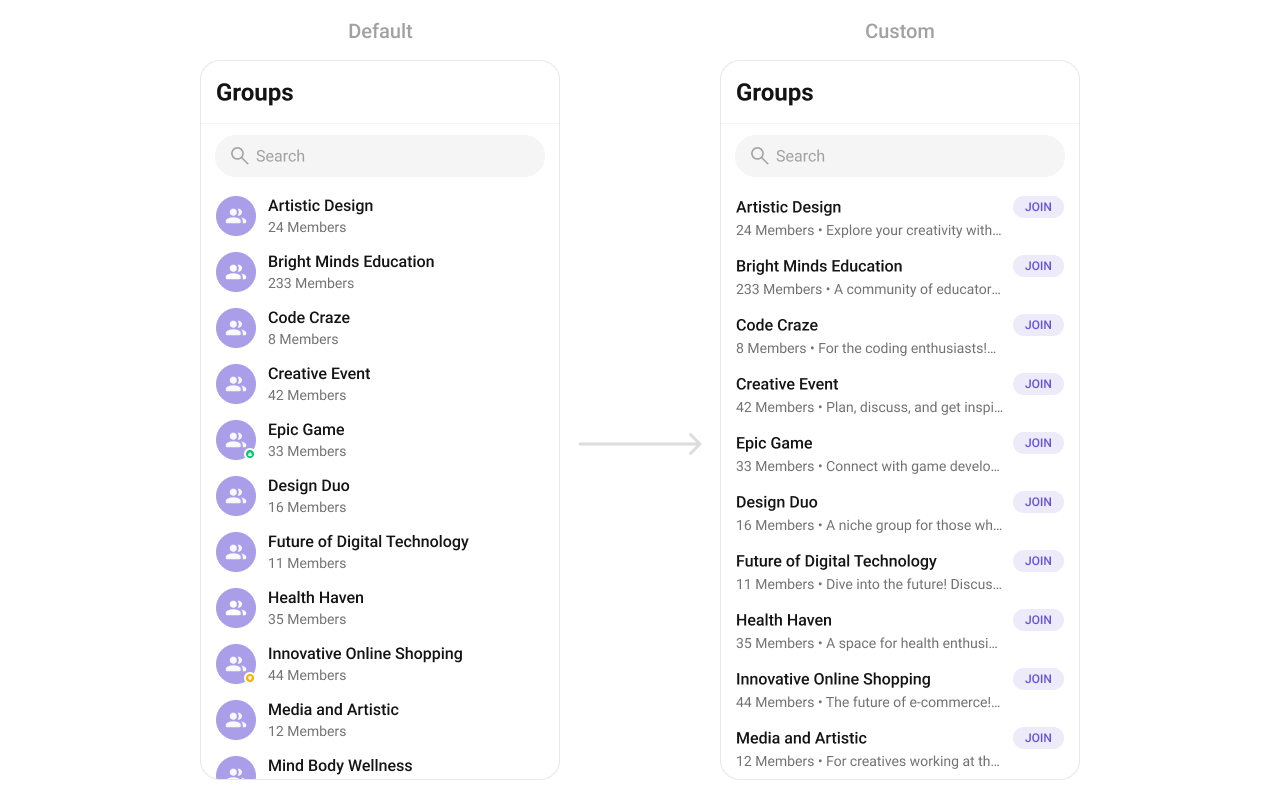 Create a `custom_group_list_item.xml` layout:
```xml custom_group_list_item.xml lines theme={null}
```
```kotlin YourActivity.kt lines theme={null}
cometchatGroups.setItemView(object : GroupsViewHolderListener() {
override fun createView(
context: Context?,
listItem: CometchatListBaseItemsBinding?
): View {
return View.inflate(context, R.layout.custom_group_list_item, null)
}
override fun bindView(
context: Context,
createdView: View,
group: Group,
holder: RecyclerView.ViewHolder,
groupList: List,
position: Int
) {
val groupName = createdView.findViewById(R.id.tvName)
val groupMemberCount = createdView.findViewById(R.id.tvSubtitle)
val params = LinearLayout.LayoutParams(
LinearLayout.LayoutParams.MATCH_PARENT,
LinearLayout.LayoutParams.WRAP_CONTENT
)
createdView.layoutParams = params
groupName.text = group.name
groupMemberCount.text =
if (group.membersCount > 1) group.membersCount.toString() + " members" else group.membersCount.toString() + " member" + " • " + group.description
}
})
```
```java YourActivity.java lines theme={null}
cometchatGroups.setItemView(new GroupsViewHolderListener() {
@Override
public View createView(Context context, CometchatListBaseItemsBinding listItem) {
return View.inflate(context, R.layout.custom_group_list_item, null);
}
@Override
public void bindView(Context context, View createdView, Group group, RecyclerView.ViewHolder holder, List groupList, int position) {
TextView groupName = createdView.findViewById(R.id.tvName);
TextView groupMemberCount = createdView.findViewById(R.id.tvSubtitle);
LinearLayout.LayoutParams params = new LinearLayout.LayoutParams(LinearLayout.LayoutParams.MATCH_PARENT, LinearLayout.LayoutParams.WRAP_CONTENT);
createdView.setLayoutParams(params);
groupName.setText(group.getName());
groupMemberCount.setText(group.getMembersCount() > 1 ? group.getMembersCount() + " members" : group.getMembersCount() + " member" + " • " + group.getDescription());
}
});
```
### `setOptions`
Replace the long-press context menu entirely.
```kotlin lines theme={null}
cometchatGroups.options = Function2?> { context, group -> emptyList() }
```
```java lines theme={null}
cometchatGroups.setOptions((context, group) -> Collections.emptyList());
```
### `addOptions`
Append to the long-press context menu without removing defaults.
```kotlin lines theme={null}
cometchatGroups.addOptions { context, group -> emptyList() }
```
```java lines theme={null}
cometchatGroups.addOptions((context, group) -> Collections.emptyList());
```
### `setLoadingView`
Sets a custom loading view displayed when data is being fetched.
```kotlin lines theme={null}
cometchatGroups.loadingView = R.layout.your_loading_view
```
```java lines theme={null}
cometchatGroups.setLoadingView(R.layout.your_loading_view);
```
### `setEmptyView`
Configures a custom view displayed when there are no groups in the list.
```kotlin lines theme={null}
cometchatGroups.emptyView = R.layout.your_empty_view
```
```java lines theme={null}
cometchatGroups.setEmptyView(R.layout.your_empty_view);
```
### `setErrorView`
Defines a custom error state view that appears when an issue occurs while loading groups.
```kotlin lines theme={null}
cometchatGroups.errorView = R.layout.your_error_view
```
```java lines theme={null}
cometchatGroups.setErrorView(R.layout.your_error_view);
```
### `setOverflowMenu`
Replace the toolbar overflow menu.
Create a `custom_group_list_item.xml` layout:
```xml custom_group_list_item.xml lines theme={null}
```
```kotlin YourActivity.kt lines theme={null}
cometchatGroups.setItemView(object : GroupsViewHolderListener() {
override fun createView(
context: Context?,
listItem: CometchatListBaseItemsBinding?
): View {
return View.inflate(context, R.layout.custom_group_list_item, null)
}
override fun bindView(
context: Context,
createdView: View,
group: Group,
holder: RecyclerView.ViewHolder,
groupList: List,
position: Int
) {
val groupName = createdView.findViewById(R.id.tvName)
val groupMemberCount = createdView.findViewById(R.id.tvSubtitle)
val params = LinearLayout.LayoutParams(
LinearLayout.LayoutParams.MATCH_PARENT,
LinearLayout.LayoutParams.WRAP_CONTENT
)
createdView.layoutParams = params
groupName.text = group.name
groupMemberCount.text =
if (group.membersCount > 1) group.membersCount.toString() + " members" else group.membersCount.toString() + " member" + " • " + group.description
}
})
```
```java YourActivity.java lines theme={null}
cometchatGroups.setItemView(new GroupsViewHolderListener() {
@Override
public View createView(Context context, CometchatListBaseItemsBinding listItem) {
return View.inflate(context, R.layout.custom_group_list_item, null);
}
@Override
public void bindView(Context context, View createdView, Group group, RecyclerView.ViewHolder holder, List groupList, int position) {
TextView groupName = createdView.findViewById(R.id.tvName);
TextView groupMemberCount = createdView.findViewById(R.id.tvSubtitle);
LinearLayout.LayoutParams params = new LinearLayout.LayoutParams(LinearLayout.LayoutParams.MATCH_PARENT, LinearLayout.LayoutParams.WRAP_CONTENT);
createdView.setLayoutParams(params);
groupName.setText(group.getName());
groupMemberCount.setText(group.getMembersCount() > 1 ? group.getMembersCount() + " members" : group.getMembersCount() + " member" + " • " + group.getDescription());
}
});
```
### `setOptions`
Replace the long-press context menu entirely.
```kotlin lines theme={null}
cometchatGroups.options = Function2?> { context, group -> emptyList() }
```
```java lines theme={null}
cometchatGroups.setOptions((context, group) -> Collections.emptyList());
```
### `addOptions`
Append to the long-press context menu without removing defaults.
```kotlin lines theme={null}
cometchatGroups.addOptions { context, group -> emptyList() }
```
```java lines theme={null}
cometchatGroups.addOptions((context, group) -> Collections.emptyList());
```
### `setLoadingView`
Sets a custom loading view displayed when data is being fetched.
```kotlin lines theme={null}
cometchatGroups.loadingView = R.layout.your_loading_view
```
```java lines theme={null}
cometchatGroups.setLoadingView(R.layout.your_loading_view);
```
### `setEmptyView`
Configures a custom view displayed when there are no groups in the list.
```kotlin lines theme={null}
cometchatGroups.emptyView = R.layout.your_empty_view
```
```java lines theme={null}
cometchatGroups.setEmptyView(R.layout.your_empty_view);
```
### `setErrorView`
Defines a custom error state view that appears when an issue occurs while loading groups.
```kotlin lines theme={null}
cometchatGroups.errorView = R.layout.your_error_view
```
```java lines theme={null}
cometchatGroups.setErrorView(R.layout.your_error_view);
```
### `setOverflowMenu`
Replace the toolbar overflow menu.
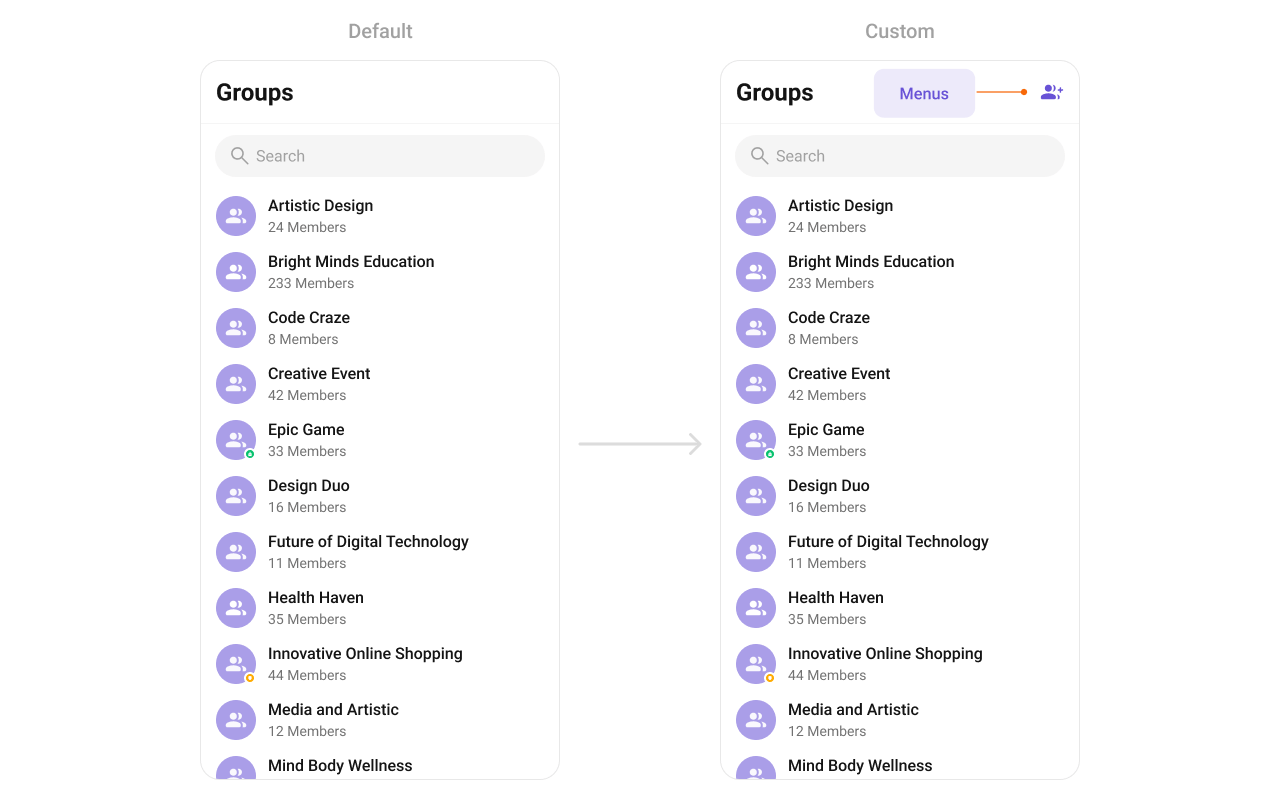 Create an `overflow_menu_layout.xml` layout:
```xml overflow_menu_layout.xml lines theme={null}
```
```kotlin YourActivity.kt lines theme={null}
val view: View = layoutInflater.inflate(R.layout.overflow_menu_layout, null)
val imgRefresh = view.findViewById(R.id.ivMenu)
imgRefresh.setOnClickListener { v: View? ->
Toast.makeText(requireContext(), "Clicked on Refresh", Toast.LENGTH_SHORT).show()
}
cometchatGroups.setOverflowMenu(view)
```
```java YourActivity.java lines theme={null}
View view = getLayoutInflater().inflate(R.layout.overflow_menu_layout, null);
ImageView imgRefresh = view.findViewById(R.id.ivMenu);
imgRefresh.setOnClickListener(v -> {
Toast.makeText(requireContext(), "Clicked on Refresh", Toast.LENGTH_SHORT).show();
});
cometchatGroups.setOverflowMenu(view);
```
* **Verify**: After setting any custom view slot, confirm the custom view renders in the correct position within the group list item, and the data binding populates correctly for each group.
## Common Patterns
### Hide all chrome — minimal list
```kotlin lines theme={null}
cometchatGroups.setGroupTypeVisibility(View.GONE)
cometchatGroups.setSeparatorVisibility(View.GONE)
cometchatGroups.setToolbarVisibility(View.GONE)
```
```java lines theme={null}
cometchatGroups.setGroupTypeVisibility(View.GONE);
cometchatGroups.setSeparatorVisibility(View.GONE);
cometchatGroups.setToolbarVisibility(View.GONE);
```
### Joined groups only
```kotlin lines theme={null}
val builder = GroupsRequestBuilder()
.joinedOnly(true)
cometchatGroups.setGroupsRequestBuilder(builder)
```
```java lines theme={null}
GroupsRequest.GroupsRequestBuilder builder = new GroupsRequest.GroupsRequestBuilder()
.joinedOnly(true);
cometchatGroups.setGroupsRequestBuilder(builder);
```
### Filter by tags
```kotlin lines theme={null}
val builder = GroupsRequestBuilder()
.setTags(listOf("vip", "premium"))
cometchatGroups.setGroupsRequestBuilder(builder)
```
```java lines theme={null}
GroupsRequest.GroupsRequestBuilder builder = new GroupsRequest.GroupsRequestBuilder()
.setTags(Arrays.asList("vip", "premium"));
cometchatGroups.setGroupsRequestBuilder(builder);
```
## Advanced Methods
### Programmatic Selection
#### `selectGroup`
Programmatically selects or deselects a group. Works with both `SINGLE` and `MULTIPLE` selection modes.
```kotlin lines theme={null}
// Select a group in single-select mode
cometchatGroups.selectGroup(group, UIKitConstants.SelectionMode.SINGLE)
// Select a group in multi-select mode
cometchatGroups.selectGroup(group, UIKitConstants.SelectionMode.MULTIPLE)
```
```java lines theme={null}
// Select a group in single-select mode
cometchatGroups.selectGroup(group, UIKitConstants.SelectionMode.SINGLE);
// Select a group in multi-select mode
cometchatGroups.selectGroup(group, UIKitConstants.SelectionMode.MULTIPLE);
```
> In `SINGLE` mode, selecting a new group replaces the previous selection. In `MULTIPLE` mode, calling this on an already-selected group deselects it (toggle behavior).
#### `clearSelection`
Clears all selected groups and resets the selection UI.
```kotlin lines theme={null}
cometchatGroups.clearSelection()
```
```java lines theme={null}
cometchatGroups.clearSelection();
```
#### `getSelectedGroups`
Returns the list of currently selected `Group` objects.
```kotlin lines theme={null}
val selected = cometchatGroups.selectedGroups
```
```java lines theme={null}
List selected = cometchatGroups.getSelectedGroups();
```
### Selected Groups List
When using multi-select mode, a horizontal list of selected groups can be shown above the main list.
| Method | Type | Description |
| - | - | - |
| `setSelectedGroupsListVisibility` | `int (View.VISIBLE / View.GONE)` | Show or hide the selected groups strip |
| `setSelectedGroupAvatarStyle` | `@StyleRes int` | Avatar style for selected group chips |
| `setSelectedGroupItemTextColor` | `@ColorInt int` | Text color for selected group names |
| `setSelectedGroupItemTextAppearance` | `@StyleRes int` | Text appearance for selected group names |
| `setSelectedGroupItemRemoveIcon` | `Drawable` | Icon for the remove button on each chip |
| `setSelectedGroupItemRemoveIconTint` | `@ColorInt int` | Tint color for the remove icon |
### Search Input Customization
The built-in search box can be customized programmatically:
| Method | Type | Description |
| - | - | - |
| `setSearchPlaceholderText` | `String` | Sets the placeholder text for the search input |
| `setSearchInputTextColor` | `@ColorInt int` | Text color of the search input |
| `setSearchInputTextAppearance` | `@StyleRes int` | Text appearance of the search input |
| `setSearchInputPlaceHolderTextColor` | `@ColorInt int` | Placeholder text color |
| `setSearchInputPlaceHolderTextAppearance` | `@StyleRes int` | Placeholder text appearance |
| `setSearchInputIcon` | `Drawable` | Leading icon in the search box |
| `setSearchInputIconTint` | `@ColorInt int` | Tint for the leading icon |
| `setSearchInputEndIcon` | `Drawable` | Trailing icon in the search box |
| `setSearchInputEndIconTint` | `@ColorInt int` | Tint for the trailing icon |
| `setSearchInputStrokeWidth` | `@Dimension int` | Stroke width of the search box border |
| `setSearchInputStrokeColor` | `@ColorInt int` | Stroke color of the search box border |
| `setSearchInputBackgroundColor` | `@ColorInt int` | Background color of the search box |
| `setSearchInputCornerRadius` | `@Dimension int` | Corner radius of the search box |
### Internal Access
These methods provide direct access to internal components for advanced use cases.
| Method | Returns | Description |
| - | - | - |
| `getBinding()` | `CometchatGroupListBinding` | The ViewBinding for the component's root layout |
| `getViewModel()` | `GroupsViewModel` | The ViewModel managing group data and state |
| `getAdapter()` | `GroupsAdapter` | The adapter powering the RecyclerView |
| `setAdapter(GroupsAdapter)` | `void` | Replaces the default adapter with a custom one |
> Use these only when the standard API is insufficient. Directly manipulating the adapter or ViewModel may conflict with the component's internal state management.
## Style
The component uses XML theme styles. Define a custom style with parent `CometChatGroupsStyle` in `themes.xml`, then apply with `setStyle()`.
Create an `overflow_menu_layout.xml` layout:
```xml overflow_menu_layout.xml lines theme={null}
```
```kotlin YourActivity.kt lines theme={null}
val view: View = layoutInflater.inflate(R.layout.overflow_menu_layout, null)
val imgRefresh = view.findViewById(R.id.ivMenu)
imgRefresh.setOnClickListener { v: View? ->
Toast.makeText(requireContext(), "Clicked on Refresh", Toast.LENGTH_SHORT).show()
}
cometchatGroups.setOverflowMenu(view)
```
```java YourActivity.java lines theme={null}
View view = getLayoutInflater().inflate(R.layout.overflow_menu_layout, null);
ImageView imgRefresh = view.findViewById(R.id.ivMenu);
imgRefresh.setOnClickListener(v -> {
Toast.makeText(requireContext(), "Clicked on Refresh", Toast.LENGTH_SHORT).show();
});
cometchatGroups.setOverflowMenu(view);
```
* **Verify**: After setting any custom view slot, confirm the custom view renders in the correct position within the group list item, and the data binding populates correctly for each group.
## Common Patterns
### Hide all chrome — minimal list
```kotlin lines theme={null}
cometchatGroups.setGroupTypeVisibility(View.GONE)
cometchatGroups.setSeparatorVisibility(View.GONE)
cometchatGroups.setToolbarVisibility(View.GONE)
```
```java lines theme={null}
cometchatGroups.setGroupTypeVisibility(View.GONE);
cometchatGroups.setSeparatorVisibility(View.GONE);
cometchatGroups.setToolbarVisibility(View.GONE);
```
### Joined groups only
```kotlin lines theme={null}
val builder = GroupsRequestBuilder()
.joinedOnly(true)
cometchatGroups.setGroupsRequestBuilder(builder)
```
```java lines theme={null}
GroupsRequest.GroupsRequestBuilder builder = new GroupsRequest.GroupsRequestBuilder()
.joinedOnly(true);
cometchatGroups.setGroupsRequestBuilder(builder);
```
### Filter by tags
```kotlin lines theme={null}
val builder = GroupsRequestBuilder()
.setTags(listOf("vip", "premium"))
cometchatGroups.setGroupsRequestBuilder(builder)
```
```java lines theme={null}
GroupsRequest.GroupsRequestBuilder builder = new GroupsRequest.GroupsRequestBuilder()
.setTags(Arrays.asList("vip", "premium"));
cometchatGroups.setGroupsRequestBuilder(builder);
```
## Advanced Methods
### Programmatic Selection
#### `selectGroup`
Programmatically selects or deselects a group. Works with both `SINGLE` and `MULTIPLE` selection modes.
```kotlin lines theme={null}
// Select a group in single-select mode
cometchatGroups.selectGroup(group, UIKitConstants.SelectionMode.SINGLE)
// Select a group in multi-select mode
cometchatGroups.selectGroup(group, UIKitConstants.SelectionMode.MULTIPLE)
```
```java lines theme={null}
// Select a group in single-select mode
cometchatGroups.selectGroup(group, UIKitConstants.SelectionMode.SINGLE);
// Select a group in multi-select mode
cometchatGroups.selectGroup(group, UIKitConstants.SelectionMode.MULTIPLE);
```
> In `SINGLE` mode, selecting a new group replaces the previous selection. In `MULTIPLE` mode, calling this on an already-selected group deselects it (toggle behavior).
#### `clearSelection`
Clears all selected groups and resets the selection UI.
```kotlin lines theme={null}
cometchatGroups.clearSelection()
```
```java lines theme={null}
cometchatGroups.clearSelection();
```
#### `getSelectedGroups`
Returns the list of currently selected `Group` objects.
```kotlin lines theme={null}
val selected = cometchatGroups.selectedGroups
```
```java lines theme={null}
List selected = cometchatGroups.getSelectedGroups();
```
### Selected Groups List
When using multi-select mode, a horizontal list of selected groups can be shown above the main list.
| Method | Type | Description |
| - | - | - |
| `setSelectedGroupsListVisibility` | `int (View.VISIBLE / View.GONE)` | Show or hide the selected groups strip |
| `setSelectedGroupAvatarStyle` | `@StyleRes int` | Avatar style for selected group chips |
| `setSelectedGroupItemTextColor` | `@ColorInt int` | Text color for selected group names |
| `setSelectedGroupItemTextAppearance` | `@StyleRes int` | Text appearance for selected group names |
| `setSelectedGroupItemRemoveIcon` | `Drawable` | Icon for the remove button on each chip |
| `setSelectedGroupItemRemoveIconTint` | `@ColorInt int` | Tint color for the remove icon |
### Search Input Customization
The built-in search box can be customized programmatically:
| Method | Type | Description |
| - | - | - |
| `setSearchPlaceholderText` | `String` | Sets the placeholder text for the search input |
| `setSearchInputTextColor` | `@ColorInt int` | Text color of the search input |
| `setSearchInputTextAppearance` | `@StyleRes int` | Text appearance of the search input |
| `setSearchInputPlaceHolderTextColor` | `@ColorInt int` | Placeholder text color |
| `setSearchInputPlaceHolderTextAppearance` | `@StyleRes int` | Placeholder text appearance |
| `setSearchInputIcon` | `Drawable` | Leading icon in the search box |
| `setSearchInputIconTint` | `@ColorInt int` | Tint for the leading icon |
| `setSearchInputEndIcon` | `Drawable` | Trailing icon in the search box |
| `setSearchInputEndIconTint` | `@ColorInt int` | Tint for the trailing icon |
| `setSearchInputStrokeWidth` | `@Dimension int` | Stroke width of the search box border |
| `setSearchInputStrokeColor` | `@ColorInt int` | Stroke color of the search box border |
| `setSearchInputBackgroundColor` | `@ColorInt int` | Background color of the search box |
| `setSearchInputCornerRadius` | `@Dimension int` | Corner radius of the search box |
### Internal Access
These methods provide direct access to internal components for advanced use cases.
| Method | Returns | Description |
| - | - | - |
| `getBinding()` | `CometchatGroupListBinding` | The ViewBinding for the component's root layout |
| `getViewModel()` | `GroupsViewModel` | The ViewModel managing group data and state |
| `getAdapter()` | `GroupsAdapter` | The adapter powering the RecyclerView |
| `setAdapter(GroupsAdapter)` | `void` | Replaces the default adapter with a custom one |
> Use these only when the standard API is insufficient. Directly manipulating the adapter or ViewModel may conflict with the component's internal state management.
## Style
The component uses XML theme styles. Define a custom style with parent `CometChatGroupsStyle` in `themes.xml`, then apply with `setStyle()`.
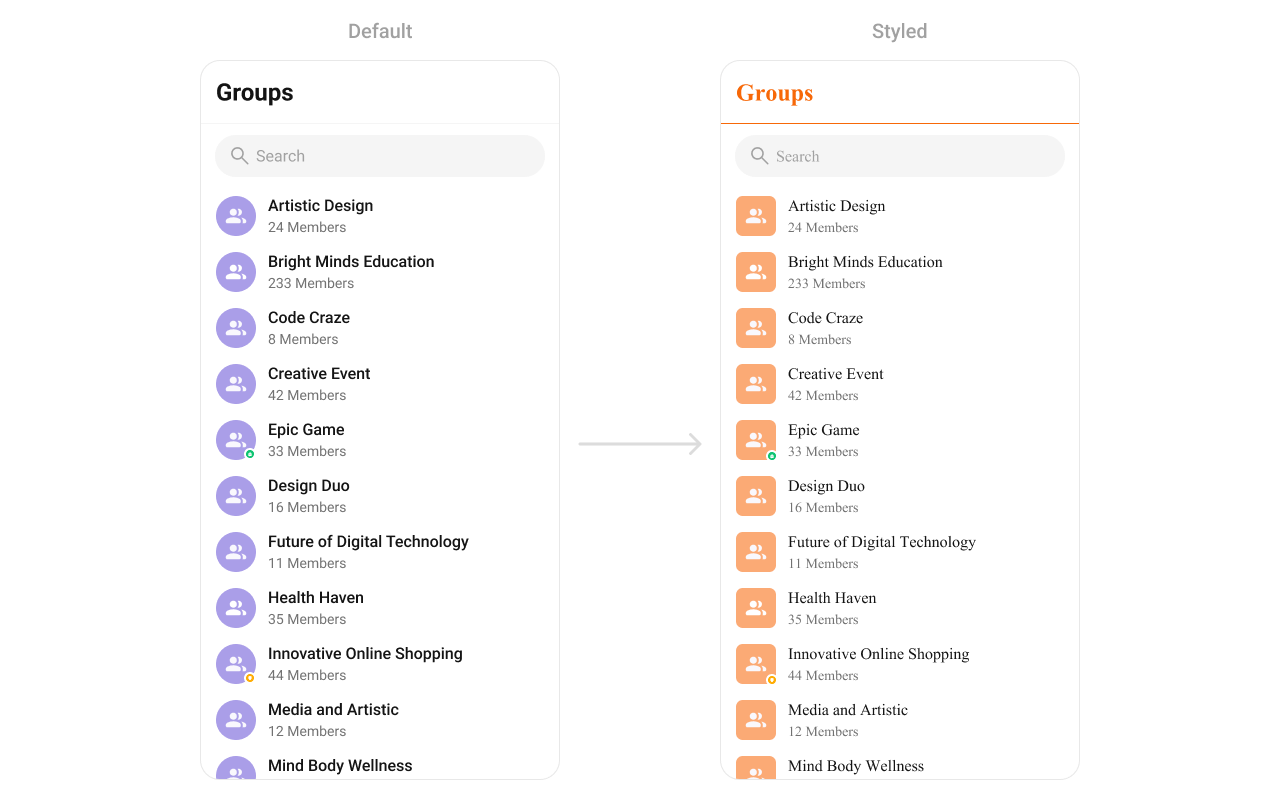 ```xml themes.xml lines theme={null}
```
```kotlin lines theme={null}
cometchatGroups.setStyle(R.style.CustomGroupsStyle)
```
```java lines theme={null}
cometchatGroups.setStyle(R.style.CustomGroupsStyle);
```
To know more such attributes, visit the [attributes file](https://github.com/cometchat/cometchat-uikit-android/blob/v5/chatuikit/src/main/res/values/attr_cometchat_groups.xml).
### Programmatic Style Properties
In addition to XML theme styles, the component exposes programmatic setters for fine-grained control:
| Method | Type | Description |
| - | - | - |
| `setBackgroundColor` | `@ColorInt int` | Background color of the component |
| `setBackIconTint` | `@ColorInt int` | Tint color for the back icon |
| `setBackIcon` | `Drawable` | Custom back icon drawable |
| `setTitleTextColor` | `@ColorInt int` | Title text color in the toolbar |
| `setTitleTextAppearance` | `@StyleRes int` | Title text appearance in the toolbar |
| `setItemTitleTextColor` | `@ColorInt int` | Text color for group item titles |
| `setItemTitleTextAppearance` | `@StyleRes int` | Text appearance for group item titles |
| `setItemBackgroundColor` | `@ColorInt int` | Background color for list items |
| `setItemSelectedBackgroundColor` | `@ColorInt int` | Background color for selected list items |
| `setSeparatorColor` | `@ColorInt int` | Color of list item separators |
| `setStrokeColor` | `@ColorInt int` | Stroke color of the component border |
| `setStrokeWidth` | `@Dimension int` | Stroke width of the component border |
| `setCornerRadius` | `@Dimension int` | Corner radius of the component |
| `setSubtitleTextColor` | `@ColorInt int` | Text color for group item subtitles |
| `setSubtitleTextAppearance` | `@StyleRes int` | Text appearance for group item subtitles |
| `setEmptyStateTextColor` | `@ColorInt int` | Title text color for the empty state |
| `setEmptyStateTextAppearance` | `@StyleRes int` | Title text appearance for the empty state |
| `setEmptyStateSubtitleTextColor` | `@ColorInt int` | Subtitle text color for the empty state |
| `setEmptyStateSubTitleTextAppearance` | `@StyleRes int` | Subtitle text appearance for the empty state |
| `setErrorStateTextColor` | `@ColorInt int` | Title text color for the error state |
| `setErrorStateTextAppearance` | `@StyleRes int` | Title text appearance for the error state |
| `setErrorStateSubtitleColor` | `@ColorInt int` | Subtitle text color for the error state |
| `setErrorStateSubtitleTextAppearance` | `@StyleRes int` | Subtitle text appearance for the error state |
| `setRetryButtonTextColor` | `@ColorInt int` | Text color for the retry button |
| `setRetryButtonTextAppearance` | `@StyleRes int` | Text appearance for the retry button |
| `setRetryButtonBackgroundColor` | `@ColorInt int` | Background color for the retry button |
| `setRetryButtonStrokeColor` | `@ColorInt int` | Stroke color for the retry button |
| `setRetryButtonStrokeWidth` | `@Dimension int` | Stroke width for the retry button |
| `setRetryButtonCornerRadius` | `@Dimension int` | Corner radius for the retry button |
| `setAvatarStyle` | `@StyleRes int` | Style for group avatars |
| `setStatusIndicatorStyle` | `@StyleRes int` | Style for group type status indicators |
### Checkbox Style Properties (Selection Mode)
When using `SINGLE` or `MULTIPLE` selection mode, checkboxes appear on each item:
| Method | Type | Description |
| - | - | - |
| `setCheckBoxStrokeWidth` | `@Dimension int` | Stroke width of the checkbox border |
| `setCheckBoxCornerRadius` | `@Dimension int` | Corner radius of the checkbox |
| `setCheckBoxStrokeColor` | `@ColorInt int` | Stroke color of the checkbox border |
| `setCheckBoxBackgroundColor` | `@ColorInt int` | Background color of unchecked checkbox |
| `setCheckBoxCheckedBackgroundColor` | `@ColorInt int` | Background color of checked checkbox |
| `setCheckBoxSelectIcon` | `Drawable` | Icon shown when checkbox is checked |
| `setCheckBoxSelectIconTint` | `@ColorInt int` | Tint for the checkbox select icon |
| `setDiscardSelectionIcon` | `Drawable` | Icon for the discard selection button |
| `setDiscardSelectionIconTint` | `@ColorInt int` | Tint for the discard selection icon |
| `setSubmitSelectionIcon` | `Drawable` | Icon for the submit selection button |
| `setSubmitSelectionIconTint` | `@ColorInt int` | Tint for the submit selection icon |
## Customization Matrix
| What to change | Where | Property/API | Example |
| - | - | - | - |
| Override behavior on group interaction | Activity/Fragment | `setOn` callbacks | `setOnItemClick((v, pos, g) -> { ... })` |
| Filter which groups appear | Activity/Fragment | `setGroupsRequestBuilder` | `setGroupsRequestBuilder(builder)` |
| Customize search results | Activity/Fragment | `setSearchRequestBuilder` | `setSearchRequestBuilder(builder)` |
| Toggle visibility of UI elements | Activity/Fragment | `setVisibility(int)` | `setGroupTypeVisibility(View.GONE)` |
| Replace a section of the list item | Activity/Fragment | `setView` | `setLeadingView(listener)` |
| Change colors, fonts, spacing | `themes.xml` | `CometChatGroupsStyle` | `
```xml themes.xml lines theme={null}
```
```kotlin lines theme={null}
cometchatGroups.setStyle(R.style.CustomGroupsStyle)
```
```java lines theme={null}
cometchatGroups.setStyle(R.style.CustomGroupsStyle);
```
To know more such attributes, visit the [attributes file](https://github.com/cometchat/cometchat-uikit-android/blob/v5/chatuikit/src/main/res/values/attr_cometchat_groups.xml).
### Programmatic Style Properties
In addition to XML theme styles, the component exposes programmatic setters for fine-grained control:
| Method | Type | Description |
| - | - | - |
| `setBackgroundColor` | `@ColorInt int` | Background color of the component |
| `setBackIconTint` | `@ColorInt int` | Tint color for the back icon |
| `setBackIcon` | `Drawable` | Custom back icon drawable |
| `setTitleTextColor` | `@ColorInt int` | Title text color in the toolbar |
| `setTitleTextAppearance` | `@StyleRes int` | Title text appearance in the toolbar |
| `setItemTitleTextColor` | `@ColorInt int` | Text color for group item titles |
| `setItemTitleTextAppearance` | `@StyleRes int` | Text appearance for group item titles |
| `setItemBackgroundColor` | `@ColorInt int` | Background color for list items |
| `setItemSelectedBackgroundColor` | `@ColorInt int` | Background color for selected list items |
| `setSeparatorColor` | `@ColorInt int` | Color of list item separators |
| `setStrokeColor` | `@ColorInt int` | Stroke color of the component border |
| `setStrokeWidth` | `@Dimension int` | Stroke width of the component border |
| `setCornerRadius` | `@Dimension int` | Corner radius of the component |
| `setSubtitleTextColor` | `@ColorInt int` | Text color for group item subtitles |
| `setSubtitleTextAppearance` | `@StyleRes int` | Text appearance for group item subtitles |
| `setEmptyStateTextColor` | `@ColorInt int` | Title text color for the empty state |
| `setEmptyStateTextAppearance` | `@StyleRes int` | Title text appearance for the empty state |
| `setEmptyStateSubtitleTextColor` | `@ColorInt int` | Subtitle text color for the empty state |
| `setEmptyStateSubTitleTextAppearance` | `@StyleRes int` | Subtitle text appearance for the empty state |
| `setErrorStateTextColor` | `@ColorInt int` | Title text color for the error state |
| `setErrorStateTextAppearance` | `@StyleRes int` | Title text appearance for the error state |
| `setErrorStateSubtitleColor` | `@ColorInt int` | Subtitle text color for the error state |
| `setErrorStateSubtitleTextAppearance` | `@StyleRes int` | Subtitle text appearance for the error state |
| `setRetryButtonTextColor` | `@ColorInt int` | Text color for the retry button |
| `setRetryButtonTextAppearance` | `@StyleRes int` | Text appearance for the retry button |
| `setRetryButtonBackgroundColor` | `@ColorInt int` | Background color for the retry button |
| `setRetryButtonStrokeColor` | `@ColorInt int` | Stroke color for the retry button |
| `setRetryButtonStrokeWidth` | `@Dimension int` | Stroke width for the retry button |
| `setRetryButtonCornerRadius` | `@Dimension int` | Corner radius for the retry button |
| `setAvatarStyle` | `@StyleRes int` | Style for group avatars |
| `setStatusIndicatorStyle` | `@StyleRes int` | Style for group type status indicators |
### Checkbox Style Properties (Selection Mode)
When using `SINGLE` or `MULTIPLE` selection mode, checkboxes appear on each item:
| Method | Type | Description |
| - | - | - |
| `setCheckBoxStrokeWidth` | `@Dimension int` | Stroke width of the checkbox border |
| `setCheckBoxCornerRadius` | `@Dimension int` | Corner radius of the checkbox |
| `setCheckBoxStrokeColor` | `@ColorInt int` | Stroke color of the checkbox border |
| `setCheckBoxBackgroundColor` | `@ColorInt int` | Background color of unchecked checkbox |
| `setCheckBoxCheckedBackgroundColor` | `@ColorInt int` | Background color of checked checkbox |
| `setCheckBoxSelectIcon` | `Drawable` | Icon shown when checkbox is checked |
| `setCheckBoxSelectIconTint` | `@ColorInt int` | Tint for the checkbox select icon |
| `setDiscardSelectionIcon` | `Drawable` | Icon for the discard selection button |
| `setDiscardSelectionIconTint` | `@ColorInt int` | Tint for the discard selection icon |
| `setSubmitSelectionIcon` | `Drawable` | Icon for the submit selection button |
| `setSubmitSelectionIconTint` | `@ColorInt int` | Tint for the submit selection icon |
## Customization Matrix
| What to change | Where | Property/API | Example |
| - | - | - | - |
| Override behavior on group interaction | Activity/Fragment | `setOn` callbacks | `setOnItemClick((v, pos, g) -> { ... })` |
| Filter which groups appear | Activity/Fragment | `setGroupsRequestBuilder` | `setGroupsRequestBuilder(builder)` |
| Customize search results | Activity/Fragment | `setSearchRequestBuilder` | `setSearchRequestBuilder(builder)` |
| Toggle visibility of UI elements | Activity/Fragment | `setVisibility(int)` | `setGroupTypeVisibility(View.GONE)` |
| Replace a section of the list item | Activity/Fragment | `setView` | `setLeadingView(listener)` |
| Change colors, fonts, spacing | `themes.xml` | `CometChatGroupsStyle` | `- #F76808
` |
| Avatar style (corner radius, background) | `themes.xml` | `cometchatGroupsAvatar` | `- 8dp
` |
| Apply a custom style | Activity/Fragment | `setStyle(int styleRes)` | `cometchatGroups.setStyle(R.style.CustomGroupsStyle);` |
| Back button visibility | Activity/Fragment | `setBackIconVisibility(int)` | `.setBackIconVisibility(View.VISIBLE);` |
| Toolbar visibility | Activity/Fragment | `setToolbarVisibility(int)` | `.setToolbarVisibility(View.GONE);` |
| Error state visibility | Activity/Fragment | `setErrorStateVisibility(int)` | `.setErrorStateVisibility(View.GONE);` |
| Empty state visibility | Activity/Fragment | `setEmptyStateVisibility(int)` | `.setEmptyStateVisibility(View.GONE);` |
| Loading state visibility | Activity/Fragment | `setLoadingStateVisibility(int)` | `.setLoadingStateVisibility(View.GONE);` |
| Separator visibility | Activity/Fragment | `setSeparatorVisibility(int)` | `.setSeparatorVisibility(View.GONE);` |
| Group type indicator visibility | Activity/Fragment | `setGroupTypeVisibility(int)` | `.setGroupTypeVisibility(View.GONE);` |
| Selection mode (single/multiple) | Activity/Fragment | `setSelectionMode(SelectionMode)` | `.setSelectionMode(UIKitConstants.SelectionMode.MULTIPLE);` |
| Search keyword | Activity/Fragment | `setSearchKeyword(String)` | `.setSearchKeyword("design");` |
| Search box visibility | Activity/Fragment | `setSearchBoxVisibility(int)` | `.setSearchBoxVisibility(View.GONE);` |
| Custom toolbar title | Activity/Fragment | `setTitleText(String)` | `.setTitleText("My Groups");` |
| Title visibility | Activity/Fragment | `setTitleVisibility(int)` | `.setTitleVisibility(View.GONE);` |
| Search placeholder | Activity/Fragment | `setSearchPlaceholderText(String)` | `.setSearchPlaceholderText("Find groups...");` |
| Long-press options (replace) | Activity/Fragment | `setOptions(Function2)` | See `setOptions` code above |
| Long-press options (append) | Activity/Fragment | `addOptions(Function2)` | See `addOptions` code above |
| Loading view | Activity/Fragment | `setLoadingView(int)` | `.setLoadingView(R.layout.your_loading_view);` |
| Empty view | Activity/Fragment | `setEmptyView(int)` | `.setEmptyView(R.layout.your_empty_view);` |
| Error view | Activity/Fragment | `setErrorView(int)` | `.setErrorView(R.layout.your_error_view);` |
| Leading view (avatar area) | Activity/Fragment | `setLeadingView(GroupsViewHolderListener)` | See `setLeadingView` code above |
| Title view | Activity/Fragment | `setTitleView(GroupsViewHolderListener)` | See `setTitleView` code above |
| Trailing view | Activity/Fragment | `setTrailingView(GroupsViewHolderListener)` | See `setTrailingView` code above |
| Entire list item | Activity/Fragment | `setItemView(GroupsViewHolderListener)` | See `setItemView` code above |
| Subtitle view | Activity/Fragment | `setSubtitleView(GroupsViewHolderListener)` | See `setSubtitleView` code above |
| Overflow menu | Activity/Fragment | `setOverflowMenu(View)` | `cometchatGroups.setOverflowMenu(view);` |
| Programmatic selection | Activity/Fragment | `selectGroup(Group, SelectionMode)` | `.selectGroup(group, SelectionMode.SINGLE);` |
| Clear selection | Activity/Fragment | `clearSelection()` | `.clearSelection();` |
| Selected groups strip | Activity/Fragment | `setSelectedGroupsListVisibility(int)` | `.setSelectedGroupsListVisibility(View.VISIBLE);` |
| Internal adapter access | Activity/Fragment | `getAdapter()` / `setAdapter()` | Advanced use only |
## Next Steps
Browse recent conversations
Browse and search available users
View and manage group members
Display messages in a conversation
This documentation is built and hosted on [Mintlify](https://mintlify.com), a developer documentation platform.