> ## Documentation Index
> Fetch the complete documentation index at: https://cometchat-22654f5b-docs-agent-native-development.mintlify.site/llms.txt
> Use this file to discover all available pages before exploring further.
# Action Sheet
> Action Sheet — CometChat documentation.
## Overview
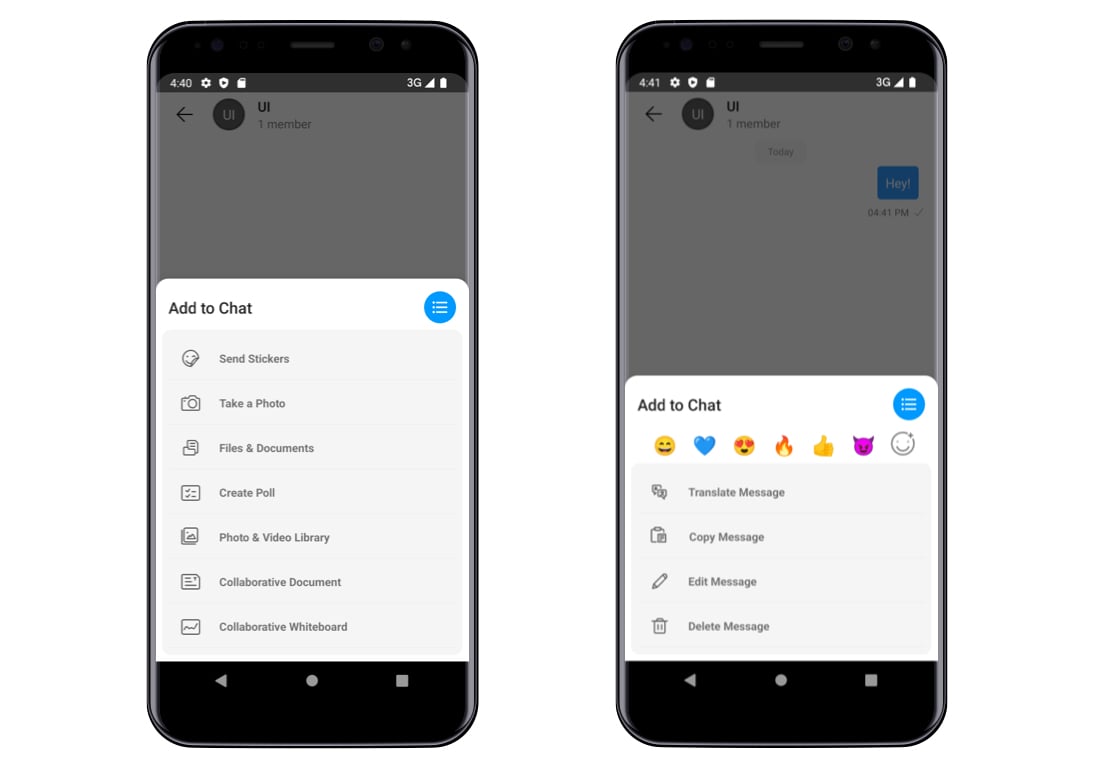
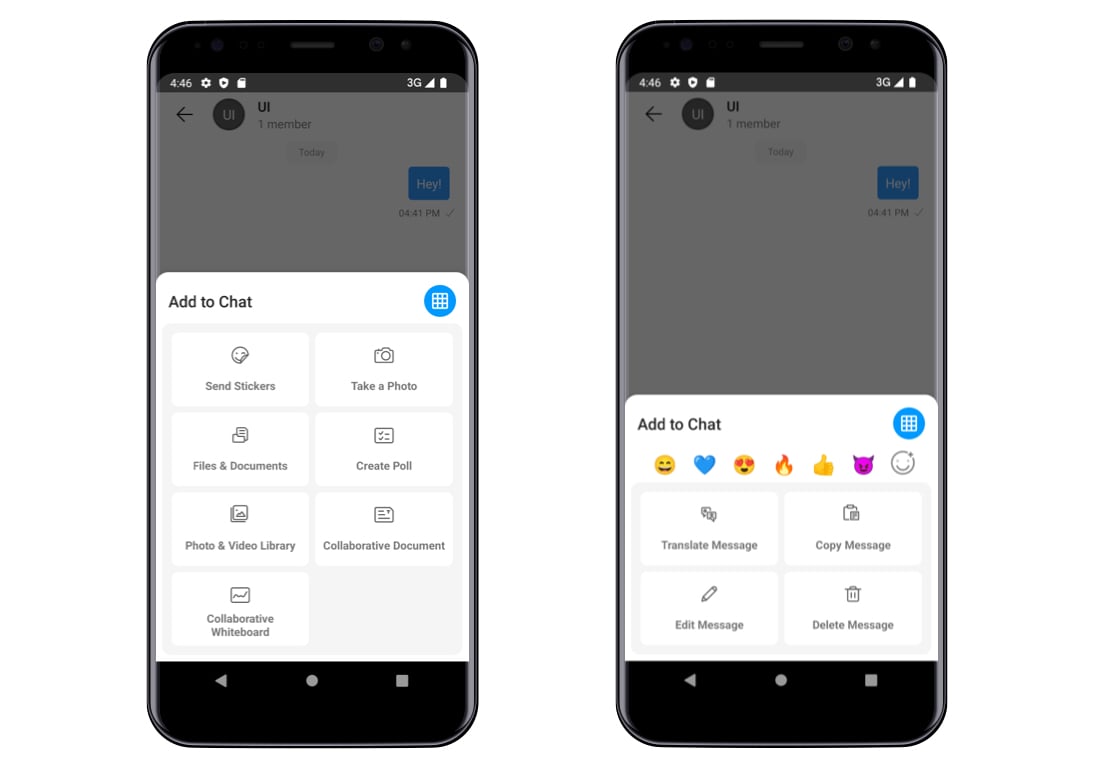
`CometChatActionSheet` is a component which presents options in a list and grid mode as per user's choice. By default, `CometChatActionSheet` is an integrated into `CometChatMessageComposer` to allow users to send multiple types of media and custom messages.
***
## Usage
`CometChatActionSheet` can be launched in a UI by adding below lines of code it into the java file.
```java theme={null}
// syntax to create instance of CometChatActionSheet
CometChatActionSheet cometChatActionSheet = new CometChatActionSheet(context);
//syntax to create list of Action item need to be added in a Action Sheet
List itemList = new ArrayList<>();
itemList.add(new ActionItem("id1","text1",R.drawable.icon));
itemList.add(new ActionItem("id2","text2",R.drawable.icon2));
//user can add as much as item they want in a Acionsheet
cometChatActionSheet.setList(itemList);
cometChatActionSheet.setLayoutMode(ActionSheet.LayoutMode.listMode); // it can be also set to grid mode
// to open Action Sheet
cometChatActionSheet.show();
//to close Action Sheet
cometChatActionSheet.dismiss();
```
 ***
## Data Model
`ActionItem` class is a Data Model used to set Data in every Item of Action Sheet.
| Parameters | Type | Description |
| - | - | - |
| id | String | Used to set id so that every item in a list can be uniquely identify. |
| text | String | Used to set name of the Item in a list. |
| startIcon | @DrawableRes int | Used to set start icon in a list item. |
| startIconTint | @ColorInt int | Used to set start Icon tint |
| iconBackgroundColor | @ColorInt int | Used to set icon background color |
| textFont | String | Used to set text font |
| appearance | @StyleRes int | Used to set text Appearance |
| textColor | @ColorInt int | Used to set text Color |
| background | @ColorInt int | Used to set Item background color |
| cornerRadius | int | Used to set item corner radius |
```java theme={null}
//how to create Actionitem object to render in a list
ActionItem item = new ActionItem("id", "text",R.drawable.icon);
//how to create ActionItem object with all the customization
ActionItem item = new ActionItem("id",R.drawable.ic_attachment,0,0,"text3",null,0,0,0,0));
```
## Methods
### **Set List**
| Method | Description |
| - | - |
| setList(List\ list) | Sets the list of action items to be displayed in action sheet. |
```java theme={null}
//syntax to create list of Action item need to be added in a Action Sheet
List itemList = new ArrayList<>();
itemList.add(new ActionItem("id1","text1",R.drawable.icon));
itemList.add(new ActionItem("id2","text2",R.drawable.icon2));
//user can add as much as item they want in a Acionsheet
//syntax for setList(itemList)
cometChatActionSheet.setList(itemList);
```
### **Layout Mode**
This method is used to set the default layout for the action sheet. It takes the LayoutMode which has two values as mention below.
1. listMode
2. gridMode
| Method | Description |
| - | - |
| setLayoutMode(@ActionSheet.LayoutMode String mode) | Sets the default layout for the action sheet. It takes the LayoutMode which has two values. `.listMode, .gridMode` |
| setLayoutModeIcon(Drawable icon) | Sets the layout mode icon. |
| setLayoutModeIconTint(@ColorInt int color) | Sets the layout mode icon color. |
| setLayoutModeIconBackgroundColor(@ColorInt int color) | Sets the layout mode icon background color. |
| hideLayoutMode(boolean isHidden) | Used to hide/unhide layout mode icon. |
```java theme={null}
//syntax to set listMode
cometChatActionSheet.setLayoutMode(ActionSheet.LayoutMode.listMode);
//syntax to set gridMode
cometChatActionSheet.setLayoutMode(ActionSheet.LayoutMode.gridMode);
//syntax for set layout mode icon
cometChatActionSheet.setLayoutModeIcon(getResources().getDrawable(R.drawable.icon));
//syntax for setLayoutModeIconTint
cometChatActionSheet.setLayoutModeIconTint(getResources().getColor(R.color.accent50));
//syntax for setLayoutModeIconTint
cometChatActionSheet.setLayoutModeIconBackgroundColor(getResources().getColor(R.color.primary));
//syntax for hideLayoutMode
cometChatActionSheet.hideLayoutMode(false);
```
***
## Data Model
`ActionItem` class is a Data Model used to set Data in every Item of Action Sheet.
| Parameters | Type | Description |
| - | - | - |
| id | String | Used to set id so that every item in a list can be uniquely identify. |
| text | String | Used to set name of the Item in a list. |
| startIcon | @DrawableRes int | Used to set start icon in a list item. |
| startIconTint | @ColorInt int | Used to set start Icon tint |
| iconBackgroundColor | @ColorInt int | Used to set icon background color |
| textFont | String | Used to set text font |
| appearance | @StyleRes int | Used to set text Appearance |
| textColor | @ColorInt int | Used to set text Color |
| background | @ColorInt int | Used to set Item background color |
| cornerRadius | int | Used to set item corner radius |
```java theme={null}
//how to create Actionitem object to render in a list
ActionItem item = new ActionItem("id", "text",R.drawable.icon);
//how to create ActionItem object with all the customization
ActionItem item = new ActionItem("id",R.drawable.ic_attachment,0,0,"text3",null,0,0,0,0));
```
## Methods
### **Set List**
| Method | Description |
| - | - |
| setList(List\ list) | Sets the list of action items to be displayed in action sheet. |
```java theme={null}
//syntax to create list of Action item need to be added in a Action Sheet
List itemList = new ArrayList<>();
itemList.add(new ActionItem("id1","text1",R.drawable.icon));
itemList.add(new ActionItem("id2","text2",R.drawable.icon2));
//user can add as much as item they want in a Acionsheet
//syntax for setList(itemList)
cometChatActionSheet.setList(itemList);
```
### **Layout Mode**
This method is used to set the default layout for the action sheet. It takes the LayoutMode which has two values as mention below.
1. listMode
2. gridMode
| Method | Description |
| - | - |
| setLayoutMode(@ActionSheet.LayoutMode String mode) | Sets the default layout for the action sheet. It takes the LayoutMode which has two values. `.listMode, .gridMode` |
| setLayoutModeIcon(Drawable icon) | Sets the layout mode icon. |
| setLayoutModeIconTint(@ColorInt int color) | Sets the layout mode icon color. |
| setLayoutModeIconBackgroundColor(@ColorInt int color) | Sets the layout mode icon background color. |
| hideLayoutMode(boolean isHidden) | Used to hide/unhide layout mode icon. |
```java theme={null}
//syntax to set listMode
cometChatActionSheet.setLayoutMode(ActionSheet.LayoutMode.listMode);
//syntax to set gridMode
cometChatActionSheet.setLayoutMode(ActionSheet.LayoutMode.gridMode);
//syntax for set layout mode icon
cometChatActionSheet.setLayoutModeIcon(getResources().getDrawable(R.drawable.icon));
//syntax for setLayoutModeIconTint
cometChatActionSheet.setLayoutModeIconTint(getResources().getColor(R.color.accent50));
//syntax for setLayoutModeIconTint
cometChatActionSheet.setLayoutModeIconBackgroundColor(getResources().getColor(R.color.primary));
//syntax for hideLayoutMode
cometChatActionSheet.hideLayoutMode(false);
```
 ### **Title**
| Methods | Description |
| - | - |
| setTitle(String title) | Sets the title in Action Sheet |
| setTitleColor(@ColorInt int color) | Sets the title color in Action Sheet |
| setTitleFont(String font) | Sets the title font in Action Sheet |
| setTitleAppearance(@StyleRes int appearance) | Sets the title appearance in Action Sheet |
```java theme={null}
////syntax to setTitle
cometChatActionSheet.setTitle("Action Sheet");
//syntax to setTitleFont
cometChatActionSheet.setTitleFont("font/Roboto-Regular.ttf");
//syntax to setTitleColor
cometChatActionSheet.setTitleColor(getResources().getColor(R.color.accent50));
//syntax to setTitleAppearance
cometChatActionSheet.setTitleAppearance(R.style.Text1);
```
**Background**
| Method | Description |
| - | - |
| setBackground(@ColorInt int color) | This method will set the background color of Action Sheet. |
| setBackground(Drawable drawable) | This method will set the background drawable of Action Sheet. |
```java theme={null}
// syntax for setBackground(@ColorInt int color)
cometChatActionSheet.setBackground(getResources().getColor(R.color.background));
// syntax for setBackground(Drawable drawable)
cometChatActionSheet.setBackground(getResources().getDrawable(R.drawable.background));
```
***
Events
To receive the Callback when the user clicks on any item or reaction on an action sheet.
| Interfaces | Description |
| - | - |
| onReactionClick(Reaction reaction) | Triggers when a reaction is Tapped |
| onActionItemClick(ActionItem actionItem) | Triggers when any item is Tapped from a list of Action sheet |
```java theme={null}
cometChatActionSheet.setEventListener(new CometChatActionSheetListener() {
@Override
public void onActionItemClick(ActionItem actionItem) {
}
});
```
This documentation is built and hosted on [Mintlify](https://mintlify.com), a developer documentation platform.
### **Title**
| Methods | Description |
| - | - |
| setTitle(String title) | Sets the title in Action Sheet |
| setTitleColor(@ColorInt int color) | Sets the title color in Action Sheet |
| setTitleFont(String font) | Sets the title font in Action Sheet |
| setTitleAppearance(@StyleRes int appearance) | Sets the title appearance in Action Sheet |
```java theme={null}
////syntax to setTitle
cometChatActionSheet.setTitle("Action Sheet");
//syntax to setTitleFont
cometChatActionSheet.setTitleFont("font/Roboto-Regular.ttf");
//syntax to setTitleColor
cometChatActionSheet.setTitleColor(getResources().getColor(R.color.accent50));
//syntax to setTitleAppearance
cometChatActionSheet.setTitleAppearance(R.style.Text1);
```
**Background**
| Method | Description |
| - | - |
| setBackground(@ColorInt int color) | This method will set the background color of Action Sheet. |
| setBackground(Drawable drawable) | This method will set the background drawable of Action Sheet. |
```java theme={null}
// syntax for setBackground(@ColorInt int color)
cometChatActionSheet.setBackground(getResources().getColor(R.color.background));
// syntax for setBackground(Drawable drawable)
cometChatActionSheet.setBackground(getResources().getDrawable(R.drawable.background));
```
***
Events
To receive the Callback when the user clicks on any item or reaction on an action sheet.
| Interfaces | Description |
| - | - |
| onReactionClick(Reaction reaction) | Triggers when a reaction is Tapped |
| onActionItemClick(ActionItem actionItem) | Triggers when any item is Tapped from a list of Action sheet |
```java theme={null}
cometChatActionSheet.setEventListener(new CometChatActionSheetListener() {
@Override
public void onActionItemClick(ActionItem actionItem) {
}
});
```
This documentation is built and hosted on [Mintlify](https://mintlify.com), a developer documentation platform.