> ## Documentation Index
> Fetch the complete documentation index at: https://cometchat-22654f5b-docs-agent-native-development.mintlify.site/llms.txt
> Use this file to discover all available pages before exploring further.
# Users
> Scrollable list of all available users with search, avatars, names, and online/offline status indicators.
`CometChatUsers` renders a scrollable list of all available users with real-time presence updates, search, avatars, and online/offline status indicators.
 ***
## Where It Fits
`CometChatUsers` is a list component. It renders all available users and emits the selected `User` via `onItemClick`. Wire it to `CometChatMessageHeader`, `CometChatMessageList`, and `CometChatMessageComposer` to build a direct messaging layout.
```xml activity_chat.xml lines theme={null}
```
```kotlin lines theme={null}
val users = findViewById(R.id.users)
users.setOnItemClick { user ->
messageHeader.setUser(user)
messageList.setUser(user)
messageComposer.setUser(user)
}
```
```kotlin lines theme={null}
CometChatUsers(
modifier = Modifier.fillMaxSize(),
onItemClick = { user ->
messageHeader.setUser(user)
messageList.setUser(user)
messageComposer.setUser(user)
}
)
```
***
## Quick Start
Add to your layout XML:
```xml lines theme={null}
```
Or programmatically:
```kotlin lines theme={null}
override fun onCreate(savedInstanceState: Bundle?) {
super.onCreate(savedInstanceState)
setContentView(CometChatUsers(this))
}
```
```kotlin lines theme={null}
@Composable
fun UsersScreen() {
CometChatUsers(
modifier = Modifier.fillMaxSize()
)
}
```
Prerequisites: CometChat SDK initialized with `CometChatUIKit.init()`, a user logged in, and the UI Kit dependency added.
Or in a Fragment:
```kotlin lines theme={null}
override fun onCreateView(inflater: LayoutInflater, container: ViewGroup?, savedInstanceState: Bundle?): View {
return CometChatUsers(requireContext())
}
```
```kotlin lines theme={null}
override fun onCreateView(inflater: LayoutInflater, container: ViewGroup?, savedInstanceState: Bundle?): View {
return ComposeView(requireContext()).apply {
setContent { CometChatUsers() }
}
}
```
***
## Filtering Users
Pass a `UsersRequest.UsersRequestBuilder` to control what loads:
```kotlin lines theme={null}
users.setUsersRequestBuilder(
UsersRequest.UsersRequestBuilder()
.friendsOnly(true)
.setLimit(20)
)
```
```kotlin lines theme={null}
CometChatUsers(
usersRequestBuilder = UsersRequest.UsersRequestBuilder()
.friendsOnly(true)
.setLimit(20)
)
```
### Filter Recipes
| Recipe | Builder method |
| - | - |
| Friends only | `.friendsOnly(true)` |
| Limit per page | `.setLimit(10)` |
| Search by keyword | `.setSearchKeyword("john")` |
| Hide blocked users | `.hideBlockedUsers(true)` |
| Filter by roles | `.setRoles(listOf("admin", "moderator"))` |
| Filter by tags | `.setTags(listOf("vip"))` |
| Online users only | `.setUserStatus(CometChatConstants.USER_STATUS_ONLINE)` |
| Filter by UIDs | `.setUIDs(listOf("uid1", "uid2"))` |
Pass the builder object, not the result of `.build()`. The component calls `.build()` internally. Default page size is 30 with infinite scroll.
***
## Actions and Events
### Callback Methods
#### `onItemClick`
Fires when a user row is tapped. Primary navigation hook.
```kotlin lines theme={null}
users.setOnItemClick { user ->
// Navigate to chat screen
}
```
```kotlin lines theme={null}
CometChatUsers(
onItemClick = { user ->
// Navigate to chat screen
}
)
```
> Replaces the default item-click behavior. Your custom lambda executes instead of the built-in navigation.
#### `onItemLongClick`
Fires when a user row is long-pressed. Use for additional actions like block or mute.
```kotlin lines theme={null}
users.setOnItemLongClick { user ->
// Show context menu
}
```
```kotlin lines theme={null}
CometChatUsers(
onItemLongClick = { user ->
// Show context menu
}
)
```
#### `onBackPress`
Fires when the user presses the back button in the toolbar.
```kotlin lines theme={null}
users.setOnBackPress {
finish()
}
```
```kotlin lines theme={null}
CometChatUsers(
onBackPress = { /* navigate back */ }
)
```
#### `onSearchClick`
Fires when the user taps the search icon in the toolbar.
```kotlin lines theme={null}
users.setOnSearchClick {
// Open search screen
}
```
```kotlin lines theme={null}
CometChatUsers(
onSearchClick = { /* open search */ }
)
```
#### `onSelection`
Fires when users are selected/deselected in multi-select mode.
```kotlin lines theme={null}
users.setSelectionMode(UIKitConstants.SelectionMode.MULTIPLE)
users.setOnSelection { selectedUsers ->
updateToolbar(selectedUsers.size)
}
```
```kotlin lines theme={null}
CometChatUsers(
selectionMode = UIKitConstants.SelectionMode.MULTIPLE,
onSelection = { selectedUsers ->
updateToolbar(selectedUsers.size)
}
)
```
#### `onError`
Fires on internal errors (network failure, auth issue, SDK exception).
```kotlin lines theme={null}
users.setOnError { exception ->
Log.e("Users", "Error: ${exception.message}")
}
```
```kotlin lines theme={null}
CometChatUsers(
onError = { exception ->
Log.e("Users", "Error: ${exception.message}")
}
)
```
#### `onLoad`
Fires when the list is successfully fetched and loaded.
```kotlin lines theme={null}
users.setOnLoad { userList ->
Log.d("Users", "Loaded ${userList.size}")
}
```
```kotlin lines theme={null}
CometChatUsers(
onLoad = { userList ->
Log.d("Users", "Loaded ${userList.size}")
}
)
```
#### `onEmpty`
Fires when the list is empty after loading.
```kotlin lines theme={null}
users.setOnEmpty {
Log.d("Users", "No users found")
}
```
```kotlin lines theme={null}
CometChatUsers(
onEmpty = { /* no users */ }
)
```
### SDK Events (Real-Time, Automatic)
The component listens to these SDK events internally. No manual setup needed.
| SDK Listener | Internal behavior |
| - | - |
| `onUserOnline` | Updates online status indicator for the user |
| `onUserOffline` | Updates offline status indicator for the user |
***
## Functionality
| Method (Kotlin XML) | Compose Parameter | Description |
| - | - | - |
| `setBackIconVisibility(View.VISIBLE)` | `hideBackIcon = false` | Toggle back button |
| `setToolbarVisibility(View.GONE)` | `hideToolbar = true` | Toggle toolbar |
| `setSearchBoxVisibility(View.GONE)` | `hideSearchBox = true` | Toggle search box |
| `setStickyHeaderVisibility(View.GONE)` | `hideStickyHeader = true` | Toggle alphabetical sticky header |
| `setUserStatusVisibility(View.GONE)` | `hideUserStatus = true` | Toggle online status indicator |
| `setSeparatorVisibility(View.GONE)` | `hideSeparator = true` | Toggle list separators |
| `setSelectionMode(MULTIPLE)` | `selectionMode = MULTIPLE` | Enable selection mode |
| `setTitle("Contacts")` | `title = "Contacts"` | Custom toolbar title |
| `setSearchPlaceholderText("Find...")` | `searchPlaceholderText = "Find..."` | Search placeholder |
***
## Custom View Slots
### Leading View
Replace the avatar / left section.
```kotlin lines theme={null}
users.setLeadingView(object : UsersViewHolderListener() {
override fun createView(context: Context, binding: CometchatListBaseItemsBinding): View {
return ImageView(context).apply {
layoutParams = ViewGroup.LayoutParams(48.dp, 48.dp)
}
}
override fun bindView(
context: Context, createdView: View, user: User,
holder: RecyclerView.ViewHolder, userList: List, position: Int
) {
val imageView = createdView as ImageView
// Load avatar image
}
})
```
```kotlin lines theme={null}
CometChatUsers(
leadingView = { user ->
CometChatAvatar(
imageUrl = user.avatar,
name = user.name
)
}
)
```
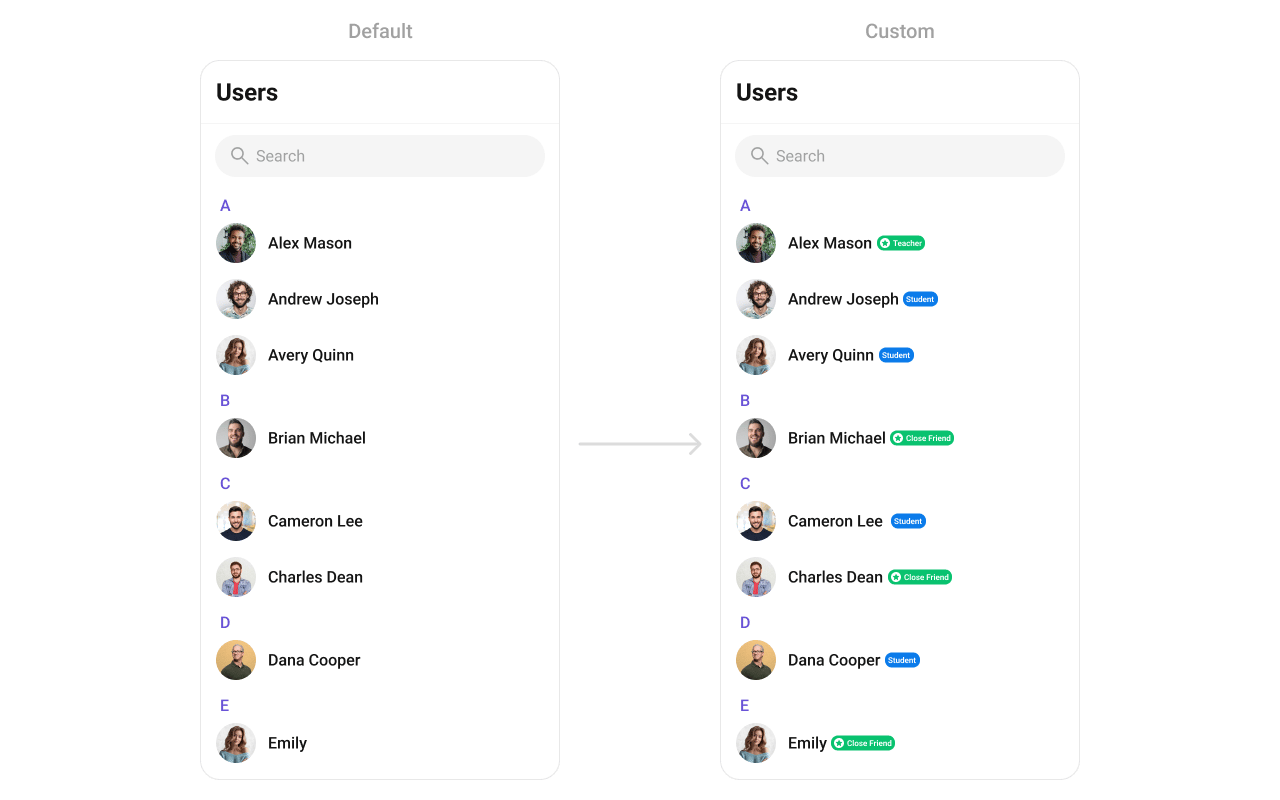
### Title View
Replace the name / title text.
***
## Where It Fits
`CometChatUsers` is a list component. It renders all available users and emits the selected `User` via `onItemClick`. Wire it to `CometChatMessageHeader`, `CometChatMessageList`, and `CometChatMessageComposer` to build a direct messaging layout.
```xml activity_chat.xml lines theme={null}
```
```kotlin lines theme={null}
val users = findViewById(R.id.users)
users.setOnItemClick { user ->
messageHeader.setUser(user)
messageList.setUser(user)
messageComposer.setUser(user)
}
```
```kotlin lines theme={null}
CometChatUsers(
modifier = Modifier.fillMaxSize(),
onItemClick = { user ->
messageHeader.setUser(user)
messageList.setUser(user)
messageComposer.setUser(user)
}
)
```
***
## Quick Start
Add to your layout XML:
```xml lines theme={null}
```
Or programmatically:
```kotlin lines theme={null}
override fun onCreate(savedInstanceState: Bundle?) {
super.onCreate(savedInstanceState)
setContentView(CometChatUsers(this))
}
```
```kotlin lines theme={null}
@Composable
fun UsersScreen() {
CometChatUsers(
modifier = Modifier.fillMaxSize()
)
}
```
Prerequisites: CometChat SDK initialized with `CometChatUIKit.init()`, a user logged in, and the UI Kit dependency added.
Or in a Fragment:
```kotlin lines theme={null}
override fun onCreateView(inflater: LayoutInflater, container: ViewGroup?, savedInstanceState: Bundle?): View {
return CometChatUsers(requireContext())
}
```
```kotlin lines theme={null}
override fun onCreateView(inflater: LayoutInflater, container: ViewGroup?, savedInstanceState: Bundle?): View {
return ComposeView(requireContext()).apply {
setContent { CometChatUsers() }
}
}
```
***
## Filtering Users
Pass a `UsersRequest.UsersRequestBuilder` to control what loads:
```kotlin lines theme={null}
users.setUsersRequestBuilder(
UsersRequest.UsersRequestBuilder()
.friendsOnly(true)
.setLimit(20)
)
```
```kotlin lines theme={null}
CometChatUsers(
usersRequestBuilder = UsersRequest.UsersRequestBuilder()
.friendsOnly(true)
.setLimit(20)
)
```
### Filter Recipes
| Recipe | Builder method |
| - | - |
| Friends only | `.friendsOnly(true)` |
| Limit per page | `.setLimit(10)` |
| Search by keyword | `.setSearchKeyword("john")` |
| Hide blocked users | `.hideBlockedUsers(true)` |
| Filter by roles | `.setRoles(listOf("admin", "moderator"))` |
| Filter by tags | `.setTags(listOf("vip"))` |
| Online users only | `.setUserStatus(CometChatConstants.USER_STATUS_ONLINE)` |
| Filter by UIDs | `.setUIDs(listOf("uid1", "uid2"))` |
Pass the builder object, not the result of `.build()`. The component calls `.build()` internally. Default page size is 30 with infinite scroll.
***
## Actions and Events
### Callback Methods
#### `onItemClick`
Fires when a user row is tapped. Primary navigation hook.
```kotlin lines theme={null}
users.setOnItemClick { user ->
// Navigate to chat screen
}
```
```kotlin lines theme={null}
CometChatUsers(
onItemClick = { user ->
// Navigate to chat screen
}
)
```
> Replaces the default item-click behavior. Your custom lambda executes instead of the built-in navigation.
#### `onItemLongClick`
Fires when a user row is long-pressed. Use for additional actions like block or mute.
```kotlin lines theme={null}
users.setOnItemLongClick { user ->
// Show context menu
}
```
```kotlin lines theme={null}
CometChatUsers(
onItemLongClick = { user ->
// Show context menu
}
)
```
#### `onBackPress`
Fires when the user presses the back button in the toolbar.
```kotlin lines theme={null}
users.setOnBackPress {
finish()
}
```
```kotlin lines theme={null}
CometChatUsers(
onBackPress = { /* navigate back */ }
)
```
#### `onSearchClick`
Fires when the user taps the search icon in the toolbar.
```kotlin lines theme={null}
users.setOnSearchClick {
// Open search screen
}
```
```kotlin lines theme={null}
CometChatUsers(
onSearchClick = { /* open search */ }
)
```
#### `onSelection`
Fires when users are selected/deselected in multi-select mode.
```kotlin lines theme={null}
users.setSelectionMode(UIKitConstants.SelectionMode.MULTIPLE)
users.setOnSelection { selectedUsers ->
updateToolbar(selectedUsers.size)
}
```
```kotlin lines theme={null}
CometChatUsers(
selectionMode = UIKitConstants.SelectionMode.MULTIPLE,
onSelection = { selectedUsers ->
updateToolbar(selectedUsers.size)
}
)
```
#### `onError`
Fires on internal errors (network failure, auth issue, SDK exception).
```kotlin lines theme={null}
users.setOnError { exception ->
Log.e("Users", "Error: ${exception.message}")
}
```
```kotlin lines theme={null}
CometChatUsers(
onError = { exception ->
Log.e("Users", "Error: ${exception.message}")
}
)
```
#### `onLoad`
Fires when the list is successfully fetched and loaded.
```kotlin lines theme={null}
users.setOnLoad { userList ->
Log.d("Users", "Loaded ${userList.size}")
}
```
```kotlin lines theme={null}
CometChatUsers(
onLoad = { userList ->
Log.d("Users", "Loaded ${userList.size}")
}
)
```
#### `onEmpty`
Fires when the list is empty after loading.
```kotlin lines theme={null}
users.setOnEmpty {
Log.d("Users", "No users found")
}
```
```kotlin lines theme={null}
CometChatUsers(
onEmpty = { /* no users */ }
)
```
### SDK Events (Real-Time, Automatic)
The component listens to these SDK events internally. No manual setup needed.
| SDK Listener | Internal behavior |
| - | - |
| `onUserOnline` | Updates online status indicator for the user |
| `onUserOffline` | Updates offline status indicator for the user |
***
## Functionality
| Method (Kotlin XML) | Compose Parameter | Description |
| - | - | - |
| `setBackIconVisibility(View.VISIBLE)` | `hideBackIcon = false` | Toggle back button |
| `setToolbarVisibility(View.GONE)` | `hideToolbar = true` | Toggle toolbar |
| `setSearchBoxVisibility(View.GONE)` | `hideSearchBox = true` | Toggle search box |
| `setStickyHeaderVisibility(View.GONE)` | `hideStickyHeader = true` | Toggle alphabetical sticky header |
| `setUserStatusVisibility(View.GONE)` | `hideUserStatus = true` | Toggle online status indicator |
| `setSeparatorVisibility(View.GONE)` | `hideSeparator = true` | Toggle list separators |
| `setSelectionMode(MULTIPLE)` | `selectionMode = MULTIPLE` | Enable selection mode |
| `setTitle("Contacts")` | `title = "Contacts"` | Custom toolbar title |
| `setSearchPlaceholderText("Find...")` | `searchPlaceholderText = "Find..."` | Search placeholder |
***
## Custom View Slots
### Leading View
Replace the avatar / left section.
```kotlin lines theme={null}
users.setLeadingView(object : UsersViewHolderListener() {
override fun createView(context: Context, binding: CometchatListBaseItemsBinding): View {
return ImageView(context).apply {
layoutParams = ViewGroup.LayoutParams(48.dp, 48.dp)
}
}
override fun bindView(
context: Context, createdView: View, user: User,
holder: RecyclerView.ViewHolder, userList: List, position: Int
) {
val imageView = createdView as ImageView
// Load avatar image
}
})
```
```kotlin lines theme={null}
CometChatUsers(
leadingView = { user ->
CometChatAvatar(
imageUrl = user.avatar,
name = user.name
)
}
)
```
### Title View
Replace the name / title text.
 ```kotlin lines theme={null}
users.setTitleView(object : UsersViewHolderListener() {
override fun createView(context: Context, binding: CometchatListBaseItemsBinding): View {
return TextView(context)
}
override fun bindView(
context: Context, createdView: View, user: User,
holder: RecyclerView.ViewHolder, userList: List, position: Int
) {
(createdView as TextView).text = user.name ?: ""
}
})
```
```kotlin lines theme={null}
CometChatUsers(
titleView = { user ->
Text(
text = user.name ?: "",
style = CometChatTheme.typography.heading4Medium
)
}
)
```
### Subtitle View
Replace the subtitle text below the user's name.
```kotlin lines theme={null}
users.setTitleView(object : UsersViewHolderListener() {
override fun createView(context: Context, binding: CometchatListBaseItemsBinding): View {
return TextView(context)
}
override fun bindView(
context: Context, createdView: View, user: User,
holder: RecyclerView.ViewHolder, userList: List, position: Int
) {
(createdView as TextView).text = user.name ?: ""
}
})
```
```kotlin lines theme={null}
CometChatUsers(
titleView = { user ->
Text(
text = user.name ?: "",
style = CometChatTheme.typography.heading4Medium
)
}
)
```
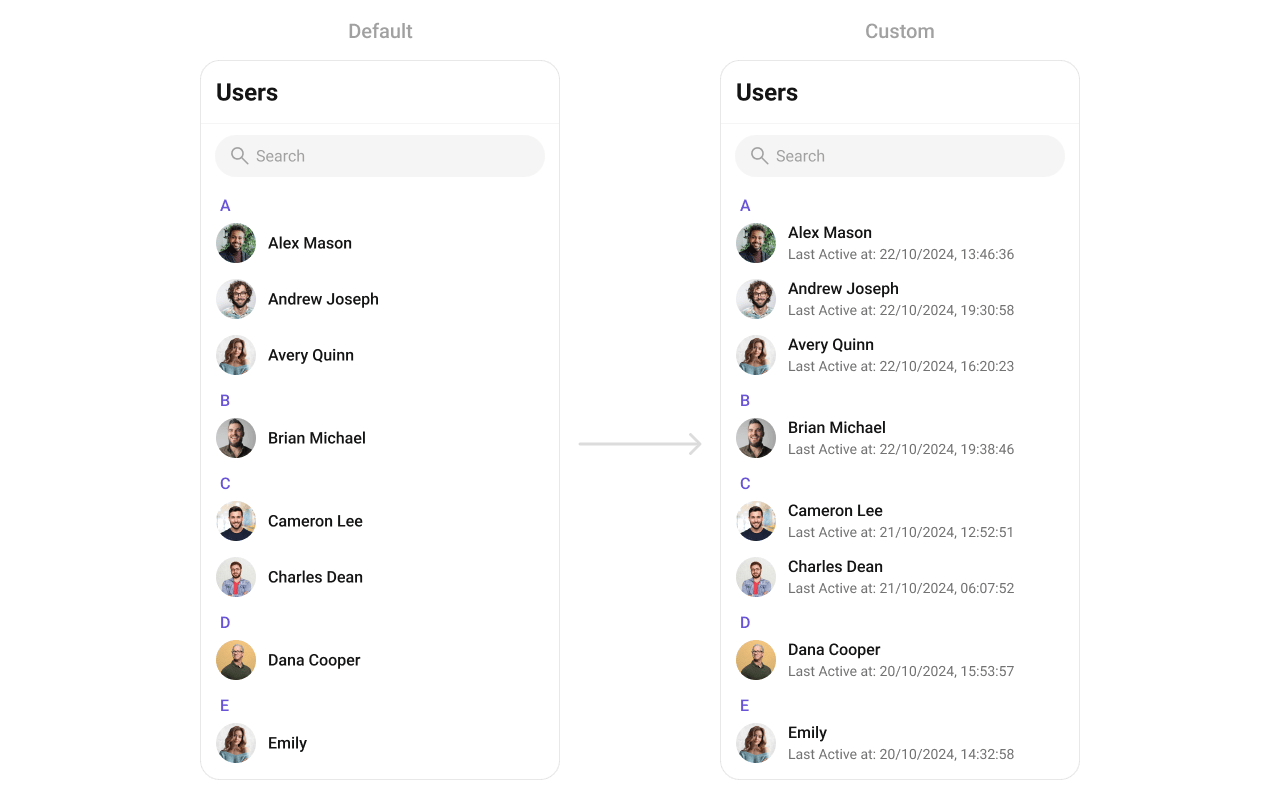
### Subtitle View
Replace the subtitle text below the user's name.
 ```kotlin lines theme={null}
users.setSubtitleView(object : UsersViewHolderListener() {
override fun createView(context: Context, binding: CometchatListBaseItemsBinding): View {
return TextView(context)
}
override fun bindView(
context: Context, createdView: View, user: User,
holder: RecyclerView.ViewHolder, userList: List, position: Int
) {
val tvSubtitle = createdView as TextView
tvSubtitle.text = "Last Active: " + SimpleDateFormat("dd/MM/yyyy, HH:mm:ss").format(user.lastActiveAt * 1000)
}
})
```
```kotlin lines theme={null}
CometChatUsers(
subtitleView = { user ->
Text(
text = "Last Active: ${SimpleDateFormat("dd/MM/yyyy").format(user.lastActiveAt * 1000)}",
maxLines = 1,
overflow = TextOverflow.Ellipsis
)
}
)
```
### Trailing View
Replace the right section of each user item.
```kotlin lines theme={null}
users.setSubtitleView(object : UsersViewHolderListener() {
override fun createView(context: Context, binding: CometchatListBaseItemsBinding): View {
return TextView(context)
}
override fun bindView(
context: Context, createdView: View, user: User,
holder: RecyclerView.ViewHolder, userList: List, position: Int
) {
val tvSubtitle = createdView as TextView
tvSubtitle.text = "Last Active: " + SimpleDateFormat("dd/MM/yyyy, HH:mm:ss").format(user.lastActiveAt * 1000)
}
})
```
```kotlin lines theme={null}
CometChatUsers(
subtitleView = { user ->
Text(
text = "Last Active: ${SimpleDateFormat("dd/MM/yyyy").format(user.lastActiveAt * 1000)}",
maxLines = 1,
overflow = TextOverflow.Ellipsis
)
}
)
```
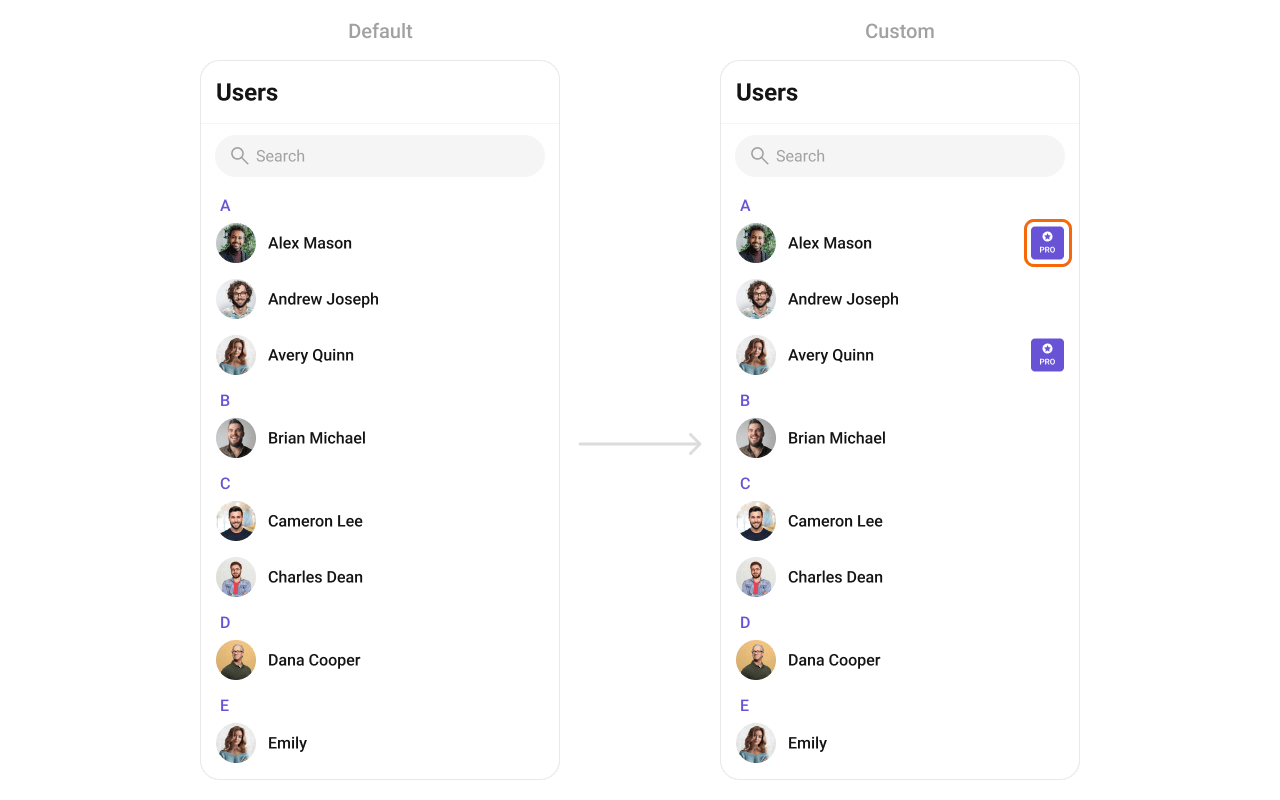
### Trailing View
Replace the right section of each user item.
 ```kotlin lines theme={null}
users.setTrailingView(object : UsersViewHolderListener() {
override fun createView(context: Context, binding: CometchatListBaseItemsBinding): View {
return TextView(context)
}
override fun bindView(
context: Context, createdView: View, user: User,
holder: RecyclerView.ViewHolder, userList: List, position: Int
) {
(createdView as TextView).text = user.role ?: ""
}
})
```
```kotlin lines theme={null}
CometChatUsers(
trailingView = { user ->
Text(text = user.role ?: "")
}
)
```
### Item View
Replace the entire list item row.
```kotlin lines theme={null}
users.setTrailingView(object : UsersViewHolderListener() {
override fun createView(context: Context, binding: CometchatListBaseItemsBinding): View {
return TextView(context)
}
override fun bindView(
context: Context, createdView: View, user: User,
holder: RecyclerView.ViewHolder, userList: List, position: Int
) {
(createdView as TextView).text = user.role ?: ""
}
})
```
```kotlin lines theme={null}
CometChatUsers(
trailingView = { user ->
Text(text = user.role ?: "")
}
)
```
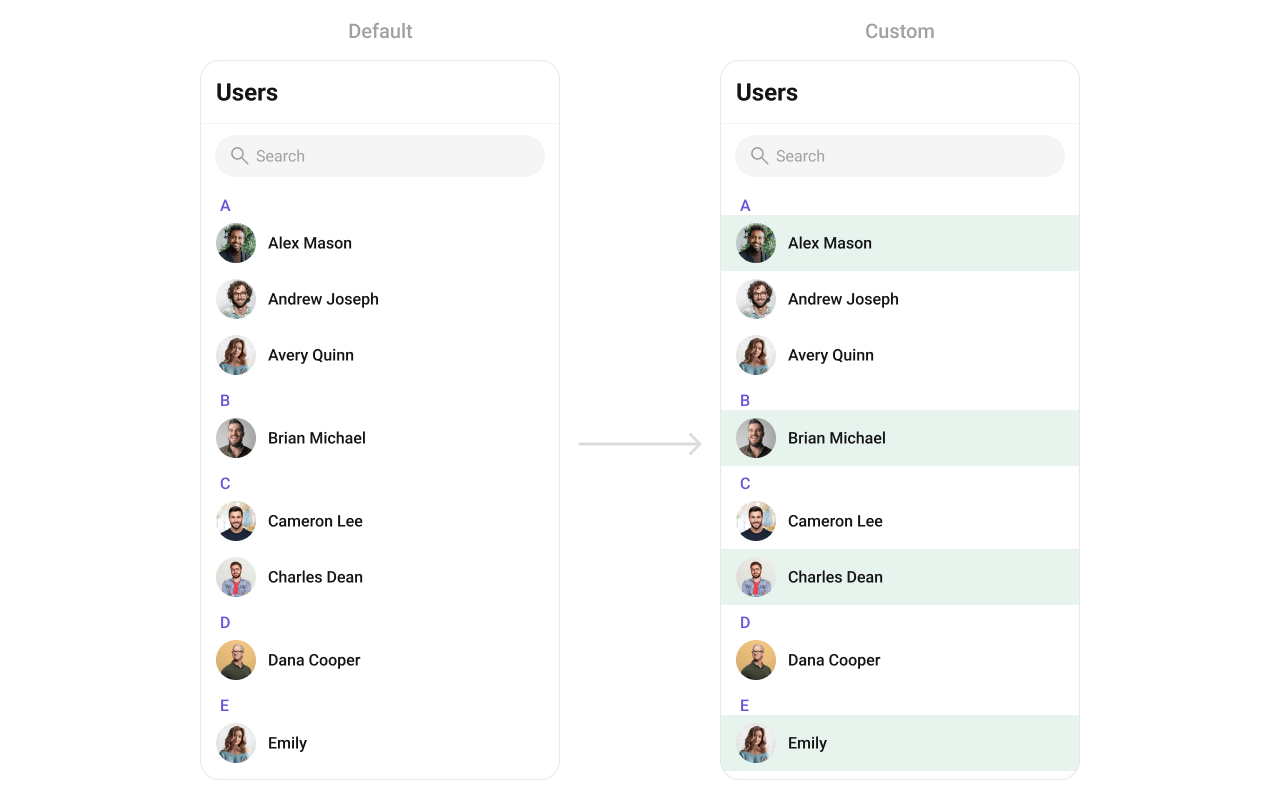
### Item View
Replace the entire list item row.
 ```kotlin lines theme={null}
users.setItemView(object : UsersViewHolderListener() {
override fun createView(context: Context, binding: CometchatListBaseItemsBinding): View {
return LayoutInflater.from(context).inflate(R.layout.custom_user_item, null)
}
override fun bindView(
context: Context, createdView: View, user: User,
holder: RecyclerView.ViewHolder, userList: List, position: Int
) {
val avatar = createdView.findViewById(R.id.custom_avatar)
val title = createdView.findViewById(R.id.tvName)
title.text = user.name
avatar.setAvatar(user.name, user.avatar)
}
})
```
```kotlin lines theme={null}
CometChatUsers(
itemView = { user ->
Row(
modifier = Modifier.fillMaxWidth().padding(12.dp),
verticalAlignment = Alignment.CenterVertically
) {
CometChatAvatar(imageUrl = user.avatar, name = user.name)
Spacer(Modifier.width(12.dp))
Text(user.name ?: "", style = CometChatTheme.typography.heading4Medium)
}
}
)
```
### State Views
```kotlin lines theme={null}
users.setEmptyView(R.layout.custom_empty_view)
users.setErrorView(R.layout.custom_error_view)
users.setLoadingView(R.layout.custom_loading_view)
```
```kotlin lines theme={null}
CometChatUsers(
emptyView = { Text("No users found") },
errorView = { onRetry -> Button(onClick = onRetry) { Text("Retry") } },
loadingView = { CircularProgressIndicator() }
)
```
### Overflow Menu
```kotlin lines theme={null}
users.setItemView(object : UsersViewHolderListener() {
override fun createView(context: Context, binding: CometchatListBaseItemsBinding): View {
return LayoutInflater.from(context).inflate(R.layout.custom_user_item, null)
}
override fun bindView(
context: Context, createdView: View, user: User,
holder: RecyclerView.ViewHolder, userList: List, position: Int
) {
val avatar = createdView.findViewById(R.id.custom_avatar)
val title = createdView.findViewById(R.id.tvName)
title.text = user.name
avatar.setAvatar(user.name, user.avatar)
}
})
```
```kotlin lines theme={null}
CometChatUsers(
itemView = { user ->
Row(
modifier = Modifier.fillMaxWidth().padding(12.dp),
verticalAlignment = Alignment.CenterVertically
) {
CometChatAvatar(imageUrl = user.avatar, name = user.name)
Spacer(Modifier.width(12.dp))
Text(user.name ?: "", style = CometChatTheme.typography.heading4Medium)
}
}
)
```
### State Views
```kotlin lines theme={null}
users.setEmptyView(R.layout.custom_empty_view)
users.setErrorView(R.layout.custom_error_view)
users.setLoadingView(R.layout.custom_loading_view)
```
```kotlin lines theme={null}
CometChatUsers(
emptyView = { Text("No users found") },
errorView = { onRetry -> Button(onClick = onRetry) { Text("Retry") } },
loadingView = { CircularProgressIndicator() }
)
```
### Overflow Menu
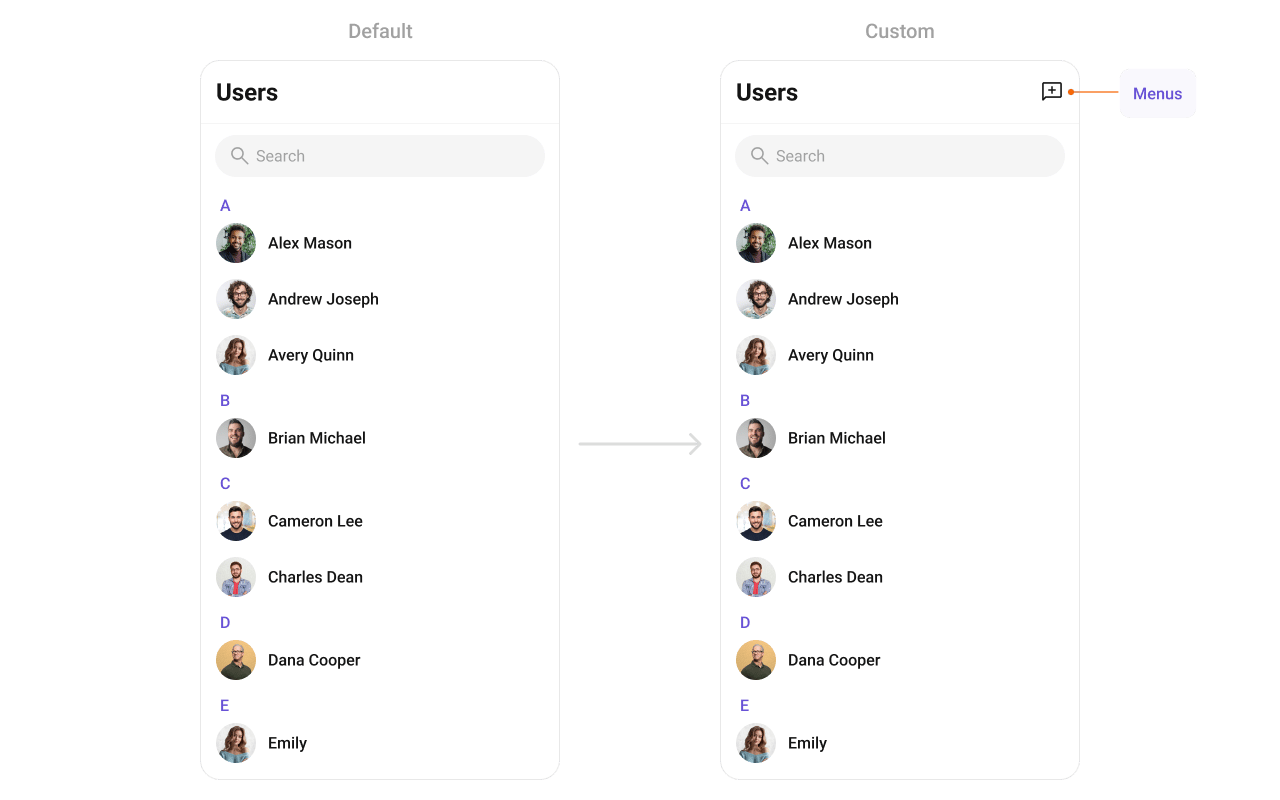 ```kotlin lines theme={null}
users.setOverflowMenu(ImageButton(context).apply {
setImageResource(R.drawable.ic_filter)
setOnClickListener { /* show filter */ }
})
```
```kotlin lines theme={null}
CometChatUsers(
overflowMenu = {
IconButton(onClick = { /* show filter */ }) {
Icon(painterResource(R.drawable.ic_filter), "Filter")
}
}
)
```
***
## Menu Options
```kotlin lines theme={null}
// Replace all options
users.setOptions { context, user ->
listOf(
CometChatPopupMenu.MenuItem(id = "block", name = "Block", onClick = { /* ... */ }),
CometChatPopupMenu.MenuItem(id = "mute", name = "Mute", onClick = { /* ... */ })
)
}
// Append to defaults
users.setAddOptions { context, user ->
listOf(
CometChatPopupMenu.MenuItem(id = "pin", name = "Pin", onClick = { /* ... */ })
)
}
```
```kotlin lines theme={null}
CometChatUsers(
options = { context, user ->
listOf(
MenuItem(id = "block", name = "Block", onClick = { /* ... */ }),
MenuItem(id = "mute", name = "Mute", onClick = { /* ... */ })
)
},
addOptions = { context, user ->
listOf(MenuItem(id = "pin", name = "Pin", onClick = { /* ... */ }))
}
)
```
***
## Common Patterns
### Minimal list — hide all chrome
```kotlin lines theme={null}
users.setToolbarVisibility(View.GONE)
users.setSearchBoxVisibility(View.GONE)
users.setStickyHeaderVisibility(View.GONE)
users.setUserStatusVisibility(View.GONE)
```
```kotlin lines theme={null}
CometChatUsers(
hideToolbar = true,
hideSearchBox = true,
hideStickyHeader = true,
hideUserStatus = true
)
```
### Friends-only list
```kotlin lines theme={null}
users.setUsersRequestBuilder(
UsersRequest.UsersRequestBuilder()
.friendsOnly(true)
)
```
```kotlin lines theme={null}
CometChatUsers(
usersRequestBuilder = UsersRequest.UsersRequestBuilder()
.friendsOnly(true)
)
```
### Online users only
```kotlin lines theme={null}
users.setUsersRequestBuilder(
UsersRequest.UsersRequestBuilder()
.setUserStatus(CometChatConstants.USER_STATUS_ONLINE)
)
```
```kotlin lines theme={null}
CometChatUsers(
usersRequestBuilder = UsersRequest.UsersRequestBuilder()
.setUserStatus(CometChatConstants.USER_STATUS_ONLINE)
)
```
***
## Advanced Methods
### Programmatic Selection
```kotlin lines theme={null}
// Enable selection
users.setSelectionMode(UIKitConstants.SelectionMode.MULTIPLE)
// Select a user
users.selectUser(user, UIKitConstants.SelectionMode.MULTIPLE)
// Get selected
val selected = users.getSelectedUsers()
// Clear
users.clearSelection()
```
Selection is managed via the `selectionMode` and `onSelection` parameters. The component handles selection state internally.
### ViewModel Access
```kotlin lines theme={null}
val factory = CometChatUsersViewModelFactory()
val viewModel = ViewModelProvider(this, factory)
.get(CometChatUsersViewModel::class.java)
```
```kotlin lines theme={null}
users.setViewModel(viewModel)
```
```kotlin lines theme={null}
CometChatUsers(
usersViewModel = viewModel
)
```
See [ViewModel & Data](/ui-kit/android/customization-viewmodel-data) for ListOperations, state observation, and custom repositories.
***
## Style
```kotlin lines theme={null}
users.setOverflowMenu(ImageButton(context).apply {
setImageResource(R.drawable.ic_filter)
setOnClickListener { /* show filter */ }
})
```
```kotlin lines theme={null}
CometChatUsers(
overflowMenu = {
IconButton(onClick = { /* show filter */ }) {
Icon(painterResource(R.drawable.ic_filter), "Filter")
}
}
)
```
***
## Menu Options
```kotlin lines theme={null}
// Replace all options
users.setOptions { context, user ->
listOf(
CometChatPopupMenu.MenuItem(id = "block", name = "Block", onClick = { /* ... */ }),
CometChatPopupMenu.MenuItem(id = "mute", name = "Mute", onClick = { /* ... */ })
)
}
// Append to defaults
users.setAddOptions { context, user ->
listOf(
CometChatPopupMenu.MenuItem(id = "pin", name = "Pin", onClick = { /* ... */ })
)
}
```
```kotlin lines theme={null}
CometChatUsers(
options = { context, user ->
listOf(
MenuItem(id = "block", name = "Block", onClick = { /* ... */ }),
MenuItem(id = "mute", name = "Mute", onClick = { /* ... */ })
)
},
addOptions = { context, user ->
listOf(MenuItem(id = "pin", name = "Pin", onClick = { /* ... */ }))
}
)
```
***
## Common Patterns
### Minimal list — hide all chrome
```kotlin lines theme={null}
users.setToolbarVisibility(View.GONE)
users.setSearchBoxVisibility(View.GONE)
users.setStickyHeaderVisibility(View.GONE)
users.setUserStatusVisibility(View.GONE)
```
```kotlin lines theme={null}
CometChatUsers(
hideToolbar = true,
hideSearchBox = true,
hideStickyHeader = true,
hideUserStatus = true
)
```
### Friends-only list
```kotlin lines theme={null}
users.setUsersRequestBuilder(
UsersRequest.UsersRequestBuilder()
.friendsOnly(true)
)
```
```kotlin lines theme={null}
CometChatUsers(
usersRequestBuilder = UsersRequest.UsersRequestBuilder()
.friendsOnly(true)
)
```
### Online users only
```kotlin lines theme={null}
users.setUsersRequestBuilder(
UsersRequest.UsersRequestBuilder()
.setUserStatus(CometChatConstants.USER_STATUS_ONLINE)
)
```
```kotlin lines theme={null}
CometChatUsers(
usersRequestBuilder = UsersRequest.UsersRequestBuilder()
.setUserStatus(CometChatConstants.USER_STATUS_ONLINE)
)
```
***
## Advanced Methods
### Programmatic Selection
```kotlin lines theme={null}
// Enable selection
users.setSelectionMode(UIKitConstants.SelectionMode.MULTIPLE)
// Select a user
users.selectUser(user, UIKitConstants.SelectionMode.MULTIPLE)
// Get selected
val selected = users.getSelectedUsers()
// Clear
users.clearSelection()
```
Selection is managed via the `selectionMode` and `onSelection` parameters. The component handles selection state internally.
### ViewModel Access
```kotlin lines theme={null}
val factory = CometChatUsersViewModelFactory()
val viewModel = ViewModelProvider(this, factory)
.get(CometChatUsersViewModel::class.java)
```
```kotlin lines theme={null}
users.setViewModel(viewModel)
```
```kotlin lines theme={null}
CometChatUsers(
usersViewModel = viewModel
)
```
See [ViewModel & Data](/ui-kit/android/customization-viewmodel-data) for ListOperations, state observation, and custom repositories.
***
## Style
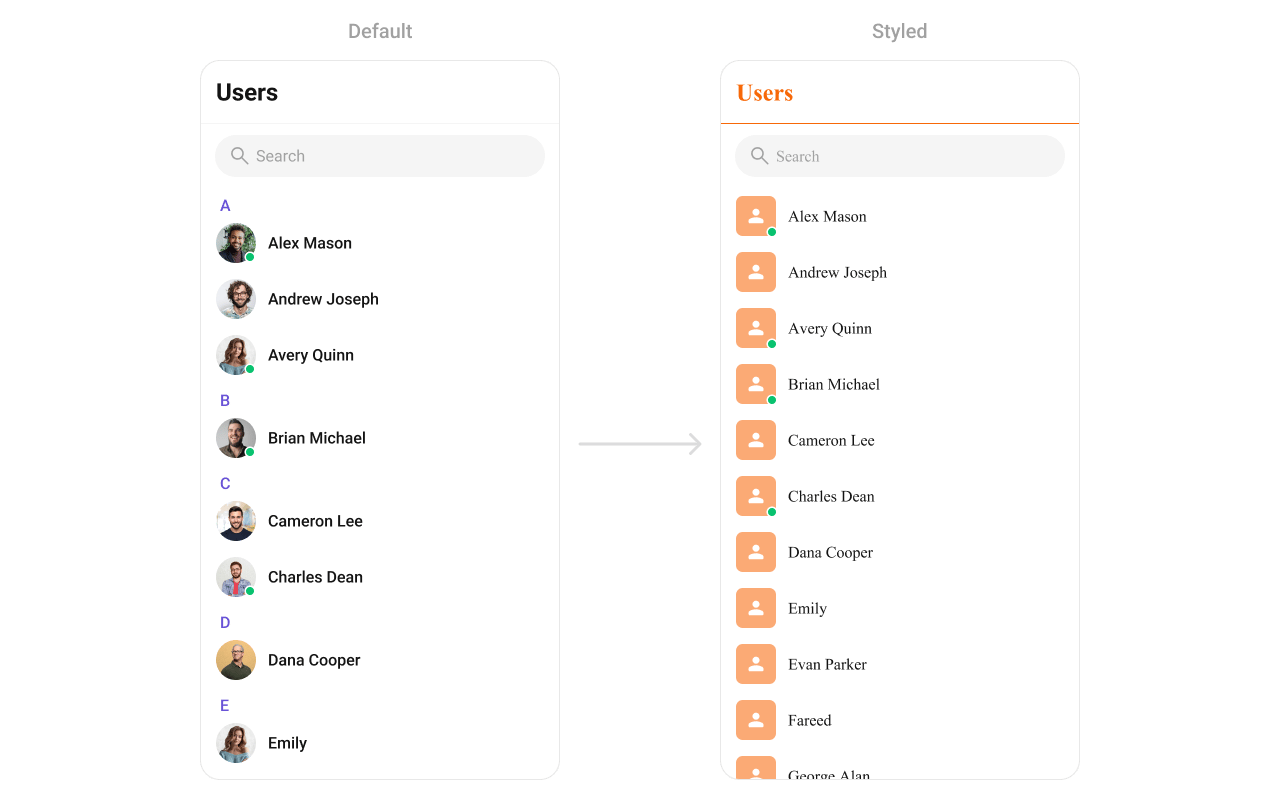 Define a custom style in `themes.xml`:
```xml themes.xml lines theme={null}
```
```kotlin lines theme={null}
CometChatUsers(
style = CometChatUsersStyle.default().copy(
backgroundColor = Color(0xFFF5F5F5),
titleTextColor = Color(0xFF141414),
itemStyle = CometChatUsersItemStyle.default().copy(
backgroundColor = Color.White,
titleTextColor = Color(0xFF141414),
subtitleTextColor = Color(0xFF727272),
avatarStyle = CometChatAvatarStyle.default().copy(cornerRadius = 12.dp),
statusIndicatorStyle = CometChatStatusIndicatorStyle.default().copy()
)
)
)
```
### Style Properties
| Property | Description |
| - | - |
| `backgroundColor` | List background color |
| `titleTextColor` | Toolbar title color |
| `searchBoxStyle` | Search box appearance |
| `itemStyle.backgroundColor` | Row background |
| `itemStyle.selectedBackgroundColor` | Selected row background |
| `itemStyle.titleTextColor` | User name color |
| `itemStyle.subtitleTextColor` | Subtitle text color |
| `itemStyle.separatorColor` | Row separator color |
| `itemStyle.avatarStyle` | Avatar appearance |
| `itemStyle.statusIndicatorStyle` | Online/offline indicator |
See [Component Styling](/ui-kit/android/component-styling) for the full reference.
***
## Next Steps
Browse recent conversations
Browse and search available groups
Detailed styling reference with screenshots
Custom ViewModels, repositories, and ListOperations
This documentation is built and hosted on [Mintlify](https://mintlify.com), a developer documentation platform.
Define a custom style in `themes.xml`:
```xml themes.xml lines theme={null}
```
```kotlin lines theme={null}
CometChatUsers(
style = CometChatUsersStyle.default().copy(
backgroundColor = Color(0xFFF5F5F5),
titleTextColor = Color(0xFF141414),
itemStyle = CometChatUsersItemStyle.default().copy(
backgroundColor = Color.White,
titleTextColor = Color(0xFF141414),
subtitleTextColor = Color(0xFF727272),
avatarStyle = CometChatAvatarStyle.default().copy(cornerRadius = 12.dp),
statusIndicatorStyle = CometChatStatusIndicatorStyle.default().copy()
)
)
)
```
### Style Properties
| Property | Description |
| - | - |
| `backgroundColor` | List background color |
| `titleTextColor` | Toolbar title color |
| `searchBoxStyle` | Search box appearance |
| `itemStyle.backgroundColor` | Row background |
| `itemStyle.selectedBackgroundColor` | Selected row background |
| `itemStyle.titleTextColor` | User name color |
| `itemStyle.subtitleTextColor` | Subtitle text color |
| `itemStyle.separatorColor` | Row separator color |
| `itemStyle.avatarStyle` | Avatar appearance |
| `itemStyle.statusIndicatorStyle` | Online/offline indicator |
See [Component Styling](/ui-kit/android/component-styling) for the full reference.
***
## Next Steps
Browse recent conversations
Browse and search available groups
Detailed styling reference with screenshots
Custom ViewModels, repositories, and ListOperations
This documentation is built and hosted on [Mintlify](https://mintlify.com), a developer documentation platform.